ADP Workforce Now Connector Guide
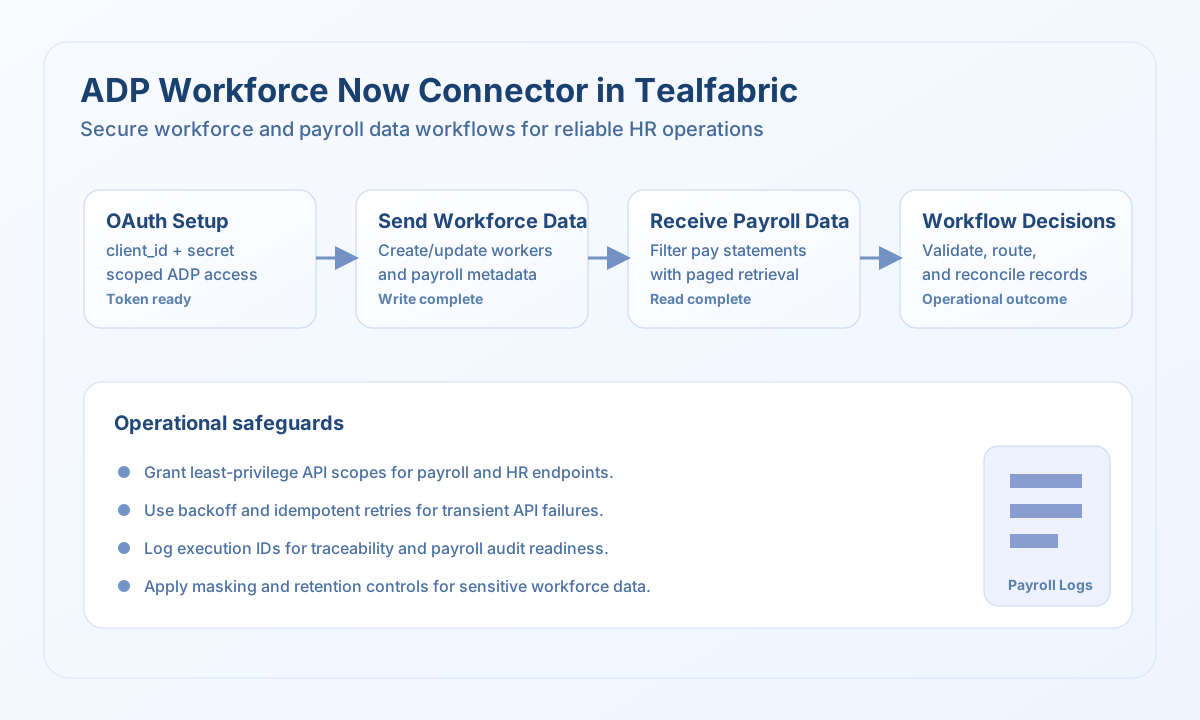
The ADP Workforce Now connector lets Tealfabric workflows integrate payroll and workforce data with ADP APIs. It supports reliable HR and payroll automations where employee updates, pay data retrieval, and compliance-aware processing need to be coordinated.
Document information
| Field | Value |
|---|---|
| Canonical URL | /docs/04_connecting-systems/connectors/a/adp-workforce-now |
| Version (published date) | 2026-05-08 |
| Tags | connectors, reference, adp-workforce-now |
| Connector ID | adp-workforce-now-1.0.0 |
When to use this connector
Use this connector when workflows need to send workforce data to ADP or retrieve payroll information for downstream business steps. Common scenarios include onboarding synchronization, payroll validation, and benefits-related reporting pipelines. The connector is most effective when roles, permissions, and data-handling policies are clearly defined before deployment.
Prerequisites
Before configuring the integration, create an ADP application in the ADP Developer Portal and grant only the scopes required by your workflows. Confirm your base_url, client_id, and client_secret, then validate access in a non-production tenant. Because payroll data is sensitive, align retention, masking, and audit practices with your compliance team before go-live.
Configuration
Store these settings in the integration profile:
base_url(required): ADP API base URL.client_id(required): OAuth client identifier.client_secret(required): OAuth client secret.timeout_seconds(optional): Request timeout in seconds; default30.
Send employee updates with send
Use send for create or update operations on ADP entities. send requires endpoint and defaults to HTTP POST when method is omitted. Provide the JSON body in data (or pass the full input object when data is omitted, matching legacy behavior).
const baseUrl = "https://api.example.com/api/v1";
const tenantId = "<TENANT_ID>";
const apiKey = "<API_KEY>";

async function createWorker(integrationId: string) {
  const response = await fetch(
    `${baseUrl}/integrations/${encodeURIComponent(integrationId)}/execute`,
    {
      method: "POST",
      headers: {
        "X-API-Key": apiKey,
        "X-Tenant-ID": tenantId,
        "Content-Type": "application/json",
      },
      body: JSON.stringify({
        operation: "send",
        endpoint: "hr/v2/workers",
        method: "POST",
        data: {
          worker: {
            person: {
              legalName: {
                givenName: "Jordan",
                familyName1: "Lee",
              },
              communication: {
                emails: [
                  {
                    emailUri: "jordan.lee@example.com",
                    typeCode: { codeValue: "WORK" },
                  },
                ],
              },
            },
            workerDates: {
              originalHireDate: "2026-05-08",
            },
          },
        },
      }),
    }
  );
  if (!response.ok) throw new Error(`Request failed: ${response.status}`);
  return response.json();
}
curl -X POST "https://api.example.com/api/v1/integrations/<ENTITY_ID>/execute" \
-H "X-API-Key: <API_KEY>" \
-H "X-Tenant-ID: <TENANT_ID>" \
-H "Content-Type: application/json" \
-d '{
"operation": "send",
"endpoint": "hr/v2/workers",
"method": "POST",
"data": {
"worker": {
"person": {
"legalName": {
"givenName": "Jordan",
"familyName1": "Lee"
}
},
"workerDates": {
"originalHireDate": "2026-05-08"
}
}
}
}'
{
  "success": true,
  "data": {
    "message": "ADP Workforce Now operation completed successfully",
    "result": {
      "associateOID": "ASSOC-2048"
    }
  }
}
Retrieve workforce data with receive
Use receive to read ADP resources via GET. Provide endpoint and optional query parameters (for example OData $filter, $top, $skip, $select). The connector normalizes workers or employees arrays from the API response into data.items.
const baseUrl = "https://api.example.com/api/v1";
const tenantId = "<TENANT_ID>";
const apiKey = "<API_KEY>";

async function listWorkers(integrationId: string) {
  const response = await fetch(
    `${baseUrl}/integrations/${encodeURIComponent(integrationId)}/execute`,
    {
      method: "POST",
      headers: {
        "X-API-Key": apiKey,
        "X-Tenant-ID": tenantId,
        "Content-Type": "application/json",
      },
      body: JSON.stringify({
        operation: "receive",
        endpoint: "hr/v2/workers",
        query: {
          $filter: "workers/workAssignments/assignmentStatus/statusCode/codeValue eq 'A'",
          $top: 25,
          $skip: 0,
        },
      }),
    }
  );
  if (!response.ok) throw new Error(`Request failed: ${response.status}`);
  return response.json();
}
curl -X POST "https://api.example.com/api/v1/integrations/<ENTITY_ID>/execute" \
-H "X-API-Key: <API_KEY>" \
-H "X-Tenant-ID: <TENANT_ID>" \
-H "Content-Type: application/json" \
-d '{
"operation": "receive",
"endpoint": "hr/v2/workers",
"query": {
"$top": 25,
"$skip": 0
}
}'
{
  "success": true,
  "data": {
    "message": "ADP Workforce Now data retrieved successfully",
    "employee_count": 1,
    "items": [
      {
        "associateOID": "ASSOC-2048",
        "workerID": { "idValue": "EMP-2048" }
      }
    ]
  }
}
Run arbitrary methods with execute
Use execute when you need full control over HTTP method and body. Provide endpoint, optional method (defaults to GET), and body or data for write payloads.
{
  "operation": "execute",
  "endpoint": "hr/v2/workers/ASSOC-2048",
  "method": "GET"
}
Validate setup with test
test validates base_url, client_id, and client_secret, obtains an OAuth2 client-credentials token at {base_url}/adp/oauth/v2/token, then probes hr/v2/workers.
{
  "success": true,
  "data": {
    "message": "ADP Workforce Now connection test successful",
    "details": {
      "base_url": "https://api.adp.com",
      "workers_found": 12
    }
  }
}
Reliability and compliance guidance
Payroll and employee records require strict governance, so apply least-privilege OAuth scopes and detailed audit logging. Use controlled retries with backoff for transient API failures and rate limits, and implement checkpointed reads for repeatable sync jobs. Keep sensitive fields out of logs and align operational procedures with your organization's privacy and regulatory controls.