Azure Event Hubs Connector Guide
The Azure Event Hubs connector lets you move high-volume event streams between Tealfabric workflows and Azure messaging infrastructure. It is designed for telemetry ingestion, event-driven integrations, and pipeline handoff patterns where throughput and reliability are important.
Document information
| Field | Value |
|---|---|
| Canonical URL | /docs/04_connecting-systems/connectors/a/azure-event-hubs |
| Version (published date) | 2026-05-08 |
| Tags | connectors, reference, azure-event-hubs |
| Connector ID | azure-event-hubs-1.0.0 |
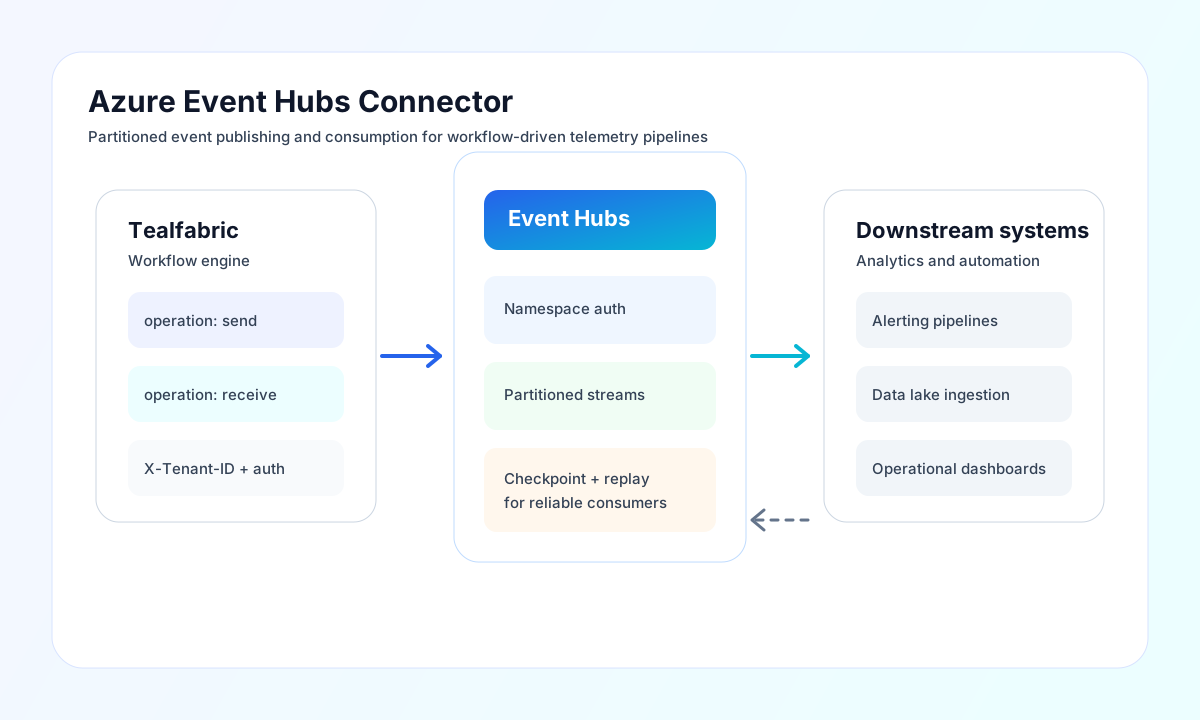
Configure namespace access and hub target
Set connection_string to an Event Hubs-compatible connection string from your Azure namespace policy, and set event_hub_name to the specific hub your workflow should target. Use a policy with least-privilege permissions for the operation you run (send, receive, or both) so that production workflows stay scoped and auditable.
Set timeout_seconds based on expected workload size and network conditions. This package currently preserves legacy stub behavior: send and receive always return a native-client-required error, and test validates required configuration before returning the same native-client-required error.
Publish events with send
Use send when your workflow emits telemetry, domain events, or integration messages into an Event Hubs stream. Keep event payloads compact and consistent so downstream processors can deserialize and route them reliably. In this package version, the operation is a compatibility stub and always returns an error until a native Event Hubs client is added.
const baseUrl = "https://api.example.com/api/v1";
const tenantId = "<TENANT_ID>";
const apiKey = "<API_KEY>";

async function publishDeviceEvent(integrationId: string) {
  const response = await fetch(`${baseUrl}/integrations/${encodeURIComponent(integrationId)}/execute`, {
    method: "POST",
    headers: {
      "X-API-Key": apiKey,
      "X-Tenant-ID": tenantId,
      "Content-Type": "application/json",
    },
    body: JSON.stringify({
      operation: "send",
      events: [
        {
          body: {
            device_id: "sensor-42",
            temperature_c: 22.6,
            recorded_at: "2026-05-08T18:56:00Z"
          },
          properties: {
            source: "factory-floor",
            schema: "v1"
          },
          partition_key: "sensor-42"
        }
      }
    }),
  });
  if (!response.ok) throw new Error(`Request failed: ${response.status}`);
  return response.json();
}
curl -X POST "https://api.example.com/api/v1/integrations/<ENTITY_ID>/execute" \
-H "X-API-Key: <API_KEY>" \
-H "X-Tenant-ID: <TENANT_ID>" \
-H "Content-Type: application/json" \
-d '{
"operation": "send",
"events": [
{
"body": {
"device_id": "sensor-42",
"temperature_c": 22.6,
"recorded_at": "2026-05-08T18:56:00Z"
},
"properties": {
"source": "factory-floor",
"schema": "v1"
},
"partition_key": "sensor-42"
}
]
}'
{
  "success": false,
  "error": {
    "code": "UNKNOWN",
    "message": "Event Hubs requires a native client library. Use @azure/event-hubs for full implementation.",
    "retriable": false
  },
  "metadata": {
    "processing_time_ms": 2,
    "execution_id": "corr_1234567890"
  }
}
Consume events with receive
Use receive when a workflow needs to poll and process events from Event Hubs, such as alert generation, enrichment, or forwarding to downstream systems. Keep checkpointing and idempotency strategies in your workflow so that retries do not duplicate side effects. In this package version, receive is also a compatibility stub and returns the same native-client-required error response as send.
Reliability and troubleshooting
Most failures are caused by invalid connection strings, insufficient shared access policy permissions, partition load spikes, or timeout settings that are too low for current traffic. Validate credentials first, then tune batch size and timeout settings to match message volume and downstream processing speed.
For stable production behavior, monitor ingress and egress metrics, track consumer lag, and apply retry-with-backoff for transient service responses. This keeps stream processing predictable as throughput grows.