AWS IAM / STS Connector Guide
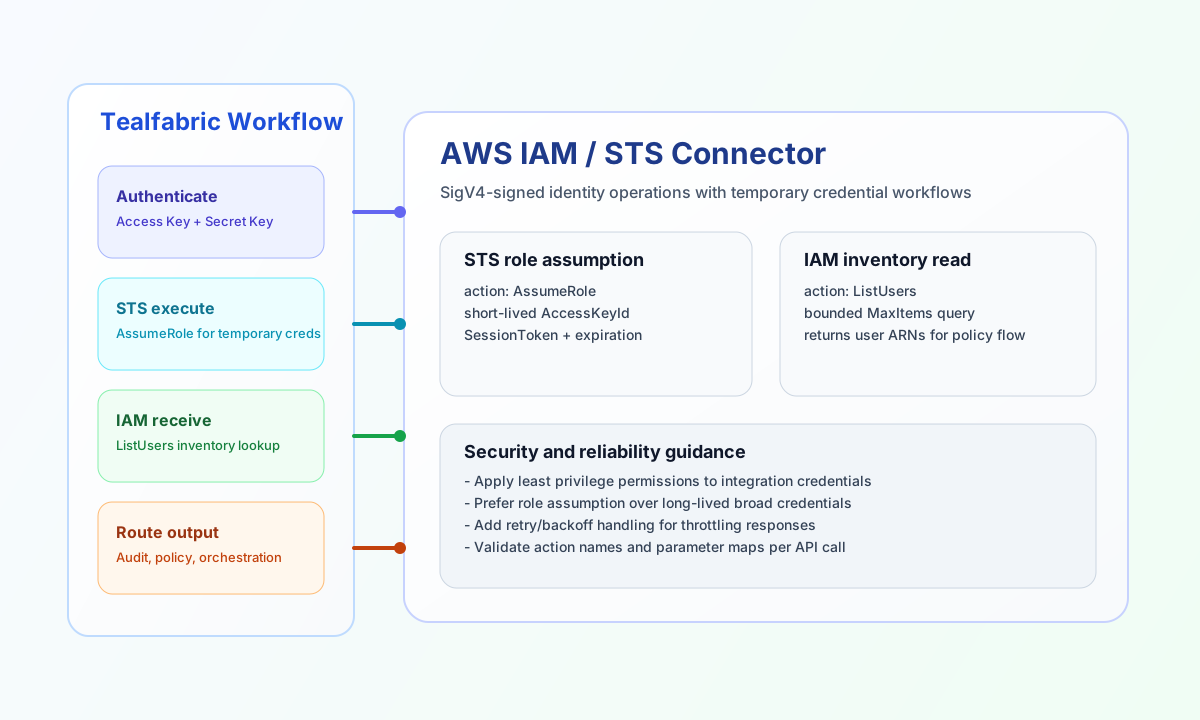
The AWS IAM / STS connector helps Tealfabric workflows manage identity resources and issue temporary credentials for downstream AWS operations. It is best suited for automation that needs role assumption, identity checks, or lightweight IAM inventory within controlled permission boundaries.
Document information
| Field | Value |
|---|---|
| Canonical URL | /docs/04_connecting-systems/connectors/a/aws-iam-sts |
| Version (published date) | 2026-05-08 |
| Tags | connectors, reference, aws-iam-sts |
| Connector ID | aws-iam-sts-1.0.0 |
Configure authentication
Configure access_key_id, secret_access_key, and region so the connector can authenticate AWS Query API calls. The runtime uses the same legacy query-string credential model as aws-iam-sts-1.0.0.php (not full Signature Version 4). IAM is a global service, but region still affects STS endpoint resolution, so keep it consistent with your environment standards.
Use minimal IAM permissions for the configured credentials and rotate long-lived access keys on a regular schedule. If you only need temporary credentials in runtime, use restrictive IAM credentials for AssumeRole and move privileged operations to target roles.
Assume a role with execute
Use execute with the STS AssumeRole action when a workflow needs short-lived credentials for another AWS account or permission boundary. Pass the target service as service (iam or sts; defaults to iam when omitted).
const baseUrl = "https://api.example.com/api/v1";
const tenantId = "<TENANT_ID>";
const apiKey = "<API_KEY>";

async function assumeRole(integrationId: string) {
  const response = await fetch(`${baseUrl}/integrations/${encodeURIComponent(integrationId)}/execute`, {
    method: "POST",
    headers: {
      "X-API-Key": apiKey,
      "X-Tenant-ID": tenantId,
      "Content-Type": "application/json",
    },
    body: JSON.stringify({
      operation: "execute",
      service: "sts",
      action: "AssumeRole",
      data: {
        RoleArn: "arn:aws:iam::123456789012:role/TealfabricAutomationRole",
        RoleSessionName: "tf-workflow-<ENTITY_ID>",
        DurationSeconds: 3600
      }
    }),
  });
  if (!response.ok) throw new Error(`Request failed: ${response.status}`);
  return response.json();
}
curl -X POST "https://api.example.com/api/v1/integrations/<ENTITY_ID>/execute" \
-H "X-API-Key: <API_KEY>" \
-H "X-Tenant-ID: <TENANT_ID>" \
-H "Content-Type: application/json" \
-d '{
"operation": "execute",
"service": "sts",
"action": "AssumeRole",
"data": {
"RoleArn": "arn:aws:iam::123456789012:role/TealfabricAutomationRole",
"RoleSessionName": "tf-workflow-<ENTITY_ID>",
"DurationSeconds": 3600
}
}'
{
  "success": true,
  "data": {
    "message": "AWS IAM/STS method executed successfully",
    "result": {
      "AssumeRoleResponse": {
        "AssumeRoleResult": {
          "Credentials": {
            "AccessKeyId": "ASIAIOSFODNN7EXAMPLE",
            "SecretAccessKey": "<SECRET_ACCESS_KEY>",
            "SessionToken": "<SESSION_TOKEN>",
            "Expiration": "2026-05-08T17:43:00Z"
          }
        }
      }
    }
  }
}
List users with receive
Use receive with IAM actions when workflows need a scoped inventory of users, roles, or related identity resources. Pass service: "iam" (default) and optional query parameters such as MaxItems to keep responses predictable.
const baseUrl = "https://api.example.com/api/v1";
const tenantId = "<TENANT_ID>";
const apiKey = "<API_KEY>";

async function listUsers(integrationId: string) {
  const response = await fetch(`${baseUrl}/integrations/${encodeURIComponent(integrationId)}/execute`, {
    method: "POST",
    headers: {
      "X-API-Key": apiKey,
      "X-Tenant-ID": tenantId,
      "Content-Type": "application/json",
    },
    body: JSON.stringify({
      operation: "receive",
      service: "iam",
      action: "ListUsers",
      query: {
        MaxItems: 10,
        PathPrefix: "/"
      }
    }),
  });
  if (!response.ok) throw new Error(`Request failed: ${response.status}`);
  return response.json();
}
curl -X POST "https://api.example.com/api/v1/integrations/<ENTITY_ID>/execute" \
-H "X-API-Key: <API_KEY>" \
-H "X-Tenant-ID: <TENANT_ID>" \
-H "Content-Type: application/json" \
-d '{
"operation": "receive",
"service": "iam",
"action": "ListUsers",
"query": {
"MaxItems": 10,
"PathPrefix": "/"
}
}'
{
  "success": true,
  "data": {
    "message": "AWS IAM/STS data retrieved successfully",
    "resource_count": 2,
    "items": [
      {
        "UserName": "tf-automation",
        "Arn": "arn:aws:iam::123456789012:user/tf-automation"
      },
      {
        "UserName": "tf-auditor",
        "Arn": "arn:aws:iam::123456789012:user/tf-auditor"
      }
    ]
  }
}
Test connection with test
Use test to validate access_key_id and secret_access_key via STS GetCallerIdentity. Full credential validation runs only on test, matching legacy testConnection behavior.
{
  "success": true,
  "data": {
    "message": "AWS IAM/STS connection test successful",
    "details": {
      "region": "us-east-1",
      "account_id": "123456789012"
    }
  }
}
Operational guidance
Most IAM and STS failures come from permission boundaries, invalid action names, or missing request parameters. When troubleshooting, first verify that the access key has explicit permission for the requested action and target resource, then confirm the payload matches AWS action requirements.
For stable production behavior, combine least-privilege IAM policies with retry logic for transient failures such as throttling. This keeps identity automation secure while maintaining predictable workflow execution.