Apache Solr Connector Guide
The Apache Solr connector lets Tealfabric workflows index, query, and manage search documents in Solr cores. It is useful for product search, catalog sync, and any automation that needs fast full-text retrieval across structured records.
Document information
| Field | Value |
|---|---|
| Canonical URL | /docs/04_connecting-systems/connectors/a/apache-solr |
| Version (published date) | 2026-05-08 |
| Tags | connectors, reference, apache-solr |
| Connector ID | apache-solr-1.0.0 |
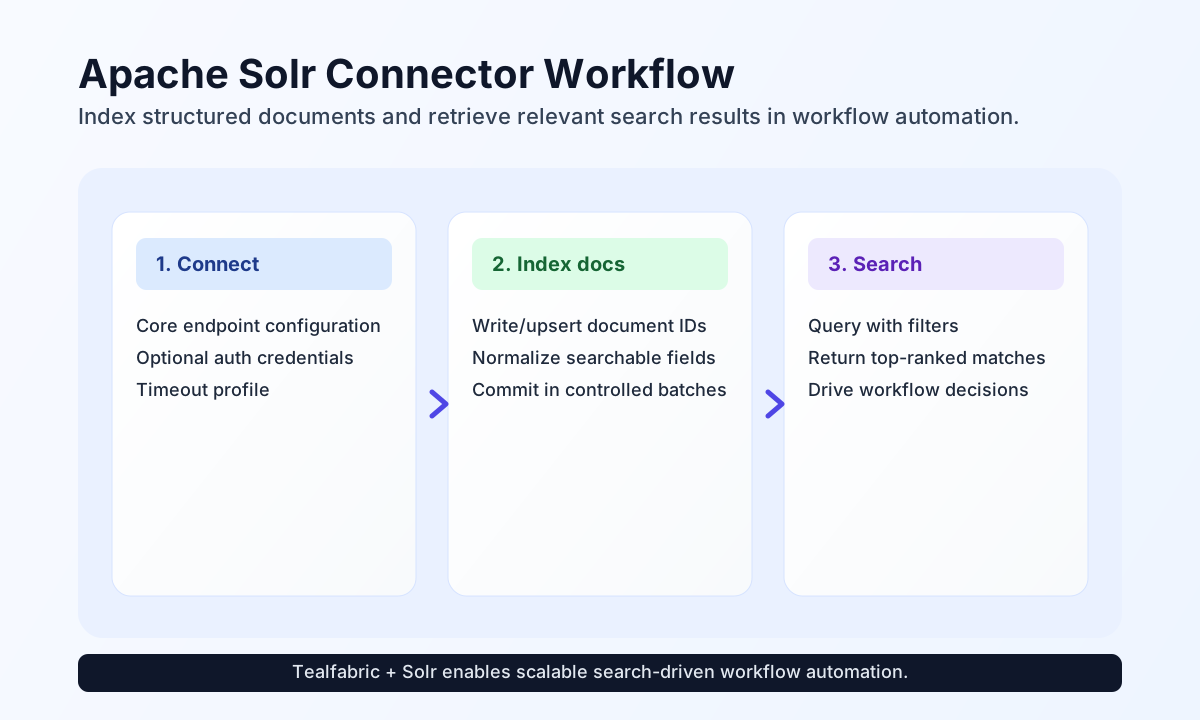
Configure Solr endpoint access
Configure the connector with your Solr endpoint_url so workflow requests target the correct Solr host and core path. When your Solr deployment is protected, provide username and password for HTTP Basic auth.
endpoint_url(required): Solr endpoint URL (for examplehttp://localhost:8983/solr).username(optional): Username for HTTP Basic auth.password(optional): Password for HTTP Basic auth.timeout_seconds(optional): Request timeout in seconds, default30.
Set timeout_seconds according to indexing volume and query complexity. Run test before production rollout to verify endpoint reachability via GET /admin/ping.
Index documents with index
Use index to write or update search documents from workflow events, such as catalog updates or content ingestion steps. Include stable IDs so repeated runs update existing documents instead of creating duplicates. Pass collection or legacy alias core, plus either documents (array) or a single document.
const baseUrl = "https://api.example.com/api/v1";
const tenantId = "<TENANT_ID>";
const apiKey = "<API_KEY>";

async function indexProduct(integrationId: string) {
  const response = await fetch(`${baseUrl}/integrations/${encodeURIComponent(integrationId)}/execute`, {
    method: "POST",
    headers: {
      "X-API-Key": apiKey,
      "X-Tenant-ID": tenantId,
      "Content-Type": "application/json",
    },
    body: JSON.stringify({
      operation: "index",
      core: "products",
      documents: [
        {
          id: "sku-10425",
          name: "Premium Trail Backpack",
          category: "outdoor",
          in_stock: true
        }
      ]
    }),
  });
  if (!response.ok) throw new Error(`Request failed: ${response.status}`);
  const payload = await response.json();
  return payload.data;
}
curl -X POST "https://api.example.com/api/v1/integrations/<ENTITY_ID>/execute" \
-H "X-API-Key: <API_KEY>" \
-H "X-Tenant-ID: <TENANT_ID>" \
-H "Content-Type: application/json" \
-d '{
"operation": "index",
"core": "products",
"documents": [
{
"id": "sku-10425",
"name": "Premium Trail Backpack",
"category": "outdoor",
"in_stock": true
}
]
}'
{
  "success": true,
  "data": {
    "document_count": 1,
    "data": {
      "responseHeader": {
        "status": 0,
        "QTime": 12
      }
    }
  }
}
Query documents with search
Use search to retrieve relevant records for recommendation flows, product lookup, or content enrichment. Pass Solr query parameters explicitly: query or alias q (defaults to *:*), rows, start, fq, sort, and facet.
const baseUrl = "https://api.example.com/api/v1";
const tenantId = "<TENANT_ID>";
const apiKey = "<API_KEY>";

async function searchOutdoorProducts(integrationId: string) {
  const response = await fetch(`${baseUrl}/integrations/${encodeURIComponent(integrationId)}/execute`, {
    method: "POST",
    headers: {
      "X-API-Key": apiKey,
      "X-Tenant-ID": tenantId,
      "Content-Type": "application/json",
    },
    body: JSON.stringify({
      operation: "search",
      core: "products",
      query: "name:backpack AND category:outdoor",
      rows: 10
    }),
  });
  if (!response.ok) throw new Error(`Request failed: ${response.status}`);
  const payload = await response.json();
  return payload.data;
}
curl -X POST "https://api.example.com/api/v1/integrations/<ENTITY_ID>/execute" \
-H "X-API-Key: <API_KEY>" \
-H "X-Tenant-ID: <TENANT_ID>" \
-H "Content-Type: application/json" \
-d '{
"operation": "search",
"core": "products",
"query": "name:backpack AND category:outdoor",
"rows": 10
}'
{
  "success": true,
  "data": {
    "document_count": 1,
    "hits": [
      {
        "id": "sku-10425",
        "name": "Premium Trail Backpack",
        "category": "outdoor"
      }
    ],
    "total": 1,
    "data": {
      "response": {
        "numFound": 1,
        "docs": [
          {
            "id": "sku-10425",
            "name": "Premium Trail Backpack",
            "category": "outdoor"
          }
        ]
      }
    }
  }
}
Additional operations
get: fetch one document byidfromcollection/core.update: upsert onedocumentvia the JSON docs API withcommit=true.delete: delete one document byidwithcommit=true.test: validateendpoint_urland probeGET /admin/ping.
get and delete accept numeric or string id values. search accepts fq as a string or array; array values are encoded with PHP http_build_query-compatible indexed keys (fq[0], fq[1], …) to match legacy connector behavior.
Reliability guidance
Most failures come from incorrect core paths, malformed query syntax, or schema mismatches during indexing. If operations fail, validate core name and document fields first, then verify query expressions against your Solr schema.
For stable production behavior, use deterministic IDs, commit in controlled batches, and keep query filters focused to prevent heavy full-scan searches. This improves indexing consistency and search responsiveness under load.