Asana Connector Guide
The Asana connector helps Tealfabric workflows create, update, and retrieve work-management data in Asana. It is commonly used to automate task creation from business events, synchronize project state with external systems, and enrich workflow decisions with live task metadata.
Document information
| Field | Value |
|---|---|
| Canonical URL | /docs/04_connecting-systems/connectors/a/asana |
| Version (published date) | 2026-05-08 |
| Tags | connectors, reference, asana |
| Connector ID | asana-1.0.0 |
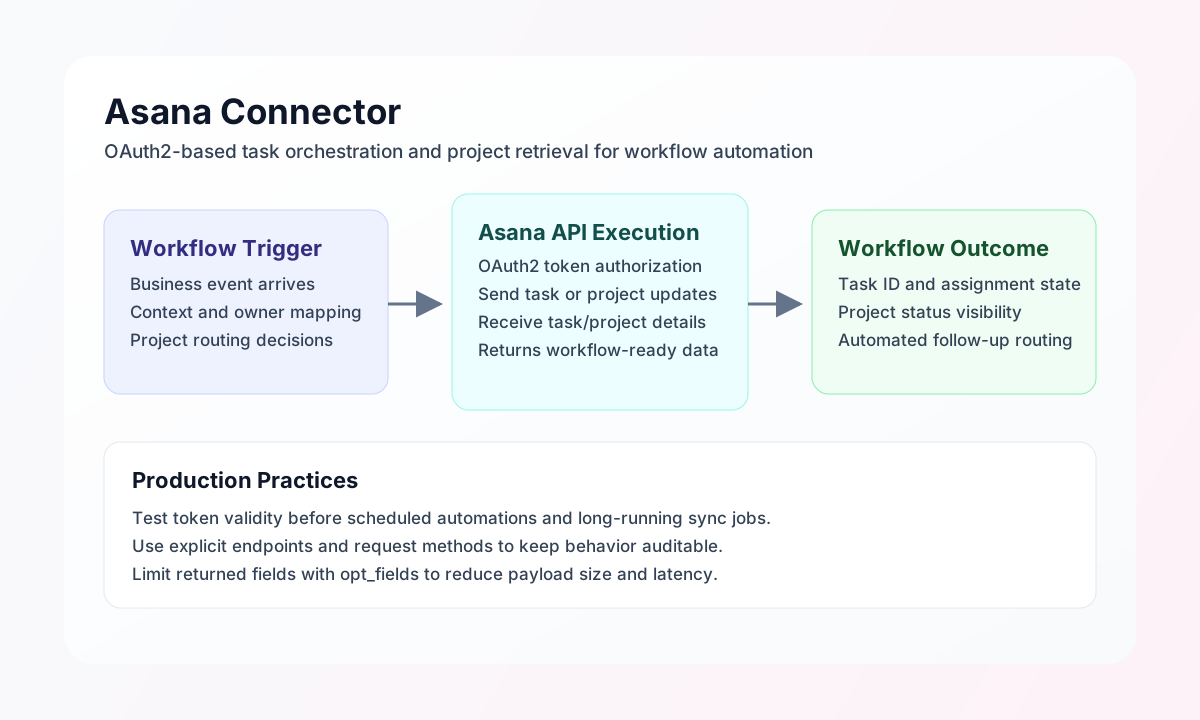
Configuration and OAuth setup
Configure the connector with your Asana OAuth app credentials so workflow calls can authenticate securely without exposing tokens in runtime payloads. This setup is the foundation for reliable project and task automation at scale.
Required values are client_id, client_secret, and redirect_uri. Optional values include access_token, refresh_token, scope, and timeout_seconds. Run test after setup to validate OAuth app configuration and token health; non-test operations require a valid access_token but do not re-validate OAuth app credentials on every call.
Create tasks with send
Use send to create or update Asana resources such as tasks and projects. Keep endpoint and HTTP method explicit in each call so workflow behavior stays predictable and easy to troubleshoot.
const baseUrl = "https://api.example.com/api/v1";
const tenantId = "<TENANT_ID>";
const apiKey = "<API_KEY>";

async function createTask(integrationId: string) {
  const response = await fetch(`${baseUrl}/integrations/${encodeURIComponent(integrationId)}/execute`, {
    method: "POST",
    headers: {
      "X-API-Key": apiKey,
      "X-Tenant-ID": tenantId,
      "Content-Type": "application/json",
    },
    body: JSON.stringify({
      operation: "send",
      endpoint: "tasks",
      method: "POST",
      data: {
        data: {
          name: "Investigate payment retries",
          notes: "Review failed payment events from overnight batch.",
          projects: ["1200000000000001"],
          assignee: "1200000000000042"
        }
      }
    }),
  });
  if (!response.ok) throw new Error(`Request failed: ${response.status}`);
  return response.json();
}
curl -X POST "https://api.example.com/api/v1/integrations/<ENTITY_ID>/execute" \
-H "X-API-Key: <API_KEY>" \
-H "X-Tenant-ID: <TENANT_ID>" \
-H "Content-Type: application/json" \
-d '{
"operation": "send",
"endpoint": "tasks",
"method": "POST",
"data": {
"data": {
"name": "Investigate payment retries",
"notes": "Review failed payment events from overnight batch.",
"projects": ["1200000000000001"],
"assignee": "1200000000000042"
}
}
}'
{
  "success": true,
  "data": {
    "message_count": 1,
    "data": {
      "data": {
        "gid": "1200000000000987",
        "name": "Investigate payment retries",
        "completed": false
      }
    },
    "response": {
      "data": {
        "gid": "1200000000000987",
        "name": "Investigate payment retries",
        "completed": false
      }
    }
  }
}
Retrieve task data with receive
Use receive to query projects and tasks for reporting, reconciliation, or conditional workflow routing. Request only the fields you need so responses stay compact and fast.
const baseUrl = "https://api.example.com/api/v1";
const tenantId = "<TENANT_ID>";
const apiKey = "<API_KEY>";

async function listProjectTasks(integrationId: string) {
  const response = await fetch(`${baseUrl}/integrations/${encodeURIComponent(integrationId)}/execute`, {
    method: "POST",
    headers: {
      "X-API-Key": apiKey,
      "X-Tenant-ID": tenantId,
      "Content-Type": "application/json",
    },
    body: JSON.stringify({
      operation: "receive",
      endpoint: "tasks",
      query: {
        project: "1200000000000001",
        limit: 20,
        opt_fields: "name,completed,assignee.name,due_on"
      }
    }),
  });
  if (!response.ok) throw new Error(`Request failed: ${response.status}`);
  return response.json();
}
curl -X POST "https://api.example.com/api/v1/integrations/<ENTITY_ID>/execute" \
-H "X-API-Key: <API_KEY>" \
-H "X-Tenant-ID: <TENANT_ID>" \
-H "Content-Type: application/json" \
-d '{
"operation": "receive",
"endpoint": "tasks",
"query": {
"project": "1200000000000001",
"limit": 20,
"opt_fields": "name,completed,assignee.name,due_on"
}
}'
{
  "success": true,
  "data": {
    "message_count": 1,
    "data": [
      {
        "gid": "1200000000000987",
        "name": "Investigate payment retries",
        "completed": false,
        "assignee": {
          "name": "Sam Patel"
        }
      }
    ],
    "total_size": 1
  }
}
Reliability and operational guidance
Most failures come from expired OAuth tokens, insufficient app scopes, or invalid endpoint payload structure. Run test before scheduled jobs, capture API errors in workflow logs, and verify that each write call uses the Asana-required data wrapper.
The connector applies in-process rate limiting (~100 requests per 60 seconds) and refreshes OAuth tokens on HTTP 401 when a refresh_token is configured. Use sync for combined outbound/inbound legs in one call, and batch for sequential send/receive sub-operations.
For sustained stability, pace high-volume requests to respect Asana rate limits and use focused opt_fields queries for lean responses. These practices keep project automations reliable and easier to maintain.