AWS Kinesis Data Streams Connector Guide
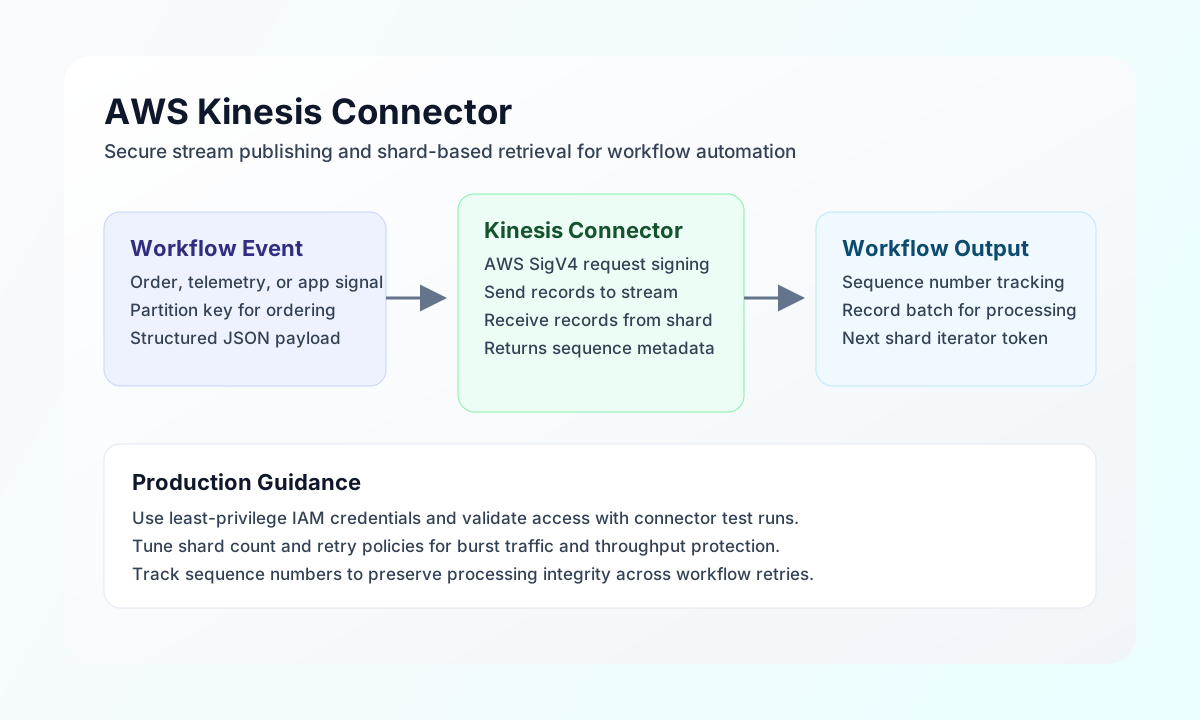
The AWS Kinesis connector helps Tealfabric workflows publish and retrieve streaming data in Amazon Kinesis Data Streams. You can use it to move event payloads from operational systems into durable stream pipelines and then read stream data for downstream automation.
Document information
| Field | Value |
|---|---|
| Canonical URL | /docs/04_connecting-systems/connectors/a/aws-kinesis |
| Version (published date) | 2026-05-08 |
| Tags | connectors, reference, aws-kinesis |
| Connector ID | aws-kinesis-1.0.0 |
Configuration and authentication
Configure the connector with IAM credentials that have only the Kinesis permissions your workflow needs. In most production setups, this means allowing write operations for producer workflows and scoped read operations for consumer workflows.
Required configuration values are access_key_id, secret_access_key, region, and stream_name. You can also set timeout_seconds if your network path or workload requires longer request windows. The connector signs requests with AWS Signature Version 4 (via @aws-sdk/client-kinesis), so credentials never need to be embedded in execution payloads.
Run a test operation after configuration to verify credentials, region, and stream access before you enable scheduled or event-driven production jobs.
Publish records with put
Use put to place one record onto your configured stream (PutRecord). A stable partition_key helps Kinesis distribute and order records predictably for your consumer design. The data field accepts a UTF-8 string or JSON-serializable object/array (encoded as UTF-8 bytes before upload).
const baseUrl = "https://api.example.com/api/v1";
const tenantId = "<TENANT_ID>";
const apiKey = "<API_KEY>";

async function publishOrderEvent(integrationId: string) {
  const response = await fetch(`${baseUrl}/integrations/${encodeURIComponent(integrationId)}/execute`, {
    method: "POST",
    headers: {
      "X-API-Key": apiKey,
      "X-Tenant-ID": tenantId,
      "Content-Type": "application/json",
    },
    body: JSON.stringify({
      operation: "put",
      partition_key: "order-49201",
      data: {
        event_type: "order.confirmed",
        order_id: "49201",
        total: 128.45,
        currency: "USD"
      }
    }),
  });
  if (!response.ok) throw new Error(`Request failed: ${response.status}`);
  return response.json();
}
curl -X POST "https://api.example.com/api/v1/integrations/<ENTITY_ID>/execute" \
-H "X-API-Key: <API_KEY>" \
-H "X-Tenant-ID: <TENANT_ID>" \
-H "Content-Type: application/json" \
-d '{
"operation": "put",
"partition_key": "order-49201",
"data": {
"event_type": "order.confirmed",
"order_id": "49201",
"total": 128.45,
"currency": "USD"
}
}'
{
  "success": true,
  "data": {
    "record_count": 1,
    "sequence_number": "49607944852334398183971526846674161616632472431548497922",
    "shard_id": "shardId-000000000003",
    "data": {
      "SequenceNumber": "49607944852334398183971526846674161616632472431548497922",
      "ShardId": "shardId-000000000003"
    }
  },
  "metadata": {
    "processing_time_ms": 142
  }
}
Read stream data with get
Use get when a workflow needs to fetch records from a shard (GetRecords). Supply a shard_iterator from a prior GetShardIterator call (or from a previous get response's data.next_shard_iterator). The connector defaults limit to 100 when omitted.
const baseUrl = "https://api.example.com/api/v1";
const tenantId = "<TENANT_ID>";
const apiKey = "<API_KEY>";

async function readRecentRecords(integrationId: string, shardIterator: string) {
  const response = await fetch(`${baseUrl}/integrations/${encodeURIComponent(integrationId)}/execute`, {
    method: "POST",
    headers: {
      "X-API-Key": apiKey,
      "X-Tenant-ID": tenantId,
      "Content-Type": "application/json",
    },
    body: JSON.stringify({
      operation: "get",
      shard_iterator: shardIterator,
      limit: 25
    }),
  });
  if (!response.ok) throw new Error(`Request failed: ${response.status}`);
  return response.json();
}
curl -X POST "https://api.example.com/api/v1/integrations/<ENTITY_ID>/execute" \
-H "X-API-Key: <API_KEY>" \
-H "X-Tenant-ID: <TENANT_ID>" \
-H "Content-Type: application/json" \
-d '{
"operation": "get",
"shard_iterator": "AAAAAAAAAAE...",
"limit": 25
}'
{
  "success": true,
  "data": {
    "record_count": 1,
    "records": [
      {
        "SequenceNumber": "49607944852334398183971526846674161616632472431548497922",
        "PartitionKey": "order-49201",
        "Data": "eyJldmVudF90eXBlIjoib3JkZXIuY29uZmlybWVkIn0=",
        "ApproximateArrivalTimestamp": 1718630400.123
      }
    ],
    "next_shard_iterator": "AAAAAAAAAAE...",
    "data": {
      "Records": [
        {
          "SequenceNumber": "49607944852334398183971526846674161616632472431548497922",
          "PartitionKey": "order-49201",
          "Data": "eyJldmVudF90eXBlIjoib3JkZXIuY29uZmlybWVkIn0=",
          "ApproximateArrivalTimestamp": 1718630400.123
        }
      ],
      "NextShardIterator": "AAAAAAAAAAE...",
      "MillisBehindLatest": 0
    }
  },
  "metadata": {
    "processing_time_ms": 198
  }
}
Record Data values are base64-encoded bytes. Decode them in your workflow to recover the original payload.
Reliability and troubleshooting
Authentication failures usually indicate invalid IAM keys, a region mismatch, or missing stream permissions. Throughput-related errors commonly mean your producer rate exceeds shard capacity, so scale shard count or smooth burst traffic with buffering and retries.
For stable production behavior, validate with test, log sequence numbers for traceability, and use exponential backoff for transient throttling responses. These practices keep real-time workflows resilient while preserving data delivery guarantees.