Auth0 Connector Guide
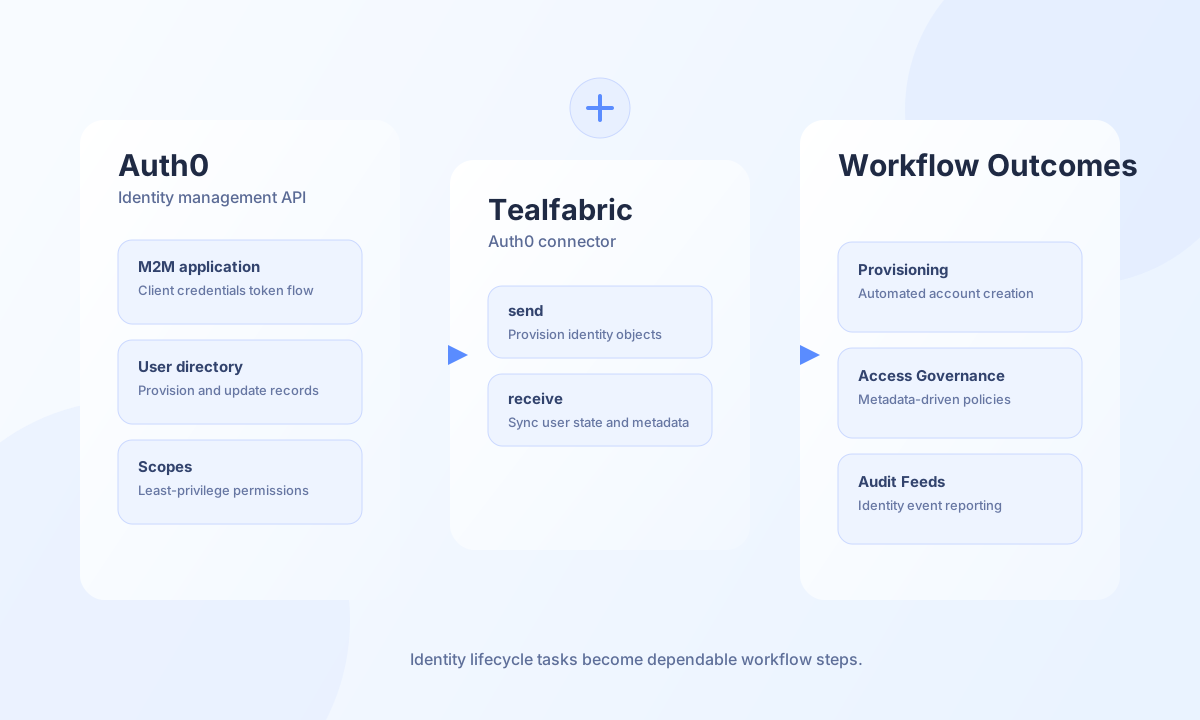
The Auth0 connector helps Tealfabric workflows automate identity lifecycle tasks through the Auth0 Management API. It is useful for account provisioning, metadata synchronization, and access-governance workflows where user state must stay aligned across systems.
Document information
| Field | Value |
|---|---|
| Canonical URL | /docs/04_connecting-systems/connectors/a/auth0 |
| Version (published date) | 2026-05-08 |
| Tags | connectors, reference, auth0 |
| Connector ID | auth0-1.0.0 |
Configuration and authentication
Before configuring this connector, create a machine-to-machine application in Auth0 and authorize it for the Management API with only the scopes you need. Use the full tenant domain and keep client secrets rotated under your security policy. The connector uses client credentials flow and handles token lifecycle automatically.
domain(required): Full Auth0 domain, for exampleyour-tenant.auth0.com.client_id(required): Management API machine-to-machine client ID.client_secret(required): Client secret for the M2M application.timeout_seconds(optional): Request timeout in seconds, default30.
The test operation validates required configuration parameters. send, receive, and execute obtain a Management API token at runtime without upfront config validation (matching legacy behavior).
Management API paths are relative to /api/v2/ — use users, not api/v2/users.
Provision users with send
Use send to create or update user records in Auth0. Keep the connection name and metadata schema consistent to avoid downstream authorization and profile-mapping errors.
const baseUrl = "https://api.example.com/api/v1";
const tenantId = "<TENANT_ID>";
const apiKey = "<API_KEY>";

async function createManagedUser(integrationId: string) {
  const response = await fetch(`${baseUrl}/integrations/${encodeURIComponent(integrationId)}/execute`, {
    method: "POST",
    headers: {
      "X-API-Key": apiKey,
      "X-Tenant-ID": tenantId,
      "Content-Type": "application/json",
    },
    body: JSON.stringify({
      operation: "send",
      endpoint: "users",
      method: "POST",
      data: {
        email: "new.user@example.com",
        password: "StrongPass!234",
        connection: "Username-Password-Authentication",
        email_verified: false,
        user_metadata: {
          department: "Operations",
          source_system: "tealfabric",
        },
      },
    }),
  });
  if (!response.ok) throw new Error(`Request failed: ${response.status}`);
  const payload = await response.json();
  return payload.data?.result;
}
curl -X POST "https://api.example.com/api/v1/integrations/<ENTITY_ID>/execute" \
-H "X-API-Key: <API_KEY>" \
-H "X-Tenant-ID: <TENANT_ID>" \
-H "Content-Type: application/json" \
-d '{
"operation": "send",
"endpoint": "users",
"method": "POST",
"data": {
"email": "new.user@example.com",
"password": "StrongPass!234",
"connection": "Username-Password-Authentication",
"email_verified": false,
"user_metadata": {
"department": "Operations",
"source_system": "tealfabric"
}
}
}'
{
  "success": true,
  "data": {
    "message": "Auth0 operation completed successfully",
    "result": {
      "user_id": "auth0|<ENTITY_ID>",
      "email": "new.user@example.com"
    }
  }
}
Retrieve user sets with receive
Use receive to query users for reconciliation, role assignment, and lifecycle automation. Pagination and field filtering help keep identity jobs efficient and within rate limits. List endpoints return an items array; single-object responses are wrapped in a one-element array.
const baseUrl = "https://api.example.com/api/v1";
const tenantId = "<TENANT_ID>";
const apiKey = "<API_KEY>";

async function listOperationsUsers(integrationId: string) {
  const response = await fetch(`${baseUrl}/integrations/${encodeURIComponent(integrationId)}/execute`, {
    method: "POST",
    headers: {
      "X-API-Key": apiKey,
      "X-Tenant-ID": tenantId,
      "Content-Type": "application/json",
    },
    body: JSON.stringify({
      operation: "receive",
      endpoint: "users",
      query: {
        q: 'user_metadata.department:"Operations"',
        page: 0,
        per_page: 25,
        include_totals: true,
      },
    }),
  });
  if (!response.ok) throw new Error(`Request failed: ${response.status}`);
  const payload = await response.json();
  return payload.data?.items ?? [];
}
curl -X POST "https://api.example.com/api/v1/integrations/<ENTITY_ID>/execute" \
-H "X-API-Key: <API_KEY>" \
-H "X-Tenant-ID: <TENANT_ID>" \
-H "Content-Type: application/json" \
-d '{
"operation": "receive",
"endpoint": "users",
"query": {
"q": "user_metadata.department:\"Operations\"",
"page": 0,
"per_page": 25,
"include_totals": true
}
}'
{
  "success": true,
  "data": {
    "message": "Auth0 data retrieved successfully",
    "item_count": 1,
    "items": [
      {
        "user_id": "auth0|<ENTITY_ID>",
        "email": "new.user@example.com"
      }
    ]
  }
}
Test connection with test
Use test to validate credentials and Management API access. The connector obtains a client-credentials token and calls GET tenants/settings.
{
  "success": true,
  "data": {
    "message": "Auth0 connection test successful",
    "details": {
      "domain": "your-tenant.auth0.com"
    }
  }
}
Reliability guidance
Most integration failures are caused by missing management scopes, tenant-domain mismatches, or API rate limits. Validate scopes and credentials with test, use pagination in user sync jobs, and apply backoff for 429 responses. These practices keep identity automation stable and auditable.