Azure IoT Hub Connector Guide
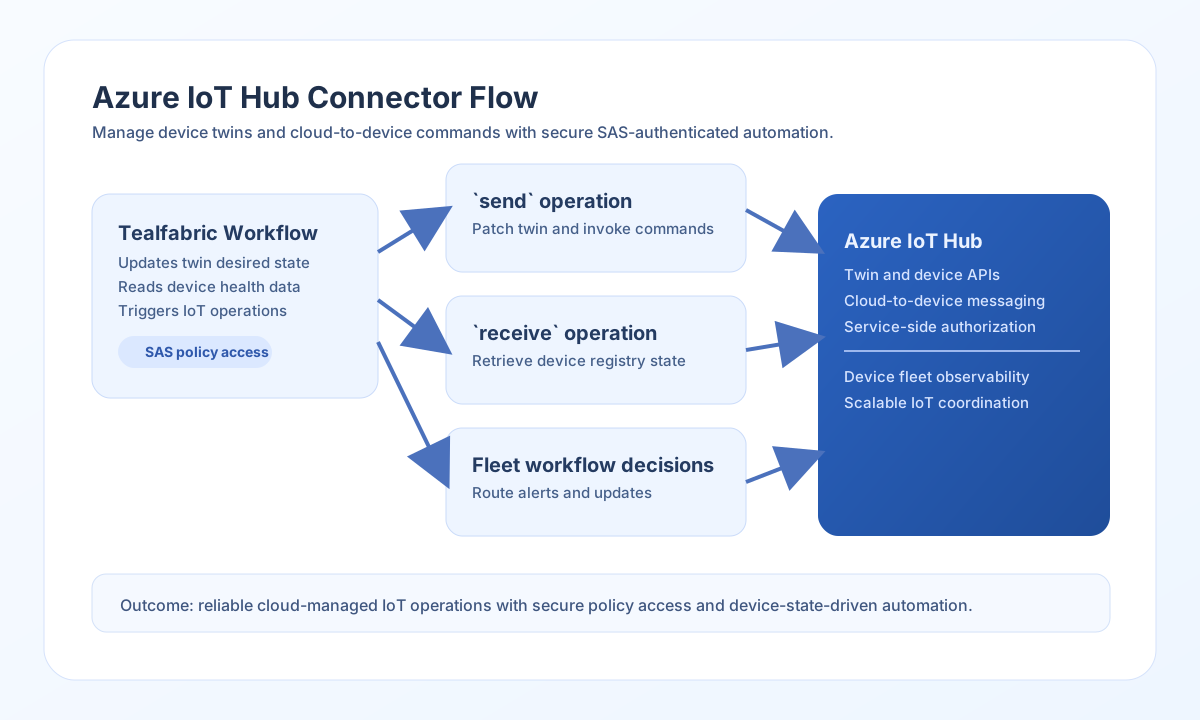
The Azure IoT Hub connector allows Tealfabric workflows to manage IoT devices, update device twins, and send cloud-to-device commands. It is useful for operational IoT automation where centralized cloud workflows orchestrate device behavior.
Document information
| Field | Value |
|---|---|
| Canonical URL | /docs/04_connecting-systems/connectors/a/azure-iot-hub |
| Version (published date) | 2026-05-08 |
| Tags | connectors, reference, azure-iot-hub |
| Connector ID | azure-iot-hub-1.0.0 |
Configure SAS authentication
Set iot_hub_name, shared_access_key, and shared_access_key_name from your Azure IoT Hub shared access policy. Use a policy with only the permissions your workflow needs, such as service messaging or registry access.
Set timeout_seconds for larger IoT operations and run test to confirm your hub and credentials are valid before enabling production workflows. The test operation validates required integration parameters (iot_hub_name, shared_access_key) and probes GET devices.
Send commands and twin updates with send
Use send for cloud-to-device messaging and device twin changes. This is typically used for remote command dispatch and fleet configuration updates.
const baseUrl = "https://api.example.com/api/v1";
const tenantId = "<TENANT_ID>";
const apiKey = "<API_KEY>";

async function updateDeviceTwin(integrationId: string) {
  const response = await fetch(`${baseUrl}/integrations/${encodeURIComponent(integrationId)}/execute`, {
    method: "POST",
    headers: {
      "X-API-Key": apiKey,
      "X-Tenant-ID": tenantId,
      "Content-Type": "application/json",
    },
    body: JSON.stringify({
      operation: "send",
      endpoint: "twins/<ENTITY_ID>",
      method: "PATCH",
      data: {
        properties: {
          desired: {
            firmwareVersion: "1.7.4",
            telemetryIntervalSeconds: 60
          }
        }
      }
    }),
  });
  if (!response.ok) throw new Error(`Request failed: ${response.status}`);
  return response.json();
}
curl -X POST "https://api.example.com/api/v1/integrations/<ENTITY_ID>/execute" \
-H "X-API-Key: <API_KEY>" \
-H "X-Tenant-ID: <TENANT_ID>" \
-H "Content-Type: application/json" \
-d '{
"operation": "send",
"endpoint": "twins/<ENTITY_ID>",
"method": "PATCH",
"data": {
"properties": {
"desired": {
"firmwareVersion": "1.7.4",
"telemetryIntervalSeconds": 60
}
}
}
}'
{
  "success": true,
  "data": {
    "message": "Azure IoT Hub operation completed successfully",
    "result": {
      "deviceId": "<ENTITY_ID>",
      "etag": "AAAAAAABBBB="
    }
  }
}
Retrieve device state with receive
Use receive to inspect device metadata, twin state, or registry listings. This supports fleet monitoring and conditional workflow branching.
const baseUrl = "https://api.example.com/api/v1";
const tenantId = "<TENANT_ID>";
const apiKey = "<API_KEY>";

async function getDeviceTwin(integrationId: string) {
  const response = await fetch(`${baseUrl}/integrations/${encodeURIComponent(integrationId)}/execute`, {
    method: "POST",
    headers: {
      "X-API-Key": apiKey,
      "X-Tenant-ID": tenantId,
      "Content-Type": "application/json",
    },
    body: JSON.stringify({
      operation: "receive",
      endpoint: "twins/<ENTITY_ID>"
    }),
  });
  if (!response.ok) throw new Error(`Request failed: ${response.status}`);
  return response.json();
}
curl -X POST "https://api.example.com/api/v1/integrations/<ENTITY_ID>/execute" \
-H "X-API-Key: <API_KEY>" \
-H "X-Tenant-ID: <TENANT_ID>" \
-H "Content-Type: application/json" \
-d '{
"operation": "receive",
"endpoint": "twins/<ENTITY_ID>"
}'
{
  "success": true,
  "data": {
    "message": "Azure IoT Hub data retrieved successfully",
    "device_count": 1,
    "items": [
      {
        "deviceId": "<ENTITY_ID>",
        "status": "enabled",
        "properties": {
          "desired": {
            "firmwareVersion": "1.7.4"
          }
        }
      }
    ]
  }
}
Run arbitrary REST calls with execute
Use execute when you need an explicit HTTP method (default GET) and optional JSON body via body or data.
{
  "operation": "execute",
  "endpoint": "devices/{deviceId}/methods",
  "method": "POST",
  "body": {
    "methodName": "reboot",
    "responseTimeoutInSeconds": 30
  }
}
{
  "success": true,
  "data": {
    "message": "Azure IoT Hub method executed successfully",
    "result": {
      "status": 200
    }
  }
}
Validate credentials with test
{
  "operation": "test"
}
{
  "success": true,
  "data": {
    "message": "Azure IoT Hub connection test successful",
    "details": {
      "iot_hub_name": "<IOT_HUB_NAME>",
      "devices_found": 12
    }
  }
}
Missing required configuration returns success: false with error.message of Configuration validation failed.
Reliability guidance
Most failures come from invalid shared access policies, missing device IDs, or IoT Hub throttling limits. Confirm policy permissions and endpoint paths first when debugging.
For stable IoT workflows, implement retry/backoff for 429 responses, keep payloads compact, and monitor device connectivity before invoking direct operations. This improves command delivery reliability.