AWS Connector Guide
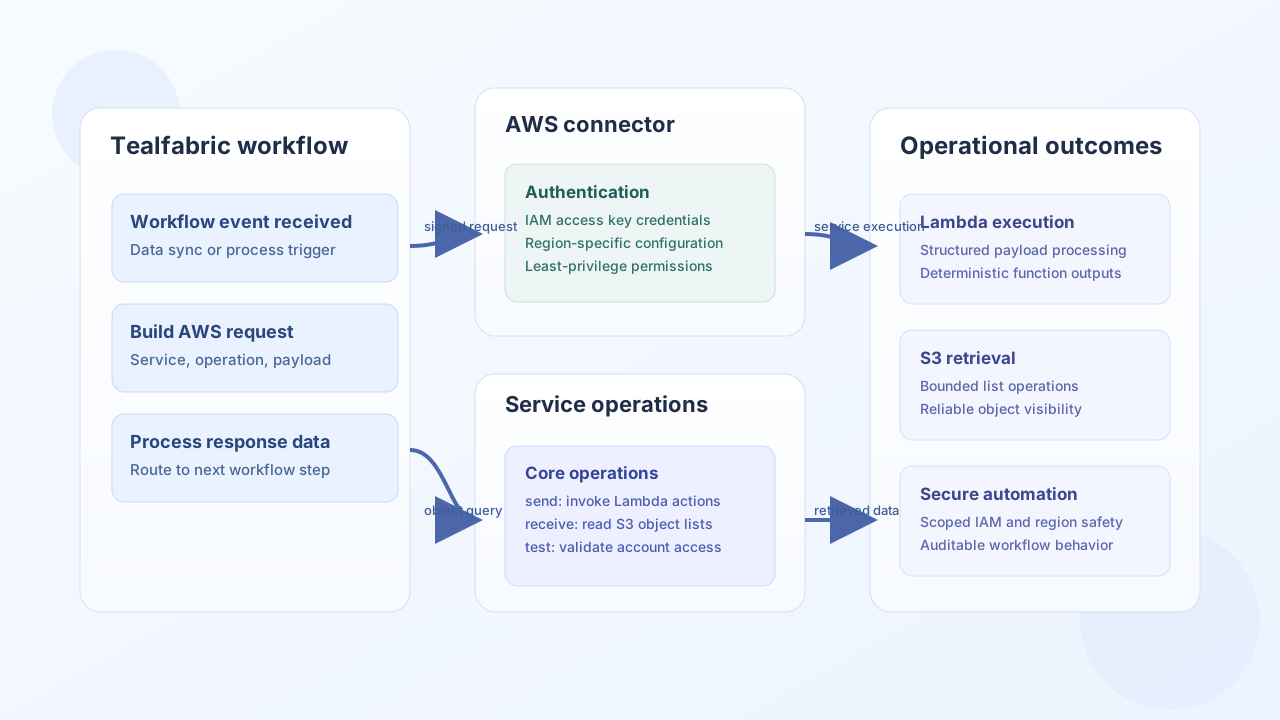
The AWS connector provides a unified way to run operations across multiple AWS services from a single Tealfabric integration. It is useful when workflows need to combine actions such as Lambda execution, object storage reads, or queue operations without managing separate connector configurations for each service.
Document information
| Field | Value |
|---|---|
| Canonical URL | /docs/04_connecting-systems/connectors/a/aws |
| Version (published date) | 2026-05-08 |
| Tags | connectors, reference, aws |
| Connector ID | aws-1.0.0 |
Configuration and authentication
Configure this connector with IAM credentials that are scoped only to the services and resources your workflows need. Set the region explicitly to avoid cross-region surprises and run test before production activation to confirm permissions and connectivity.
access_key_id(required): IAM access key ID.secret_access_key(required): IAM secret access key.region(required): AWS region such asus-east-1.
Run AWS operations with send
Use send for write or execution actions such as invoking a Lambda function. Keep payloads minimal, include operation-specific fields only, and handle service-level errors in workflow logic.
const baseUrl = "https://api.example.com/api/v1";
const tenantId = "<TENANT_ID>";
const apiKey = "<API_KEY>";

async function invokeProcessorLambda(integrationId: string) {
  const response = await fetch(`${baseUrl}/integrations/${encodeURIComponent(integrationId)}/execute`, {
    method: "POST",
    headers: {
      "X-API-Key": apiKey,
      "X-Tenant-ID": tenantId,
      "Content-Type": "application/json",
    },
    body: JSON.stringify({
      operation: "send",
      service: "lambda",
      endpoint: "Invoke",
      method: "POST",
      data: {
        FunctionName: "workflow-processor",
        InvocationType: "RequestResponse",
        Payload: JSON.stringify({
          entityId: "<ENTITY_ID>",
          action: "sync",
        }),
      },
    }),
  });
  if (!response.ok) throw new Error(`Request failed: ${response.status}`);
  const payload = await response.json();
  return payload.data;
}
curl -X POST "https://api.example.com/api/v1/integrations/<ENTITY_ID>/execute" \
-H "X-API-Key: <API_KEY>" \
-H "X-Tenant-ID: <TENANT_ID>" \
-H "Content-Type: application/json" \
-d '{
"operation": "send",
"service": "lambda",
"endpoint": "Invoke",
"method": "POST",
"data": {
"FunctionName": "workflow-processor",
"InvocationType": "RequestResponse",
"Payload": "{\"entityId\":\"<ENTITY_ID>\",\"action\":\"sync\"}"
}
}'
{
  "success": true,
  "data": {
    "StatusCode": 200,
    "ExecutedVersion": "$LATEST"
  }
}
Retrieve AWS data with receive
Use receive for read operations such as listing S3 objects or querying service metadata. Add narrow query parameters so data retrieval remains fast, predictable, and cost-aware.
const baseUrl = "https://api.example.com/api/v1";
const tenantId = "<TENANT_ID>";
const apiKey = "<API_KEY>";

async function listInboundObjects(integrationId: string) {
  const response = await fetch(`${baseUrl}/integrations/${encodeURIComponent(integrationId)}/execute`, {
    method: "POST",
    headers: {
      "X-API-Key": apiKey,
      "X-Tenant-ID": tenantId,
      "Content-Type": "application/json",
    },
    body: JSON.stringify({
      operation: "receive",
      service: "s3",
      endpoint: "ListObjectsV2",
      query: {
        Bucket: "tf-workflow-inputs",
        Prefix: "daily/",
        MaxKeys: 25,
      },
    }),
  });
  if (!response.ok) throw new Error(`Request failed: ${response.status}`);
  const payload = await response.json();
  return payload.data ?? [];
}
curl -X POST "https://api.example.com/api/v1/integrations/<ENTITY_ID>/execute" \
-H "X-API-Key: <API_KEY>" \
-H "X-Tenant-ID: <TENANT_ID>" \
-H "Content-Type: application/json" \
-d '{
"operation": "receive",
"service": "s3",
"endpoint": "ListObjectsV2",
"query": {
"Bucket": "tf-workflow-inputs",
"Prefix": "daily/",
"MaxKeys": 25
}
}'
{
  "success": true,
  "total_size": 2,
  "data": [
    {"Key": "daily/2026-05-08/report-01.json", "Size": 4832},
    {"Key": "daily/2026-05-08/report-02.json", "Size": 5179}
  ]
}
Reliability guidance
Most AWS integration failures come from overly broad IAM permissions, region mismatches, or missing service-specific parameters. Use least-privilege IAM policies, keep region configuration explicit, and log service operation names with request IDs for troubleshooting. These practices improve reliability and security as workloads scale.