AWS IoT Core Connector Guide
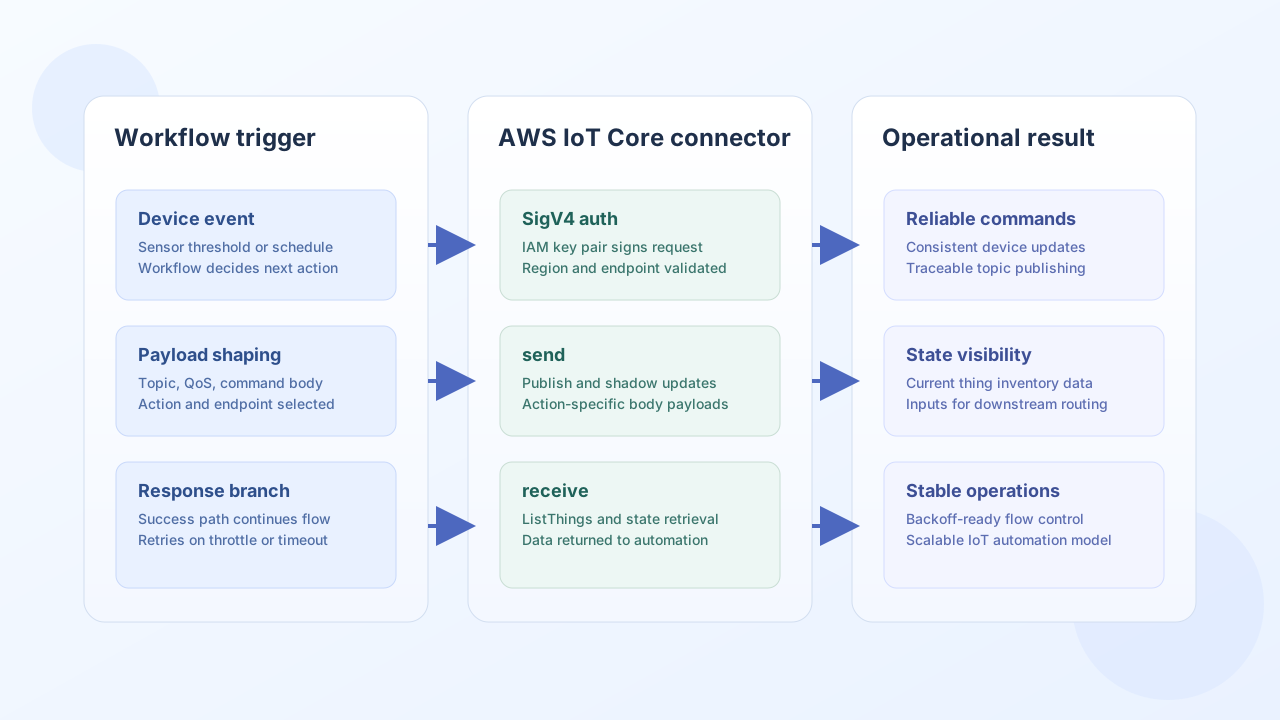
The AWS IoT Core connector helps Tealfabric workflows interact with device fleets in AWS IoT Core. You can use it to publish device commands, update shadow state, and retrieve thing metadata so operational automations stay synchronized with field devices.
Document information
| Field | Value |
|---|---|
| Canonical URL | /docs/04_connecting-systems/connectors/a/aws-iot-core |
| Version (published date) | 2026-05-08 |
| Tags | connectors, reference, aws-iot-core |
| Connector ID | aws-iot-core-1.0.0 |
Configuration and authentication
Set up the connector with IAM credentials and your AWS IoT endpoint so every request can be signed with AWS Signature Version 4 (SigV4). AWS IoT Core does not use OAuth2 for these APIs, so valid SigV4 credentials are required for all send and receive operations.
access_key_id(required): IAM access key ID.secret_access_key(required): IAM secret access key.region(required): AWS region, such asus-east-1.endpoint(required): AWS IoT Core endpoint (for exampleexample-ats.iot.us-east-1.amazonaws.com).timeout_seconds(optional): request timeout for API calls.
Use least-privilege IAM policies that allow only the actions and resources your workflows need.
Publish commands and update state with send
Use send when a workflow needs to push data into AWS IoT Core, such as creating a thing or updating a thing shadow. Set endpoint to an AWS IoT REST path relative to your configured IoT endpoint host.
const baseUrl = "https://api.example.com/api/v1";
const tenantId = "<TENANT_ID>";
const apiKey = "<API_KEY>";

async function publishDeviceCommand(integrationId: string) {
  const response = await fetch(`${baseUrl}/integrations/${encodeURIComponent(integrationId)}/execute`, {
    method: "POST",
    headers: {
      "X-API-Key": apiKey,
      "X-Tenant-ID": tenantId,
      "Content-Type": "application/json",
    },
    body: JSON.stringify({
      operation: "send",
      endpoint: "things/device-001/shadow",
      method: "POST",
      data: {
        state: {
          desired: {
            fan_speed: 3
          }
        }
      }
    }),
  });
  if (!response.ok) throw new Error(`Request failed: ${response.status}`);
  return response.json();
}
curl -X POST "https://api.example.com/api/v1/integrations/<ENTITY_ID>/execute" \
-H "X-API-Key: <API_KEY>" \
-H "X-Tenant-ID: <TENANT_ID>" \
-H "Content-Type: application/json" \
-d '{
"operation": "send",
"endpoint": "things/device-001/shadow",
"method": "POST",
"data": {
"state": {
"desired": {
"fan_speed": 3
}
}
}
}'
{
  "success": true,
  "data": {
    "message": "AWS IoT Core operation completed successfully",
    "result": {
      "state": {
        "desired": {
          "fan_speed": 3
        }
      }
    }
  }
}
Retrieve device inventory and state with receive
Use receive to collect current device information from AWS IoT Core for dashboards, alerts, and follow-up workflow decisions. Typical patterns include listing things by page and reading the latest shadow document for a specific device.
const baseUrl = "https://api.example.com/api/v1";
const tenantId = "<TENANT_ID>";
const apiKey = "<API_KEY>";

async function listIoTThings(integrationId: string) {
  const response = await fetch(`${baseUrl}/integrations/${encodeURIComponent(integrationId)}/execute`, {
    method: "POST",
    headers: {
      "X-API-Key": apiKey,
      "X-Tenant-ID": tenantId,
      "Content-Type": "application/json",
    },
    body: JSON.stringify({
      operation: "receive",
      endpoint: "things",
      query: {
        maxResults: 25
      }
    }),
  });
  if (!response.ok) throw new Error(`Request failed: ${response.status}`);
  const payload = await response.json();
  return payload.data?.items ?? [];
}
curl -X POST "https://api.example.com/api/v1/integrations/<ENTITY_ID>/execute" \
-H "X-API-Key: <API_KEY>" \
-H "X-Tenant-ID: <TENANT_ID>" \
-H "Content-Type: application/json" \
-d '{
"operation": "receive",
"endpoint": "things",
"query": {
"maxResults": 25
}
}'
{
  "success": true,
  "data": {
    "message": "AWS IoT Core data retrieved successfully",
    "thing_count": 2,
    "items": [
      {"thingName": "device-001", "thingTypeName": "thermostat"},
      {"thingName": "device-002", "thingTypeName": "fan-controller"}
    ]
  }
}
Operational guidance
Most production issues with AWS IoT integrations come from IAM scope, endpoint mismatch, and burst traffic limits. Confirm region and endpoint alignment, enforce retry with backoff for throttling (429), and monitor workflow logs for signature or permission failures (401 or 403).
These habits keep IoT automations predictable as device volume and traffic patterns grow.