Apache Druid Connector Guide
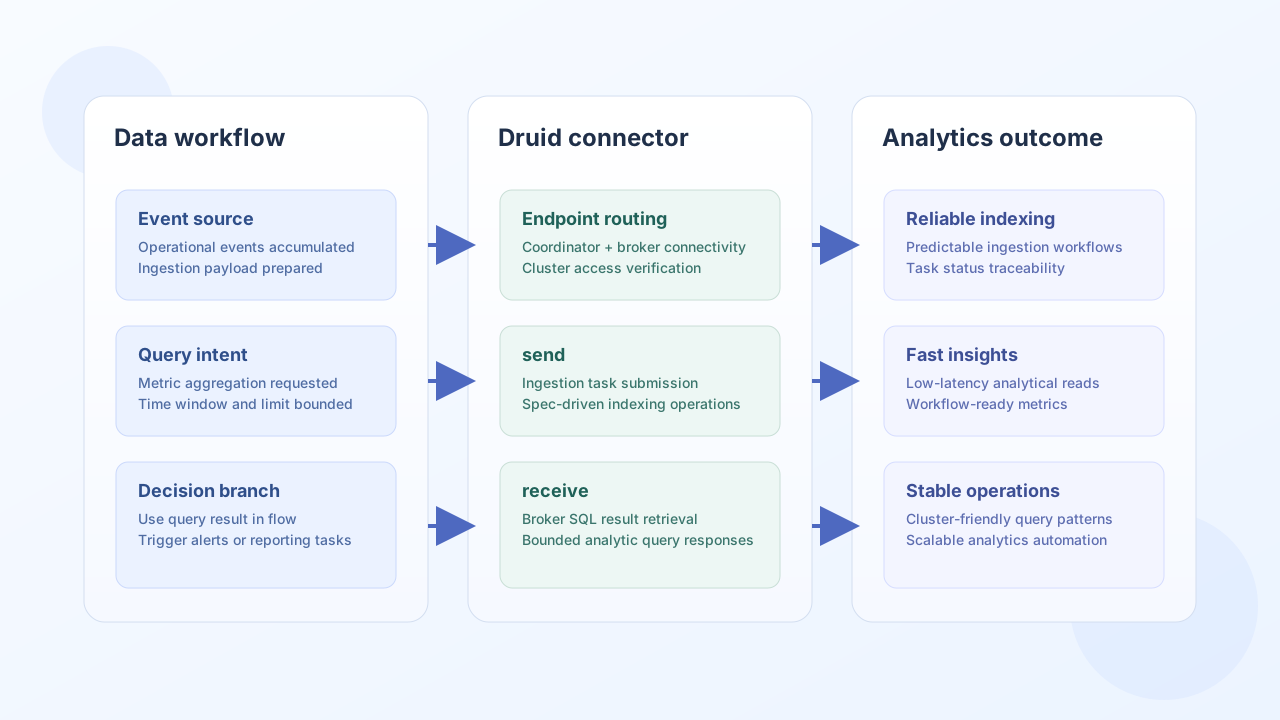
The Apache Druid connector helps Tealfabric workflows run analytical queries and submit ingestion tasks against Druid clusters. It is useful for near-real-time reporting pipelines, event analytics automation, and operational KPI workflows.
Document information
| Field | Value |
|---|---|
| Canonical URL | /docs/04_connecting-systems/connectors/a/apache-druid |
| Version (published date) | 2026-05-08 |
| Tags | connectors, reference, apache-druid |
| Connector ID | apache-druid-1.0.0 |
Configuration and endpoint setup
Configure the connector with both Druid coordinator and broker endpoints so workflows can query data and manage ingestion from one integration. In production, apply network controls and authentication policies appropriate to your cluster deployment.
coordinator_url(required): Druid coordinator API endpoint.broker_url(required): Druid broker query endpoint.timeout_seconds(optional): request timeout value.
Before deployment, run a connection test to validate endpoint reachability and access permissions.
Execute SQL with query
Use query when workflows need analytical results from the Druid broker SQL API. Keep query windows bounded for predictable latency and cluster stability.
const baseUrl = "https://api.example.com/api/v1";
const tenantId = "<TENANT_ID>";
const apiKey = "<API_KEY>";

async function runDruidQuery(integrationId: string) {
  const response = await fetch(`${baseUrl}/integrations/${encodeURIComponent(integrationId)}/execute`, {
    method: "POST",
    headers: {
      "X-API-Key": apiKey,
      "X-Tenant-ID": tenantId,
      "Content-Type": "application/json",
    },
    body: JSON.stringify({
      operation: "query",
      query: "SELECT channel, COUNT(*) AS total FROM events_daily WHERE __time >= CURRENT_TIMESTAMP - INTERVAL '1' DAY GROUP BY channel ORDER BY total DESC LIMIT 10"
    }),
  });
  if (!response.ok) throw new Error(`Request failed: ${response.status}`);
  const payload = await response.json();
  return payload.data?.data ?? [];
}
curl -X POST "https://api.example.com/api/v1/integrations/<ENTITY_ID>/execute" \
-H "X-API-Key: <API_KEY>" \
-H "X-Tenant-ID: <TENANT_ID>" \
-H "Content-Type: application/json" \
-d '{
"operation": "send",
"query": "SELECT channel, COUNT(*) AS total FROM events_daily WHERE __time >= CURRENT_TIMESTAMP - INTERVAL '1' DAY GROUP BY channel ORDER BY total DESC LIMIT 10"
}'
{
  "success": true,
  "data": {
    "row_count": 2,
    "data": [
      {"channel": "web", "total": 52314},
      {"channel": "mobile", "total": 38109}
    ]
  }
}
Read datasource metadata with datasource
Use datasource to fetch coordinator metadata for a specific datasource name.
const baseUrl = "https://api.example.com/api/v1";
const tenantId = "<TENANT_ID>";
const apiKey = "<API_KEY>";

async function getDatasourceMetadata(integrationId: string) {
  const response = await fetch(`${baseUrl}/integrations/${encodeURIComponent(integrationId)}/execute`, {
    method: "POST",
    headers: {
      "X-API-Key": apiKey,
      "X-Tenant-ID": tenantId,
      "Content-Type": "application/json",
    },
    body: JSON.stringify({
      operation: "datasource",
      datasource: "events_daily"
    }),
  });
  if (!response.ok) throw new Error(`Request failed: ${response.status}`);
  const payload = await response.json();
  return payload.data?.data ?? {};
}
curl -X POST "https://api.example.com/api/v1/integrations/<ENTITY_ID>/execute" \
-H "X-API-Key: <API_KEY>" \
-H "X-Tenant-ID: <TENANT_ID>" \
-H "Content-Type: application/json" \
-d '{
"operation": "datasource",
"datasource": "events_daily"
}'
{
  "success": true,
  "data": {
    "row_count": 1,
    "data": {
      "name": "events_daily",
      "segments": {
        "count": 128
      }
    }
  }
}
Reliability guidance
Most Druid integration failures come from endpoint misconfiguration, oversized queries, or datasource naming mismatches. Validate coordinator and broker access with test, keep SQL windows bounded, and verify datasource names before coordinator metadata requests.
These practices keep analytics workflows stable while preserving cluster performance.