Apache Pinot Connector Guide
The Apache Pinot connector helps Tealfabric workflows run low-latency analytical queries and retrieve table metadata from Pinot clusters. It is useful when you want real-time aggregations and operational dashboards to feed downstream automation.
Document information
| Field | Value |
|---|---|
| Canonical URL | /docs/04_connecting-systems/connectors/a/apache-pinot |
| Version (published date) | 2026-05-08 |
| Tags | connectors, reference, apache-pinot |
| Connector ID | apache-pinot-1.0.0 |
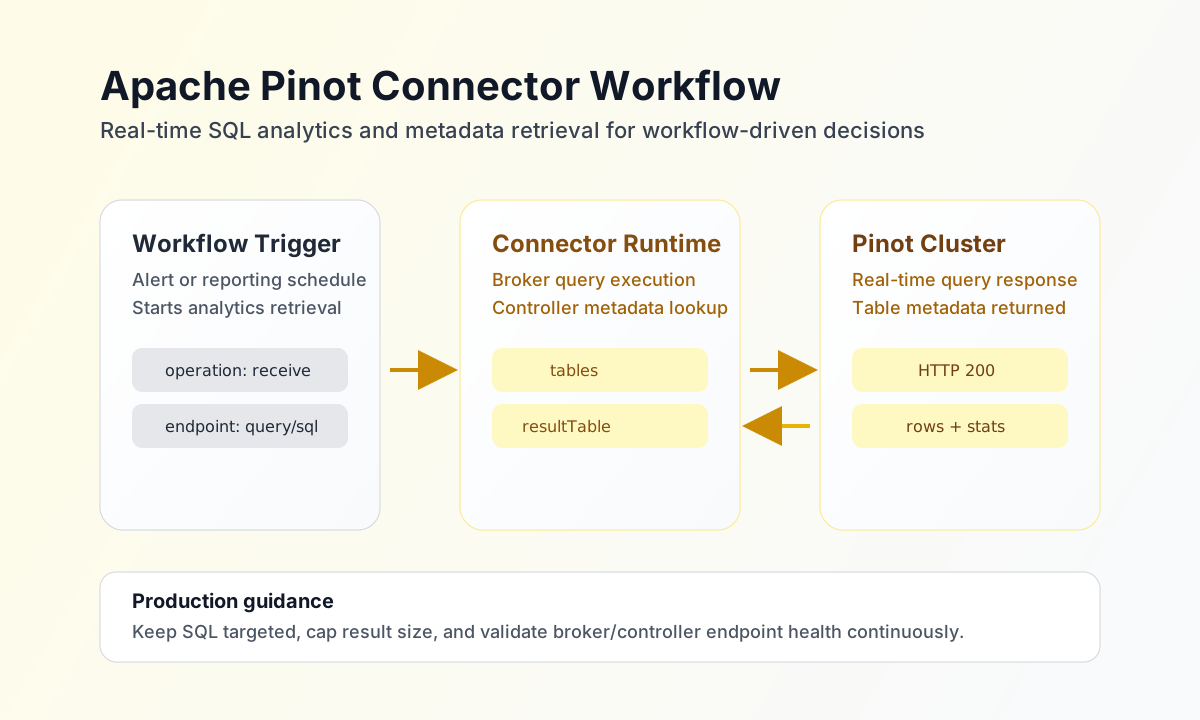
Configuration and endpoint setup
Configure the connector with both Pinot controller and broker endpoints so workflows can run SQL queries and fetch table metadata from one integration.
controller_url(required): Pinot controller API endpoint.broker_url(required): Pinot broker query endpoint.timeout_seconds(optional): request timeout value (default30).
Before deployment, run test to validate endpoint reachability and access permissions.
Execute SQL with query
Use query when workflows need analytical results from the Pinot broker SQL API. Keep SQL statements explicit and scoped to required columns for predictable latency.
const baseUrl = "https://api.example.com/api/v1";
const tenantId = "<TENANT_ID>";
const apiKey = "<API_KEY>";

async function runPinotQuery(integrationId: string) {
  const response = await fetch(`${baseUrl}/integrations/${encodeURIComponent(integrationId)}/execute`, {
    method: "POST",
    headers: {
      "X-API-Key": apiKey,
      "X-Tenant-ID": tenantId,
      "Content-Type": "application/json",
    },
    body: JSON.stringify({
      operation: "query",
      query: "SELECT campaign, SUM(conversions) AS total_conversions FROM marketing_events GROUP BY campaign ORDER BY total_conversions DESC LIMIT 10"
    }),
  });
  if (!response.ok) throw new Error(`Request failed: ${response.status}`);
  const payload = await response.json();
  return payload.data?.data ?? {};
}
curl -X POST "https://api.example.com/api/v1/integrations/<ENTITY_ID>/execute" \
-H "X-API-Key: <API_KEY>" \
-H "X-Tenant-ID: <TENANT_ID>" \
-H "Content-Type: application/json" \
-d '{
"operation": "query",
"query": "SELECT campaign, SUM(conversions) AS total_conversions FROM marketing_events GROUP BY campaign ORDER BY total_conversions DESC LIMIT 10"
}'
{
  "success": true,
  "data": {
    "row_count": 2,
    "data": {
      "resultTable": {
        "dataSchema": {
          "columnNames": ["campaign", "total_conversions"]
        },
        "rows": [
          ["summer_launch", 1842],
          ["retargeting_q2", 1298]
        ]
      }
    }
  }
}
Read table metadata with table
Use table to fetch controller metadata for a specific Pinot table name.
const baseUrl = "https://api.example.com/api/v1";
const tenantId = "<TENANT_ID>";
const apiKey = "<API_KEY>";

async function getTableMetadata(integrationId: string) {
  const response = await fetch(`${baseUrl}/integrations/${encodeURIComponent(integrationId)}/execute`, {
    method: "POST",
    headers: {
      "X-API-Key": apiKey,
      "X-Tenant-ID": tenantId,
      "Content-Type": "application/json",
    },
    body: JSON.stringify({
      operation: "table",
      table: "marketing_events"
    }),
  });
  if (!response.ok) throw new Error(`Request failed: ${response.status}`);
  const payload = await response.json();
  return payload.data?.data ?? {};
}
curl -X POST "https://api.example.com/api/v1/integrations/<ENTITY_ID>/execute" \
-H "X-API-Key: <API_KEY>" \
-H "X-Tenant-ID: <TENANT_ID>" \
-H "Content-Type: application/json" \
-d '{
"operation": "table",
"table": "marketing_events"
}'
{
  "success": true,
  "data": {
    "row_count": 1,
    "data": {
      "tableName": "marketing_events",
      "tableType": "OFFLINE"
    }
  }
}
Reliability guidance
Most Pinot integration failures come from endpoint misconfiguration, oversized queries, or table naming mismatches. Validate controller and broker access with test, keep SQL windows bounded, and verify table names before controller metadata requests.
These practices keep analytics workflows stable while preserving cluster performance.