Azure AD Graph Connector Guide
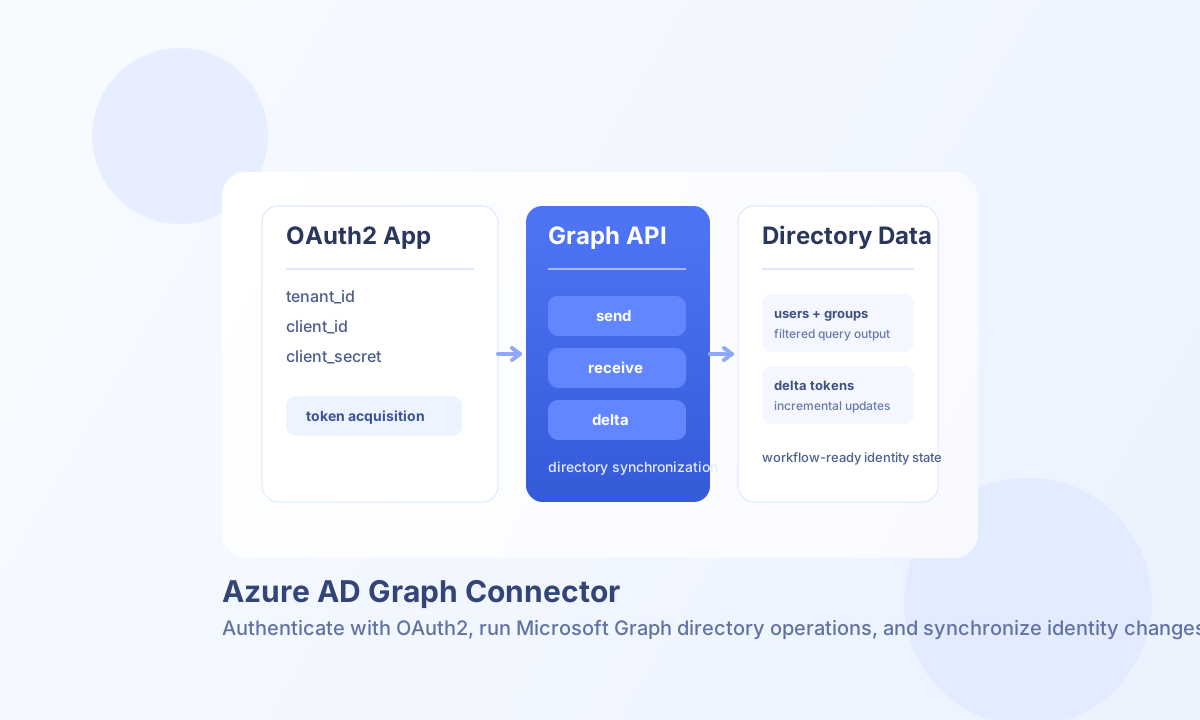
The Azure AD Graph connector integrates Tealfabric workflows with Microsoft Graph directory APIs for user, group, and directory automation. It is designed for server-to-server identity workflows such as account provisioning, directory reporting, and incremental sync.
Document information
| Field | Value |
|---|---|
| Canonical URL | /docs/04_connecting-systems/connectors/a/azure-ad-graph |
| Version (published date) | 2026-05-08 |
| Tags | connectors, reference, azure-ad-graph |
| Connector ID | azure-ad-graph-1.0.0 |
Configure Microsoft Graph access
Set tenant_id, client_id, and client_secret from your Azure app registration. The app must have Microsoft Graph application permissions for the operations you plan to run, and those permissions must be granted with admin consent.
Use api_version as v1.0 for production stability and increase timeout_seconds for larger directory reads such as delta-based sync cycles. After configuration, run the connector test operation before scheduling automations.
Create or update directory objects with send
Use send to create or modify directory resources such as users and groups. This operation maps to Microsoft Graph endpoints, so the request payload must match Graph schema requirements for the target resource.
const baseUrl = "https://api.example.com/api/v1";
const tenantId = "<TENANT_ID>";
const apiKey = "<API_KEY>";

async function createDirectoryUser(integrationId: string) {
  const response = await fetch(`${baseUrl}/integrations/${encodeURIComponent(integrationId)}/execute`, {
    method: "POST",
    headers: {
      "X-API-Key": apiKey,
      "X-Tenant-ID": tenantId,
      "Content-Type": "application/json",
    },
    body: JSON.stringify({
      operation: "send",
      endpoint: "users",
      method: "POST",
      data: {
        accountEnabled: true,
        displayName: "Alex Stone",
        mailNickname: "alexstone",
        userPrincipalName: "alexstone@contoso.com",
        passwordProfile: {
          forceChangePasswordNextSignIn: true,
          password: "<ENTITY_ID>-TempPassword#2026"
        }
      }
    }),
  });
  if (!response.ok) throw new Error(`Request failed: ${response.status}`);
  return response.json();
}
curl -X POST "https://api.example.com/api/v1/integrations/<ENTITY_ID>/execute" \
-H "X-API-Key: <API_KEY>" \
-H "X-Tenant-ID: <TENANT_ID>" \
-H "Content-Type: application/json" \
-d '{
"operation": "send",
"endpoint": "users",
"method": "POST",
"data": {
"accountEnabled": true,
"displayName": "Alex Stone",
"mailNickname": "alexstone",
"userPrincipalName": "alexstone@contoso.com",
"passwordProfile": {
"forceChangePasswordNextSignIn": true,
"password": "<ENTITY_ID>-TempPassword#2026"
}
}
}'
{
  "success": true,
  "data": {
    "message": "Azure AD Graph operation completed successfully",
    "result": {
      "id": "<ENTITY_ID>",
      "displayName": "Alex Stone",
      "userPrincipalName": "alexstone@contoso.com"
    }
  }
}
Read directory data with receive
Use receive for filtered directory queries with OData options such as filter, select, top, and orderby. This is useful when workflows need to inspect subsets of users or groups before applying business rules.
Track changes with delta
Use delta to run incremental synchronization instead of full directory scans. Start with an initial query, persist the returned delta_link, and use that value as the next delta_token so future runs only retrieve changes.
Validate connectivity with test
Use test to confirm OAuth2 credentials and Graph reachability before enabling scheduled automations.
{
  "success": true,
  "data": {
    "message": "Azure AD Graph connection test successful",
    "details": {
      "tenant_id": "<TENANT_ID>",
      "organizations_found": 1
    }
  }
}
Reliability and security guidance
Most failures come from missing Graph permissions, expired secrets, malformed OData filters, or Graph throttling (429). Keep permissions minimal, rotate secrets regularly, and apply retry logic with backoff for rate-limited requests.
For production stability, prefer v1.0 endpoints and monitor sync job behavior over time. If a stored delta token is no longer valid, run a fresh baseline query and store a new token for subsequent cycles.