Apache Pulsar Connector Guide
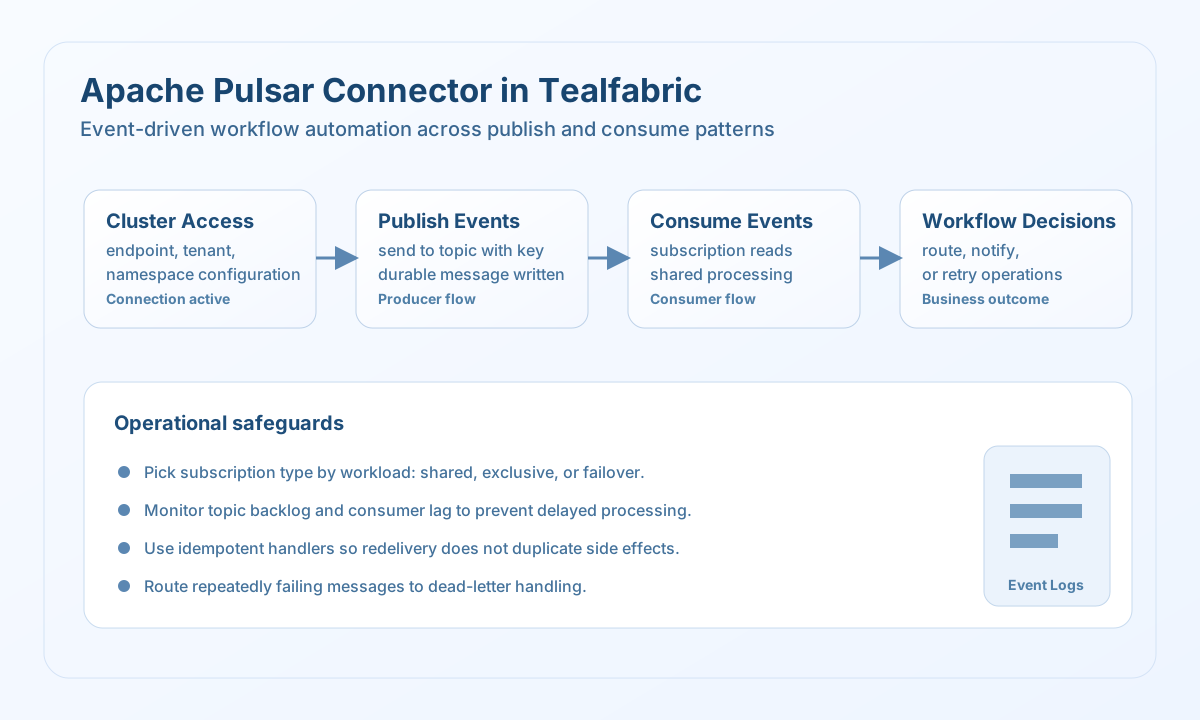
The Apache Pulsar connector allows Tealfabric workflows to publish and read event messages through Pulsar topics. It is intended for event-driven automation where durable messaging and ordered consumer handling are required.
Document information
| Field | Value |
|---|---|
| Canonical URL | /docs/04_connecting-systems/connectors/a/apache-pulsar |
| Version (published date) | 2026-05-08 |
| Tags | connectors, reference, apache-pulsar |
| Connector ID | apache-pulsar-1.0.0 |
When to use this connector
Use this connector when your workflows depend on asynchronous events, such as processing order updates, propagating status changes, or coordinating services through topics. Pulsar is a strong fit when you need durable messaging and scalable consumer patterns. The connector is most effective when topic naming, subscription strategy, and retry semantics are planned in advance.
Prerequisites
Before creating the integration, verify that your Pulsar cluster is reachable from the runtime environment and that the target tenant and namespace exist. Confirm topic permissions for produce and consume operations. If you use token-based or TLS authentication in your cluster, ensure those settings are configured in the connector profile used by your environment.
Configuration
Store these values in the integration profile:
endpoint_url(required): Pulsar broker URL, for examplepulsar://localhost:6650.admin_url(required): Pulsar admin API URL, for examplehttp://localhost:8080.tenant(required): Pulsar tenant name.namespace(required): Pulsar namespace name.timeout_seconds(optional): Request timeout in seconds.
Publish messages with send
Use send to publish events to a topic so downstream systems can process them asynchronously. Keep payloads explicit and include identifiers that make replay and troubleshooting straightforward.
const baseUrl = "https://api.example.com/api/v1";
const tenantId = "<TENANT_ID>";
const apiKey = "<API_KEY>";

type PulsarSendResult = {
  message_id?: string;
  published?: boolean;
};

async function publishOrderEvent(integrationId: string): Promise<PulsarSendResult> {
  const response = await fetch(
    `${baseUrl}/integrations/${encodeURIComponent(integrationId)}/execute`,
    {
      method: "POST",
      headers: {
        "X-API-Key": apiKey,
        "X-Tenant-ID": tenantId,
        "Content-Type": "application/json",
      },
      body: JSON.stringify({
        operation: "send",
        topic: "persistent://operations/orders/events",
        message: {
          event_type: "order_validated",
          order_id: "A-100",
          status: "ready_for_fulfillment",
          occurred_at: "2026-05-08T13:03:00Z",
        },
        key: "A-100",
      }),
    }
  );
  if (!response.ok) throw new Error(`Request failed: ${response.status}`);
  const payload = (await response.json()) as { data?: PulsarSendResult };
  if (!payload.data) throw new Error("Missing Pulsar publish payload");
  return payload.data;
}
curl -X POST "https://api.example.com/api/v1/integrations/<ENTITY_ID>/execute" \
-H "X-API-Key: <API_KEY>" \
-H "X-Tenant-ID: <TENANT_ID>" \
-H "Content-Type: application/json" \
-d '{
"operation": "send",
"topic": "persistent://operations/orders/events",
"message": {
"event_type": "order_validated",
"order_id": "A-100",
"status": "ready_for_fulfillment",
"occurred_at": "2026-05-08T13:03:00Z"
},
"key": "A-100"
}'
{
  "success": true,
  "data": {
    "message_id": "5:42:-1",
    "published": true
  }
}
Read messages with receive
Use receive to consume topic events with a subscription that matches your processing pattern. Keep batch sizes manageable so workflows can acknowledge messages and recover cleanly after failures.
const baseUrl = "https://api.example.com/api/v1";
const tenantId = "<TENANT_ID>";
const apiKey = "<API_KEY>";

type PulsarMessage = {
  message_id?: string;
  key?: string;
  payload?: Record<string, unknown>;
};

async function consumeOrderEvents(integrationId: string): Promise<PulsarMessage[]> {
  const response = await fetch(
    `${baseUrl}/integrations/${encodeURIComponent(integrationId)}/execute`,
    {
      method: "POST",
      headers: {
        "X-API-Key": apiKey,
        "X-Tenant-ID": tenantId,
        "Content-Type": "application/json",
      },
      body: JSON.stringify({
        operation: "receive",
        topic: "persistent://operations/orders/events",
        subscription: "tealfabric-order-workers",
        subscription_type: "Shared",
        max_messages: 10,
      }),
    }
  );
  if (!response.ok) throw new Error(`Request failed: ${response.status}`);
  const payload = (await response.json()) as { data?: PulsarMessage[] };
  if (!payload.data) throw new Error("Missing Pulsar consume payload");
  return payload.data;
}
curl -X POST "https://api.example.com/api/v1/integrations/<ENTITY_ID>/execute" \
-H "X-API-Key: <API_KEY>" \
-H "X-Tenant-ID: <TENANT_ID>" \
-H "Content-Type: application/json" \
-d '{
"operation": "receive",
"topic": "persistent://operations/orders/events",
"subscription": "tealfabric-order-workers",
"subscription_type": "Shared",
"max_messages": 10
}'
{
  "success": true,
  "data": [
    {
      "message_id": "5:42:0",
      "key": "A-100",
      "payload": {
        "event_type": "order_validated",
        "status": "ready_for_fulfillment"
      }
    }
  ]
}
Reliability guidance
Choose subscription types based on your processing model, and ensure acknowledgment behavior is consistent with your retry strategy. Monitor backlog and consumer lag so workflows do not silently fall behind during traffic spikes. For production safety, combine idempotent consumers with dead-letter handling for messages that repeatedly fail business validation.