Azure Connector Guide
The Azure connector lets Tealfabric workflows create and retrieve Azure resources through Azure Resource Manager APIs. It is useful for infrastructure automation, environment provisioning, and governance workflows that need API-level control.
Document information
| Field | Value |
|---|---|
| Canonical URL | /docs/04_connecting-systems/connectors/a/azure |
| Version (published date) | 2026-05-08 |
| Tags | connectors, reference, azure |
| Connector ID | azure-1.0.0 |
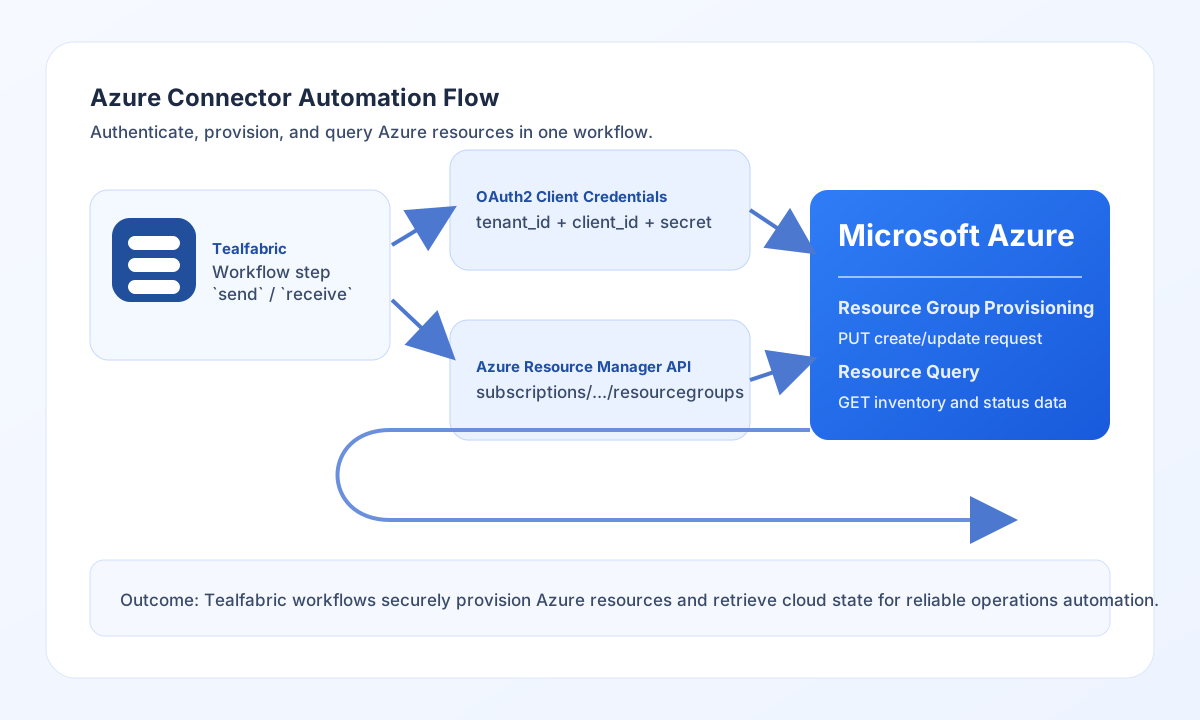
Configure authentication
Set tenant_id, client_id, and client_secret for an Azure app registration that has the required RBAC permissions. Add access_token only when you need to seed an existing token; otherwise let the connector request tokens through client credentials flow.
Use timeout_seconds based on API latency and resource complexity. Before production rollout, confirm that the service principal has least-privilege access to target subscriptions and resource groups.
Create resources with send
Use send for Azure operations that create or update resources through POST, PUT, or PATCH requests. A common pattern is creating resource groups before downstream service deployment.
const baseUrl = "https://api.example.com/api/v1";
const tenantId = "<TENANT_ID>";
const apiKey = "<API_KEY>";

async function createResourceGroup(integrationId: string) {
  const response = await fetch(`${baseUrl}/integrations/${encodeURIComponent(integrationId)}/execute`, {
    method: "POST",
    headers: {
      "X-API-Key": apiKey,
      "X-Tenant-ID": tenantId,
      "Content-Type": "application/json",
    },
    body: JSON.stringify({
      operation: "send",
      endpoint: "subscriptions/<ENTITY_ID>/resourcegroups/tf-prod-rg",
      method: "PUT",
      data: {
        location: "westeurope",
        tags: {
          environment: "production",
          owner: "platform-team"
        }
      }
    }),
  });
  if (!response.ok) throw new Error(`Request failed: ${response.status}`);
  return response.json();
}
curl -X POST "https://api.example.com/api/v1/integrations/<ENTITY_ID>/execute" \
-H "X-API-Key: <API_KEY>" \
-H "X-Tenant-ID: <TENANT_ID>" \
-H "Content-Type: application/json" \
-d '{
"operation": "send",
"endpoint": "subscriptions/<ENTITY_ID>/resourcegroups/tf-prod-rg",
"method": "PUT",
"data": {
"location": "westeurope",
"tags": {
"environment": "production",
"owner": "platform-team"
}
}
}'
{
  "success": true,
  "data": {
    "name": "tf-prod-rg",
    "location": "westeurope",
    "provisioningState": "Succeeded"
  }
}
Retrieve resources with receive
Use receive to query resources for auditing, reporting, or orchestration steps. Paging and filters help keep large resource inventories manageable in automation workflows.
const baseUrl = "https://api.example.com/api/v1";
const tenantId = "<TENANT_ID>";
const apiKey = "<API_KEY>";

async function listResourceGroups(integrationId: string) {
  const response = await fetch(`${baseUrl}/integrations/${encodeURIComponent(integrationId)}/execute`, {
    method: "POST",
    headers: {
      "X-API-Key": apiKey,
      "X-Tenant-ID": tenantId,
      "Content-Type": "application/json",
    },
    body: JSON.stringify({
      operation: "receive",
      endpoint: "subscriptions/<ENTITY_ID>/resourcegroups",
      query: {
        "filter": "tagName eq "environment"",
        "api-version": "2021-04-01"
      }
    }),
  });
  if (!response.ok) throw new Error(`Request failed: ${response.status}`);
  return response.json();
}
curl -X POST "https://api.example.com/api/v1/integrations/<ENTITY_ID>/execute" \
  -H "X-API-Key: <API_KEY>" \
  -H "X-Tenant-ID: <TENANT_ID>" \
  -H "Content-Type: application/json" \
  -d '{
    "operation": "receive",
    "endpoint": "subscriptions/<ENTITY_ID>/resourcegroups",
    "query": {
      "$filter": "tagName eq '\''environment'\''",
      "api-version": "2021-04-01"
    }
  }'
{
  "success": true,
  "total_size": 1,
  "data": [
    {
      "name": "tf-prod-rg",
      "location": "westeurope"
    }
  ]
}
Reliability guidance
Most failures come from incorrect tenant credentials, missing RBAC permissions, or malformed endpoint payloads. If an operation fails, verify service-principal access first and then validate endpoint path and API-version details.
For production reliability, scope permissions to required resources, paginate large reads, and add retry/backoff handling for transient rate-limit conditions. This keeps Azure automation predictable and auditable.