Airtable Connector Guide
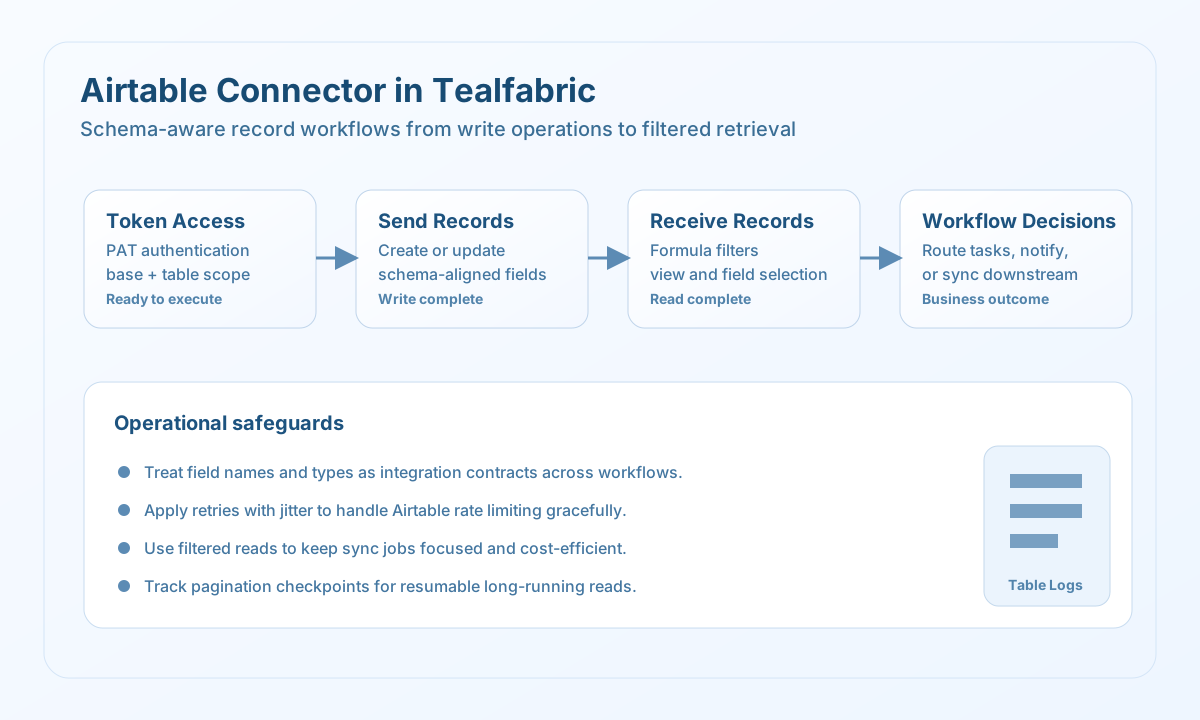
The Airtable connector allows Tealfabric workflows to create, update, and retrieve records in Airtable bases. It is a practical option for operational tracking, lightweight CRM workflows, and collaboration-driven automations where teams already use Airtable as a shared system of record.
Document information
| Field | Value |
|---|---|
| Canonical URL | /docs/04_connecting-systems/connectors/a/airtable |
| Version (published date) | 2026-05-08 |
| Tags | connectors, reference, airtable |
| Connector ID | airtable-1.0.0 |
When to use this connector
Use this connector when your workflow needs to move structured business data into Airtable or query records to drive next-step decisions. Typical examples include lead intake pipelines, task boards, and status synchronization between operations systems. The connector is most reliable when table schema and field names are treated as stable integration contracts.
Prerequisites
Before configuring the integration, create a personal access token with permissions for the target base and tables. Confirm the exact base ID, table ID or table name, and required field names to avoid runtime mismatches. For production usage, define ownership for token rotation and permission audits.
Configuration
Store these settings in the integration profile:
token(required): Airtable personal access token.base_url(optional): API URL, defaulthttps://api.airtable.com/v0.timeout_seconds(optional): Request timeout in seconds, default30.
Create records with send
Use send for single-record writes or controlled batch inserts when workflow data must become visible in Airtable. Keep payloads schema-aligned so updates are predictable and auditable.
const baseUrl = "https://api.example.com/api/v1";
const tenantId = "<TENANT_ID>";
const apiKey = "<API_KEY>";

type AirtableWriteResult = {
  id?: string;
  createdTime?: string;
};

async function createContactRecord(integrationId: string): Promise<AirtableWriteResult> {
  const response = await fetch(
    `${baseUrl}/integrations/${encodeURIComponent(integrationId)}/execute`,
    {
      method: "POST",
      headers: {
        "X-API-Key": apiKey,
        "X-Tenant-ID": tenantId,
        "Content-Type": "application/json",
      },
      body: JSON.stringify({
        operation: "send",
        base_id: "<ENTITY_ID>",
        table_id: "Contacts",
        method: "POST",
        data: {
          fields: {
            Name: "Jordan Lee",
            Email: "jordan.lee@example.com",
            Status: "Active",
          },
        },
      }),
    }
  );
  if (!response.ok) throw new Error(`Request failed: ${response.status}`);
  const payload = (await response.json()) as {
    data?: { message_count?: number; data?: AirtableWriteResult; response?: AirtableWriteResult };
  };
  if (!payload.data?.data) throw new Error("Missing Airtable write payload");
  return payload.data.data;
}
curl -X POST "https://api.example.com/api/v1/integrations/<ENTITY_ID>/execute" \
-H "X-API-Key: <API_KEY>" \
-H "X-Tenant-ID: <TENANT_ID>" \
-H "Content-Type: application/json" \
-d '{
"operation": "send",
"base_id": "<ENTITY_ID>",
"table_id": "Contacts",
"method": "POST",
"data": {
"fields": {
"Name": "Jordan Lee",
"Email": "jordan.lee@example.com",
"Status": "Active"
}
}
}'
{
  "success": true,
  "data": {
    "message_count": 1,
    "data": {
      "id": "recA1B2C3D4",
      "createdTime": "2026-05-08T13:06:00.000Z"
    },
    "response": {
      "id": "recA1B2C3D4",
      "createdTime": "2026-05-08T13:06:00.000Z"
    }
  }
}
Query records with receive
Use receive to fetch targeted records by view or formula, especially for scheduled jobs that need bounded results. Start with explicit filters and small page sizes, then scale gradually as usage grows.
const baseUrl = "https://api.example.com/api/v1";
const tenantId = "<TENANT_ID>";
const apiKey = "<API_KEY>";

type AirtableRecord = {
  id?: string;
  fields?: Record<string, unknown>;
};

async function listActiveContacts(integrationId: string): Promise<AirtableRecord[]> {
  const response = await fetch(
    `${baseUrl}/integrations/${encodeURIComponent(integrationId)}/execute`,
    {
      method: "POST",
      headers: {
        "X-API-Key": apiKey,
        "X-Tenant-ID": tenantId,
        "Content-Type": "application/json",
      },
      body: JSON.stringify({
        operation: "receive",
        base_id: "<ENTITY_ID>",
        table_id: "Contacts",
        query: {
          filterByFormula: "Status = 'Active'",
          maxRecords: 20,
          fields: ["Name", "Email", "Status"],
        },
      }),
    }
  );
  if (!response.ok) throw new Error(`Request failed: ${response.status}`);
  const payload = (await response.json()) as {
    data?: { message_count?: number; data?: AirtableRecord[]; total_size?: number };
  };
  if (!payload.data?.data) throw new Error("Missing Airtable read payload");
  return payload.data.data;
}
curl -X POST "https://api.example.com/api/v1/integrations/<ENTITY_ID>/execute" \
-H "X-API-Key: <API_KEY>" \
-H "X-Tenant-ID: <TENANT_ID>" \
-H "Content-Type: application/json" \
-d '{
"operation": "receive",
"base_id": "<ENTITY_ID>",
"table_id": "Contacts",
"query": {
"filterByFormula": "Status = '\''Active'\''",
"maxRecords": 20,
"fields": ["Name", "Email", "Status"]
}
}'
{
  "success": true,
  "data": {
    "message_count": 1,
    "data": [
      {
        "id": "recA1B2C3D4",
        "fields": {
          "Name": "Jordan Lee",
          "Email": "jordan.lee@example.com",
          "Status": "Active"
        }
      }
    ],
    "total_size": 1
  }
}
receive encodes query object parameters using legacy-compatible nested query serialization (for example fields[] and sort[][field]). Pass a raw query string when you already have an encoded Airtable query string.
Test connection with test
test validates that token is configured and calls GET meta/bases.
{
  "success": true,
  "data": {
    "message": "Airtable connection test successful",
    "details": {
      "api_base_url": "https://api.airtable.com/v0"
    }
  }
}
Bidirectional sync and sequential batch
syncruns optionaloutbound(send) and/orinbound(receive) payloads in one call.batchruns multiplesend/receivesub-operations sequentially with local ~5 req/sec throttling.
Reliability guidance
Airtable enforces per-base rate limits, so queue writes and use bounded retries for transient failures. Keep field names and expected types centralized so schema changes are caught before execution. For large pulls, use pagination cursors and checkpoints to support resumable sync runs.