Apache Kafka Connector Guide
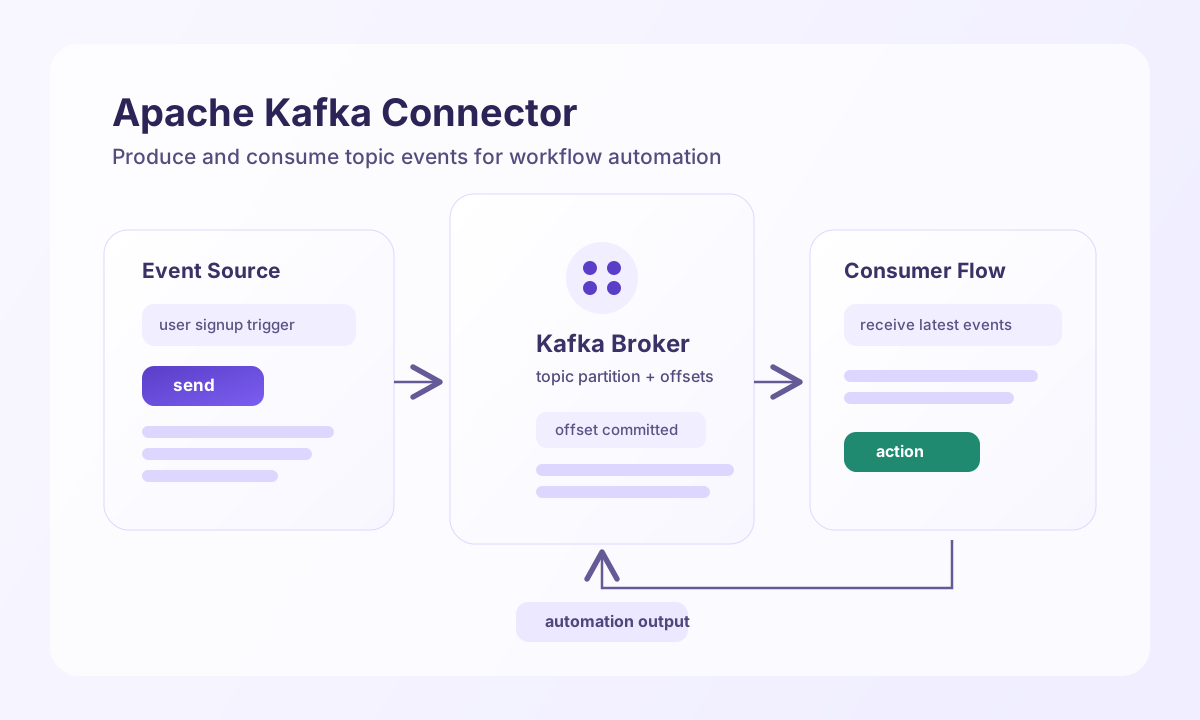
The Apache Kafka connector (apache-kafka-1.0.0) lets Tealfabric workflows produce and consume topic messages for event-driven automation. It uses the Kafka REST Proxy (Confluent REST API v2) when base_url is an http(s):// endpoint. Direct host:port broker lists are validated on test only; send, receive, and batch require a REST Proxy URL because the legacy connector also depends on HTTP-based produce/consume paths (native php-rdkafka is not available in the native runtime).
Document information
| Field | Value |
|---|---|
| Canonical URL | /docs/04_connecting-systems/connectors/a/apache-kafka |
| Version (published date) | 2026-05-08 |
| Tags | connectors, reference, apache-kafka |
| Connector ID | apache-kafka-1.0.0 |
Configuration and connectivity
Set integration configuration parameters before calling operations:
queue_name(required): default Kafka topic for produce/consume operations.base_url(required fortest): comma-separated broker list (broker1:9092,broker2:9092) or Kafka REST Proxy base URL (http://kafka-rest:8082). When unset at runtime, non-test operations fall back tolocalhost:9092(legacyloadConnectorConfigbehavior).timeout_seconds(optional): HTTP timeout in seconds; default30.exchange_name(optional): unused compatibility field (legacy parity).
Use test to validate queue_name and base_url before production rollout. Configuration validation failures on test return the generic Configuration validation failed message (legacy validateConfiguration() behavior). With a REST Proxy URL, test performs GET /topics on the proxy.
Produce topic messages with send
Use send to publish one record to the configured topic (queue_name). Provide message, body, or value in call data. Optional key and partition map to REST Proxy record fields.
const baseUrl = "https://api.example.com/api/v1";
const tenantId = "<TENANT_ID>";
const apiKey = "<API_KEY>";

async function publishUserSignupEvent(integrationId: string) {
  const response = await fetch(`${baseUrl}/integrations/${encodeURIComponent(integrationId)}/execute`, {
    method: "POST",
    headers: {
      "X-API-Key": apiKey,
      "X-Tenant-ID": tenantId,
      "Content-Type": "application/json",
    },
    body: JSON.stringify({
      operation: "send",
      key: "<ENTITY_ID>",
      message: {
        user_id: "<ENTITY_ID>",
        action: "signup",
        timestamp: "2026-05-08T20:02:00Z"
      }
    }),
  });
  if (!response.ok) throw new Error(`Request failed: ${response.status}`);
  return response.json();
}
curl -X POST "https://api.example.com/api/v1/integrations/<ENTITY_ID>/execute" \
-H "X-API-Key: <API_KEY>" \
-H "X-Tenant-ID: <TENANT_ID>" \
-H "Content-Type: application/json" \
-d '{
"operation": "send",
"key": "<ENTITY_ID>",
"message": {
"user_id": "<ENTITY_ID>",
"action": "signup",
"timestamp": "2026-05-08T20:02:00Z"
}
}'
{
  "success": true,
  "data": {
    "message_count": 1,
    "topic": "user-events",
    "details": {
      "offsets": [
        { "partition": 0, "offset": 1042, "error_code": null, "error": null }
      ]
    }
  }
}
Consume messages with receive
Use receive to read records from the configured topic via REST Proxy consumer APIs (create consumer, subscribe, GET /records). limit (alias max_messages) defaults to 1. consumer_group (alias group_id) defaults to tealfabric_io_consumer. When offset is omitted, the consumer uses auto.offset.reset: earliest; when offset is present (any value), the consumer uses auto.offset.reset: none (legacy parity).
const baseUrl = "https://api.example.com/api/v1";
const tenantId = "<TENANT_ID>";
const apiKey = "<API_KEY>";

async function consumeUserEvents(integrationId: string) {
  const response = await fetch(`${baseUrl}/integrations/${encodeURIComponent(integrationId)}/execute`, {
    method: "POST",
    headers: {
      "X-API-Key": apiKey,
      "X-Tenant-ID": tenantId,
      "Content-Type": "application/json",
    },
    body: JSON.stringify({
      operation: "receive",
      limit: 10,
      consumer_group: "tealfabric-workflows"
    }),
  });
  if (!response.ok) throw new Error(`Request failed: ${response.status}`);
  return response.json();
}
curl -X POST "https://api.example.com/api/v1/integrations/<ENTITY_ID>/execute" \
-H "X-API-Key: <API_KEY>" \
-H "X-Tenant-ID: <TENANT_ID>" \
-H "Content-Type: application/json" \
-d '{
"operation": "receive",
"limit": 10,
"consumer_group": "tealfabric-workflows"
}'
{
  "success": true,
  "data": {
    "message_count": 1,
    "messages": [
      {
        "topic": "user-events",
        "partition": 0,
        "offset": 1042,
        "key": "<ENTITY_ID>",
        "value": {
          "user_id": "<ENTITY_ID>",
          "action": "signup",
          "timestamp": "2026-05-08T20:02:00Z"
        }
      }
    ]
  }
}
Produce multiple records with batch
Use batch to publish multiple records sequentially. Each messages[] element uses the same call data shape as send. The operation succeeds when at least one record is produced (legacy continuation behavior).
{
  "operation": "batch",
  "messages": [
    { "message": { "event": "created", "id": "1" } },
    { "message": { "event": "created", "id": "2" }, "key": "partition-key" }
  ]
}
{
  "success": true,
  "data": {
    "message_count": 2,
    "total_messages": 2,
    "successful_messages": 2,
    "results": [
      { "index": 0, "success": true, "result": { "success": true, "data": { "message_count": 1, "topic": "user-events", "details": {} } } },
      { "index": 1, "success": true, "result": { "success": true, "data": { "message_count": 1, "topic": "user-events", "details": {} } } }
    ]
  }
}
Test connectivity with test
test validates required integration configuration and, for REST Proxy URLs, checks proxy reachability.
{
  "success": true,
  "data": {
    "message": "Apache Kafka connection test successful",
    "details": {
      "broker_list": "http://kafka-rest:8082",
      "topic": "user-events",
      "method": "REST Proxy"
    }
  }
}
Invalid configuration:
{
  "success": false,
  "error": {
    "code": "VALIDATION",
    "message": "Configuration validation failed",
    "retriable": false
  }
}
Production guidance
Kafka reliability depends on topic design, key strategy, and offset management, so define these choices before scaling throughput. Consistent keys improve ordering for related events while controlled batch sizes help maintain predictable processing times.
Most runtime issues come from unavailable brokers, missing topics, and consumer lag. Monitor broker health and lag metrics, apply retry/backoff for transient failures, and verify that topic permissions are in place before deployment.
Related resources
Use the Apache Kafka documentation for broker, producer, and consumer behavior details. For REST Proxy wire formats, see the Confluent Kafka REST API.