AWS SQS Connector Guide
The AWS SQS connector lets Tealfabric workflows publish, consume, and remove queue messages in Amazon Simple Queue Service. It is commonly used for asynchronous processing, event fan-out, and resilient workflow decoupling.
Document information
| Field | Value |
|---|---|
| Canonical URL | /docs/04_connecting-systems/connectors/a/aws-sqs |
| Version (published date) | 2026-05-08 |
| Tags | connectors, reference, aws-sqs |
| Connector ID | aws-sqs-1.0.0 |
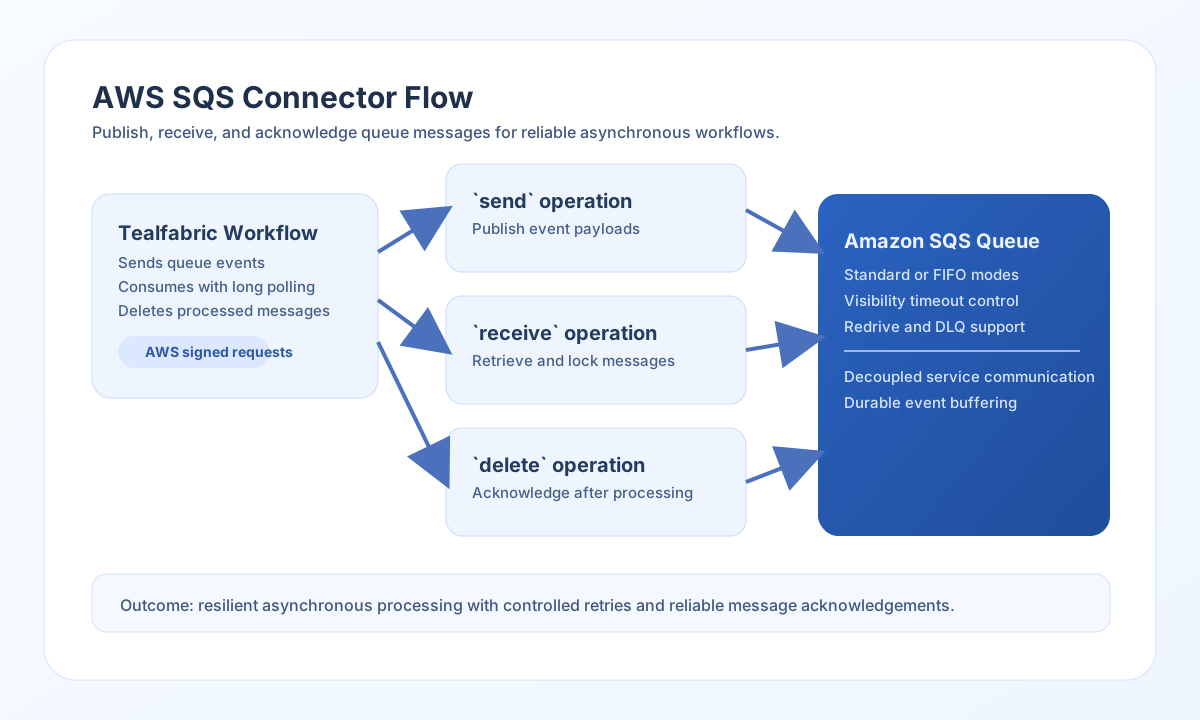
Configure AWS access and queue targeting
Set api_key and api_secret to IAM credentials that have permission to send, receive, and delete messages for the target queue. Use queue_name with a full queue URL whenever possible to avoid ambiguity across accounts and regions.
Set region to the queue region and only override base_url when your environment requires a custom endpoint. Run test before production rollout so permission and endpoint issues are caught early.
Publish queue messages with send
Use send to enqueue workflow events for downstream consumers. Include attributes when routing, priority, or tenant metadata must travel with the message.
const baseUrl = "https://api.example.com/api/v1";
const tenantId = "<TENANT_ID>";
const apiKey = "<API_KEY>";

async function sendQueueMessage(integrationId: string) {
  const response = await fetch(`${baseUrl}/integrations/${encodeURIComponent(integrationId)}/execute`, {
    method: "POST",
    headers: {
      "X-API-Key": apiKey,
      "X-Tenant-ID": tenantId,
      "Content-Type": "application/json",
    },
    body: JSON.stringify({
      operation: "send",
      message: JSON.stringify({
        event: "order.created",
        order_id: "<ENTITY_ID>",
        created_at: "2026-05-08T17:44:00Z"
      }),
      message_attributes: {
        priority: { StringValue: "high", DataType: "String" }
      },
      delay_seconds: 0
    }),
  });
  if (!response.ok) throw new Error(`Request failed: ${response.status}`);
  return response.json();
}
curl -X POST "https://api.example.com/api/v1/integrations/<ENTITY_ID>/execute" \
-H "X-API-Key: <API_KEY>" \
-H "X-Tenant-ID: <TENANT_ID>" \
-H "Content-Type: application/json" \
-d '{
"operation": "send",
"message": "{\"event\":\"order.created\",\"order_id\":\"<ENTITY_ID>\",\"created_at\":\"2026-05-08T17:44:00Z\"}",
"message_attributes": {
"priority": {"StringValue":"high","DataType":"String"}
},
"delay_seconds": 0
}'
{
  "success": true,
  "data": {
    "message_id": "<ENTITY_ID>",
    "md5_of_message_body": "9e107d9d372bb6826bd81d3542a419d6"
  }
}
Consume and acknowledge messages with receive and delete
Use receive with long polling to reduce empty reads and improve cost efficiency. After processing each message, call delete with the receipt_handle so the message does not reappear after visibility timeout.
const baseUrl = "https://api.example.com/api/v1";
const tenantId = "<TENANT_ID>";
const apiKey = "<API_KEY>";

async function receiveAndDelete(integrationId: string) {
  const received = await fetch(`${baseUrl}/integrations/${encodeURIComponent(integrationId)}/execute`, {
    method: "POST",
    headers: {
      "X-API-Key": apiKey,
      "X-Tenant-ID": tenantId,
      "Content-Type": "application/json",
    },
    body: JSON.stringify({
      operation: "receive",
      max_messages: 5,
      wait_time_seconds: 20
    }),
  });
  if (!received.ok) throw new Error(`Receive failed: ${received.status}`);
  const payload = await received.json();
  return payload;
}
curl -X POST "https://api.example.com/api/v1/integrations/<ENTITY_ID>/execute" \
-H "X-API-Key: <API_KEY>" \
-H "X-Tenant-ID: <TENANT_ID>" \
-H "Content-Type: application/json" \
-d '{
"operation": "receive",
"max_messages": 5,
"wait_time_seconds": 20
}'
{
  "success": true,
  "message_count": 1,
  "data": [
    {
      "message_id": "<ENTITY_ID>",
      "receipt_handle": "<ENTITY_ID>",
      "body": "{\"event\":\"order.created\",\"order_id\":\"<ENTITY_ID>\"}"
    }
  ]
}
Reliability guidance
Common failures include missing IAM permissions, wrong queue region, and unacknowledged messages reappearing after visibility timeout. Validate queue URLs and policies first when troubleshooting delivery behavior.
For resilient processing, use long polling, delete messages only after successful processing, and apply dead-letter queues for repeated failures. This prevents duplicate work and improves observability.