Azure Active Directory Connector Guide
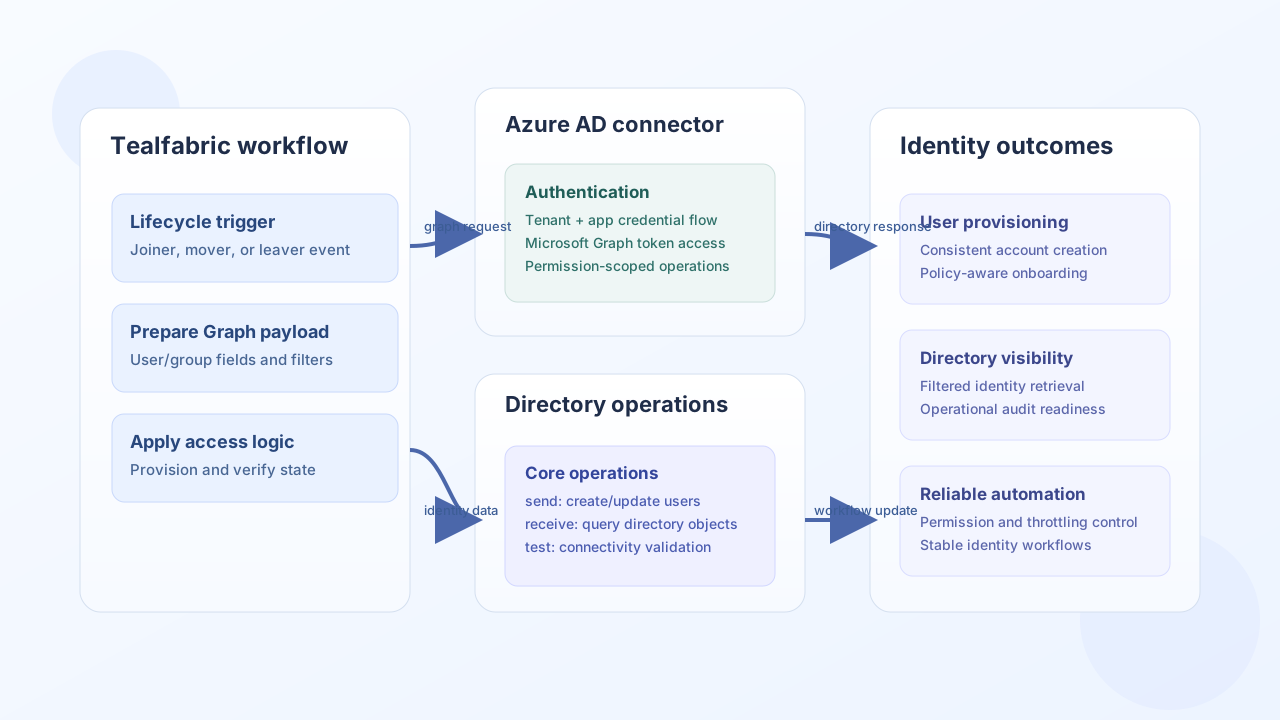
The Azure Active Directory connector (Microsoft Entra ID) helps Tealfabric workflows manage directory objects through Microsoft Graph. It is useful for identity lifecycle automation such as provisioning users, querying groups, and driving access operations from business events.
Document information
| Field | Value |
|---|---|
| Canonical URL | /docs/04_connecting-systems/connectors/a/azure-ad |
| Version (published date) | 2026-05-08 |
| Tags | connectors, reference, azure-ad |
| Connector ID | azure-ad-1.0.0 |
Configuration and authentication
Configure this connector with Azure AD app credentials and tenant context so it can request Microsoft Graph access tokens. Apply least-privilege Graph permissions and grant admin consent where required before production rollout.
tenant_id(required fortest): Entra tenant identifier.client_id(required fortest): Application (client) identifier.client_secret(required fortest): Application client secret.access_token(optional): Pre-provisioned OAuth2 bearer token; when set, runtime operations can proceed without full app registration fields.refresh_token(optional): Refresh token used before client-credentials fallback whenaccess_tokenis absent.timeout_seconds(optional): Request timeout in seconds (default30).
The connector uses OAuth2 client credentials flow and handles token acquisition automatically for service-to-service operations. Full credential validation runs only on the test operation; other operations use available tokens or acquire new ones when credentials are present.
Create directory objects with send
Use send for object creation and update patterns, such as onboarding users and creating security groups. Keep payloads explicit and validate required fields against Microsoft Graph schemas.
const baseUrl = "https://api.example.com/api/v1";
const tenantId = "<TENANT_ID>";
const apiKey = "<API_KEY>";

async function createDirectoryUser(integrationId: string) {
  const response = await fetch(`${baseUrl}/integrations/${encodeURIComponent(integrationId)}/execute`, {
    method: "POST",
    headers: {
      "X-API-Key": apiKey,
      "X-Tenant-ID": tenantId,
      "Content-Type": "application/json",
    },
    body: JSON.stringify({
      operation: "send",
      endpoint: "users",
      method: "POST",
      data: {
        accountEnabled: true,
        displayName: "Jordan Miles",
        mailNickname: "jordanmiles",
        userPrincipalName: "jordan.miles@contoso.example",
        passwordProfile: {
          password: "TemporaryPass#2026",
          forceChangePasswordNextSignIn: true,
        },
      },
    }),
  });
  if (!response.ok) throw new Error(`Request failed: ${response.status}`);
  const payload = await response.json();
  return payload.data?.result;
}
curl -X POST "https://api.example.com/api/v1/integrations/<ENTITY_ID>/execute" \
-H "X-API-Key: <API_KEY>" \
-H "X-Tenant-ID: <TENANT_ID>" \
-H "Content-Type: application/json" \
-d '{
"operation": "send",
"endpoint": "users",
"method": "POST",
"data": {
"accountEnabled": true,
"displayName": "Jordan Miles",
"mailNickname": "jordanmiles",
"userPrincipalName": "jordan.miles@contoso.example",
"passwordProfile": {
"password": "TemporaryPass#2026",
"forceChangePasswordNextSignIn": true
}
}
}'
{
  "success": true,
  "data": {
    "message": "Azure AD operation completed successfully",
    "result": {
      "id": "<ENTITY_ID>",
      "displayName": "Jordan Miles",
      "userPrincipalName": "jordan.miles@contoso.example"
    }
  }
}
Query directory data with receive
Use receive for directory lookups and list operations that drive approvals, access reviews, and downstream notifications. Apply selective query parameters to keep responses efficient. List responses expose data.items (from Graph value when present, otherwise a single wrapped object).
const baseUrl = "https://api.example.com/api/v1";
const tenantId = "<TENANT_ID>";
const apiKey = "<API_KEY>";

async function listEnabledUsers(integrationId: string) {
  const response = await fetch(`${baseUrl}/integrations/${encodeURIComponent(integrationId)}/execute`, {
    method: "POST",
    headers: {
      "X-API-Key": apiKey,
      "X-Tenant-ID": tenantId,
      "Content-Type": "application/json",
    },
    body: JSON.stringify({
      operation: "receive",
      endpoint: "users",
      query: {
        $filter: "accountEnabled eq true",
        $top: 20,
        $select: "id,displayName,userPrincipalName",
      },
    }),
  });
  if (!response.ok) throw new Error(`Request failed: ${response.status}`);
  const payload = await response.json();
  return payload.data?.items ?? [];
}
curl -X POST "https://api.example.com/api/v1/integrations/<ENTITY_ID>/execute" \
-H "X-API-Key: <API_KEY>" \
-H "X-Tenant-ID: <TENANT_ID>" \
-H "Content-Type: application/json" \
-d '{
"operation": "receive",
"endpoint": "users",
"query": {
"$filter": "accountEnabled eq true",
"$top": 20,
"$select": "id,displayName,userPrincipalName"
}
}'
{
  "success": true,
  "data": {
    "message": "Azure AD data retrieved successfully",
    "item_count": 2,
    "items": [
      {"id": "<ENTITY_ID>", "displayName": "Jordan Miles", "userPrincipalName": "jordan.miles@contoso.example"},
      {"id": "<ENTITY_ID>", "displayName": "Alex Rivera", "userPrincipalName": "alex.rivera@contoso.example"}
    ]
  }
}
Call Graph with execute
Use execute when you need an explicit HTTP method and optional JSON body against any Microsoft Graph v1.0 path. Prefer body (or data alias) for request payloads.
{
  "success": true,
  "data": {
    "message": "Azure AD method executed successfully",
    "result": {
      "id": "<ENTITY_ID>",
      "displayName": "Jordan Miles"
    }
  }
}
Validate connectivity with test
Use test to confirm OAuth2 credentials and Graph reachability before enabling scheduled automations. This operation validates tenant_id, client_id, and client_secret, then probes GET organization.
{
  "success": true,
  "data": {
    "message": "Azure AD connection test successful",
    "details": {
      "tenant_id": "<TENANT_ID>",
      "organizations_found": 1
    }
  }
}
Reliability guidance
Most production failures come from missing Graph permissions, tenant/app credential drift, and unbounded query patterns. Keep app permissions minimal but sufficient, monitor token acquisition errors, and use selective query filters to reduce throttling risk. These practices keep directory automation stable and auditable.