Azure Event Grid Connector Guide
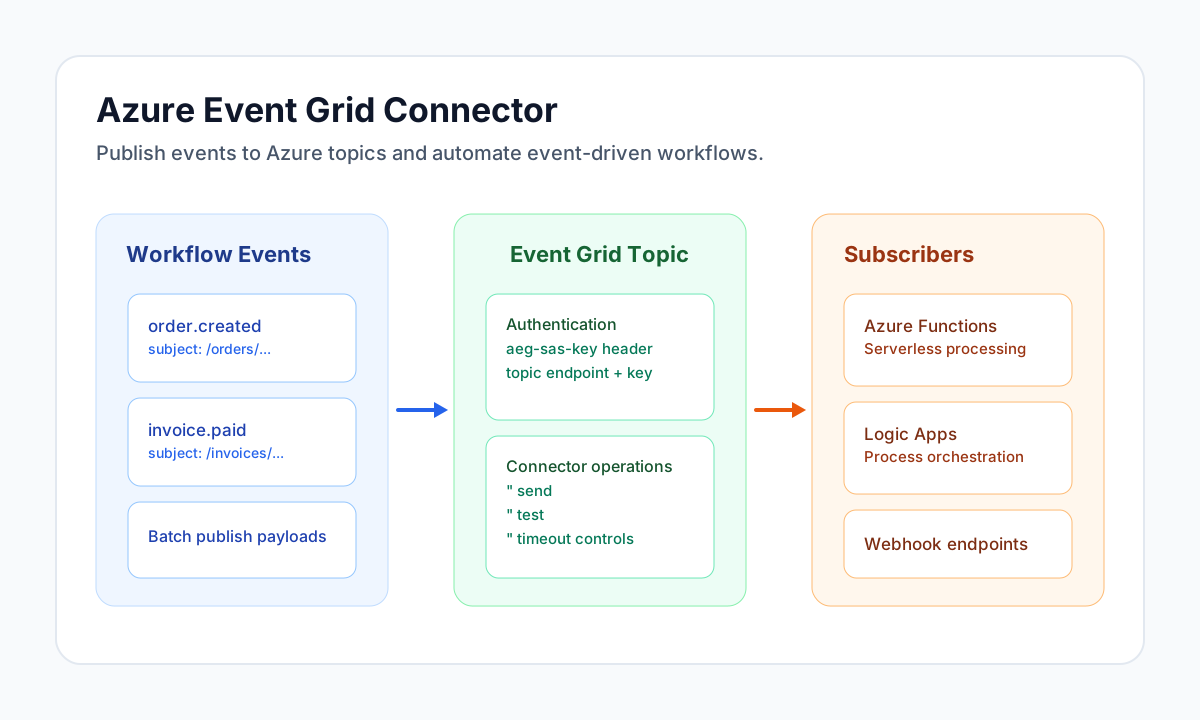
The Azure Event Grid connector lets Tealfabric workflows publish domain events to Azure topics for near real-time routing and downstream processing. It is useful when you need reliable event fan-out to Azure Functions, Logic Apps, webhooks, or service integrations.
Document information
| Field | Value |
|---|---|
| Canonical URL | /docs/04_connecting-systems/connectors/a/azure-event-grid |
| Version (published date) | 2026-05-08 |
| Tags | connectors, reference, azure-event-grid |
| Connector ID | azure-event-grid-1.0.0 |
Configure Event Grid access
Set topic_endpoint to your Event Grid topic publish endpoint and store the topic access_key in connector configuration. The connector uses the Event Grid shared key header (aeg-sas-key) for authentication, so key rotation should be part of your operational runbook.
Use timeout_seconds to match network latency and expected publish volume. Run test before production use so endpoint and credential issues are identified early.
Publish events with publish
Use publish to publish one or more events to an Event Grid topic. Each event should include an id, eventType, subject, eventTime, dataVersion, and a domain-specific data object.
const baseUrl = "https://api.example.com/api/v1";
const tenantId = "<TENANT_ID>";
const apiKey = "<API_KEY>";

async function publishOrderEvent(integrationId: string) {
  const response = await fetch(`${baseUrl}/integrations/${encodeURIComponent(integrationId)}/execute`, {
    method: "POST",
    headers: {
      "X-API-Key": apiKey,
      "X-Tenant-ID": tenantId,
      "Content-Type": "application/json",
    },
    body: JSON.stringify({
      operation: "publish",
      events: [
        {
          id: "<ENTITY_ID>",
          eventType: "order.created",
          subject: "/orders/<ENTITY_ID>",
          eventTime: "2026-05-08T20:23:00Z",
          dataVersion: "1.0",
          data: {
            order_id: "<ENTITY_ID>",
            customer_id: "<ENTITY_ID>",
            total_amount: 249.5
          }
        }
      }
    }),
  });
  if (!response.ok) throw new Error(`Request failed: ${response.status}`);
  return response.json();
}
curl -X POST "https://api.example.com/api/v1/integrations/<ENTITY_ID>/execute" \
-H "X-API-Key: <API_KEY>" \
-H "X-Tenant-ID: <TENANT_ID>" \
-H "Content-Type: application/json" \
-d '{
"operation": "publish",
"events": [
{
"id": "<ENTITY_ID>",
"eventType": "order.created",
"subject": "/orders/<ENTITY_ID>",
"eventTime": "2026-05-08T20:23:00Z",
"dataVersion": "1.0",
"data": {
"order_id": "<ENTITY_ID>",
"customer_id": "<ENTITY_ID>",
"total_amount": 249.5
}
}
]
}'
{
  "success": true,
  "data": {
    "event_count": 1,
    "data": {
      "status": "published"
    }
  }
}
Validate setup with test
Use test to confirm topic reachability and key validity before enabling scheduled or high-volume event workflows. A successful test indicates the connector can authenticate and publish to the configured topic endpoint.
const baseUrl = "https://api.example.com/api/v1";
const tenantId = "<TENANT_ID>";
const apiKey = "<API_KEY>";

async function testEventGrid(integrationId: string) {
  const response = await fetch(`${baseUrl}/integrations/${encodeURIComponent(integrationId)}/execute`, {
    method: "POST",
    headers: {
      "X-API-Key": apiKey,
      "X-Tenant-ID": tenantId,
      "Content-Type": "application/json",
    },
    body: JSON.stringify({ operation: "test" }),
  });
  if (!response.ok) throw new Error(`Request failed: ${response.status}`);
  return response.json();
}
curl -X POST "https://api.example.com/api/v1/integrations/<ENTITY_ID>/execute" \
-H "X-API-Key: <API_KEY>" \
-H "X-Tenant-ID: <TENANT_ID>" \
-H "Content-Type: application/json" \
-d '{"operation":"test"}'
{
  "success": true,
  "message": "Azure Event Grid connection test successful"
}
Production guidance
Event delivery pipelines are most reliable when you use idempotent event handlers and globally unique event IDs. This reduces duplicate side effects when retries occur.
Monitor publish failures, rotate topic keys regularly, and separate high-priority event types into dedicated topics or subjects when downstream SLAs differ. These practices improve observability and operational control.
Related resources
Use the Azure Event Grid overview, Event schema reference, and security and authentication guidance for deeper platform configuration details.