Amazon DynamoDB Connector Guide
The Amazon DynamoDB connector lets Tealfabric workflows write and read document-style records in DynamoDB tables for operational automation. It is useful when you need low-latency key-value access for state tracking, event snapshots, or workflow checkpoints.
Document information
| Field | Value |
|---|---|
| Canonical URL | /docs/04_connecting-systems/connectors/a/amazon-dynamodb |
| Version (published date) | 2026-05-08 |
| Tags | connectors, reference, amazon-dynamodb |
| Connector ID | amazon-dynamodb-1.0.0 |
When to use this connector
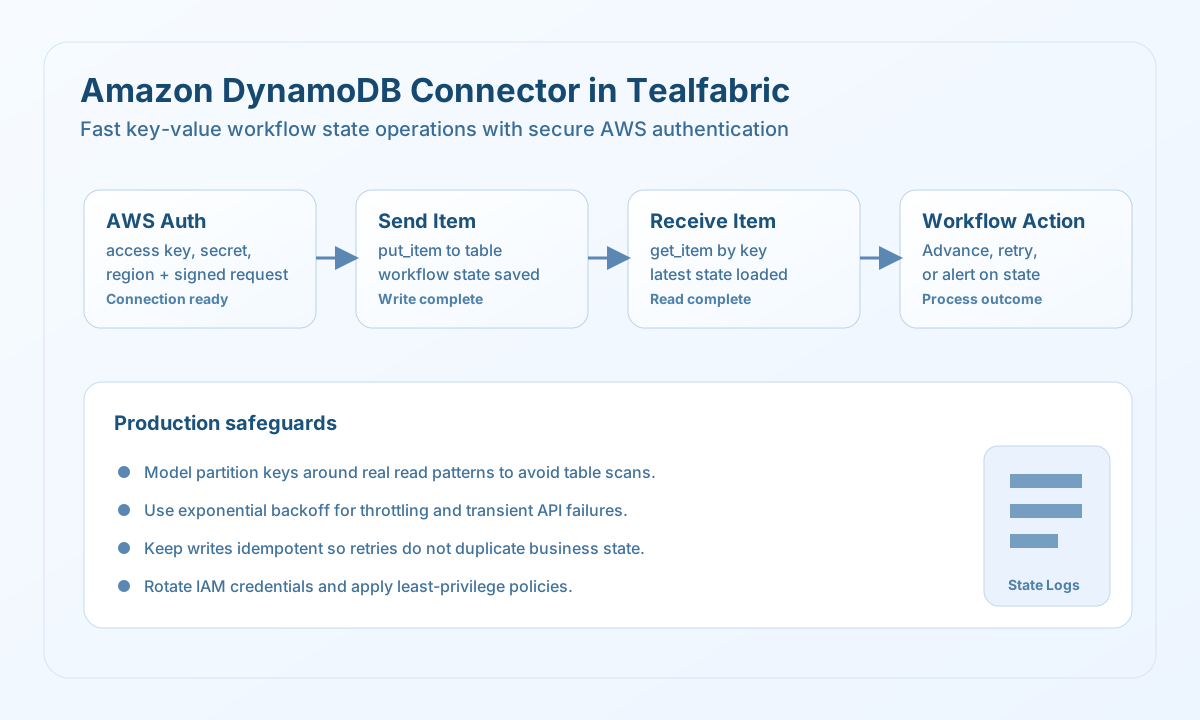
Use this connector when a workflow needs fast reads and writes keyed by a stable identifier, such as order IDs, session IDs, or job execution references. DynamoDB works well for operational data that changes frequently and must be available with predictable latency. This integration is most reliable when partition key design and retry behavior are planned before production use.
Prerequisites
Before configuring the connector, create or select a DynamoDB table with the correct partition key and optional sort key for your access pattern. Ensure IAM credentials grant only the required actions, such as PutItem, GetItem, or Query. If you use a custom endpoint for testing, validate connectivity and signing behavior in that environment first.
Configuration
Set these values in the integration profile:
access_key_id(required): AWS access key ID.secret_access_key(required): AWS secret access key.region(required): AWS region, for exampleus-east-1.endpoint_url(optional): Custom endpoint for local or test environments.timeout_seconds(optional): Request timeout in seconds (default30).
Run test during setup to confirm credentials and list access via ListTables. The test operation validates required configuration and returns Configuration validation failed when access_key_id, secret_access_key, or region is missing. Non-test operations do not pre-validate configuration; they attempt the DynamoDB API call and surface API or network errors.
Write records with put
Use put to persist workflow state or transactional metadata in a DynamoDB table. Pass plain JSON attribute values in item; the connector marshals them to DynamoDB AttributeValue format.
const baseUrl = "https://api.example.com/api/v1";
const tenantId = "<TENANT_ID>";
const apiKey = "<API_KEY>";

async function putOrderState(integrationId: string) {
  const response = await fetch(
    `${baseUrl}/integrations/${encodeURIComponent(integrationId)}/execute`,
    {
      method: "POST",
      headers: {
        "X-API-Key": apiKey,
        "X-Tenant-ID": tenantId,
        "Content-Type": "application/json",
      },
      body: JSON.stringify({
        operation: "put",
        table: "workflow_order_state",
        item: {
          order_id: "A-100",
          workflow_status: "validated",
          updated_at: "2026-05-08T13:02:00Z",
          source: "processflow",
        },
      }),
    }
  );
  if (!response.ok) throw new Error(`Request failed: ${response.status}`);
  return response.json();
}
curl -X POST "https://api.example.com/api/v1/integrations/<ENTITY_ID>/execute" \
-H "X-API-Key: <API_KEY>" \
-H "X-Tenant-ID: <TENANT_ID>" \
-H "Content-Type: application/json" \
-d '{
"operation": "put",
"table": "workflow_order_state",
"item": {
"order_id": "A-100",
"workflow_status": "validated",
"updated_at": "2026-05-08T13:02:00Z",
"source": "processflow"
}
}'
{
  "success": true,
  "item_count": 1,
  "data": {}
}
Read records with get
Use get to fetch one item by primary key. The unmarshaled attributes are returned in item (or null when not found).
const baseUrl = "https://api.example.com/api/v1";
const tenantId = "<TENANT_ID>";
const apiKey = "<API_KEY>";

async function getOrderState(integrationId: string) {
  const response = await fetch(
    `${baseUrl}/integrations/${encodeURIComponent(integrationId)}/execute`,
    {
      method: "POST",
      headers: {
        "X-API-Key": apiKey,
        "X-Tenant-ID": tenantId,
        "Content-Type": "application/json",
      },
      body: JSON.stringify({
        operation: "get",
        table: "workflow_order_state",
        key: { order_id: "A-100" },
      }),
    }
  );
  if (!response.ok) throw new Error(`Request failed: ${response.status}`);
  return response.json();
}
curl -X POST "https://api.example.com/api/v1/integrations/<ENTITY_ID>/execute" \
-H "X-API-Key: <API_KEY>" \
-H "X-Tenant-ID: <TENANT_ID>" \
-H "Content-Type: application/json" \
-d '{
"operation": "get",
"table": "workflow_order_state",
"key": { "order_id": "A-100" }
}'
{
  "success": true,
  "item_count": 1,
  "item": {
    "order_id": "A-100",
    "workflow_status": "validated",
    "updated_at": "2026-05-08T13:02:00Z"
  },
  "data": {}
}
Query and scan
Use query with key_condition_expression for partition-key access patterns. Use scan with optional filter_expression when you must read across partitions (prefer query in production when possible).
{
  "operation": "query",
  "table": "workflow_order_state",
  "key_condition_expression": "order_id = :id",
  "expression_attribute_values": { ":id": "A-100" }
}
Reliability guidance
Design table keys around your real query patterns so reads do not require expensive scans in production workloads. Handle throttling and transient failures with exponential backoff and idempotent workflow behavior for safe retries. Rotate IAM credentials regularly and use least-privilege permissions to reduce operational and security risk.