Amazon Redshift Connector Guide
The Amazon Redshift connector lets Tealfabric workflows execute SQL queries and retrieve warehouse data for analytics, reporting, and operational decisioning. It is designed for teams that need reliable access to Redshift tables from scheduled or event-driven workflows.
Document information
| Field | Value |
|---|---|
| Canonical URL | /docs/04_connecting-systems/connectors/a/amazon-redshift |
| Version (published date) | 2026-05-08 |
| Tags | connectors, reference, amazon-redshift |
| Connector ID | amazon-redshift-1.0.0 |
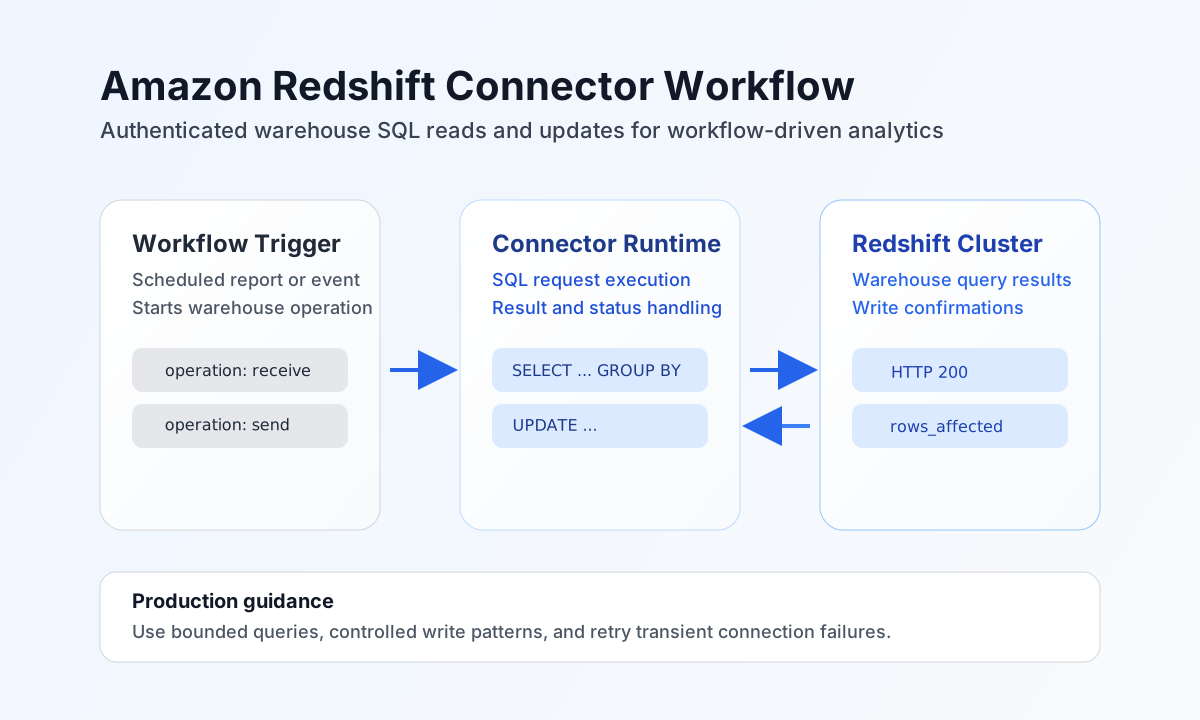
Configure Redshift connection settings
Set host to your Redshift cluster endpoint, then provide database, username, and password for the target schema context. Use a dedicated integration user with scoped read or write permissions to keep access auditable and controlled.
Set port to your cluster port if it differs from the default, and tune timeout_seconds based on expected query duration. Optional TLS settings include ssl_mode (disable, require, verify-ca, verify-full) and ssl_ca_pem. Run test after setup to verify network reachability and credentials before enabling production workflows.
Use ssl_mode: disable when a tenant explicitly allows non-encrypted transport.
Use ssl_mode: require for encrypted transport without certificate verification.
Use ssl_mode: verify-ca or ssl_mode: verify-full for strict certificate validation; set ssl_ca_pem when a custom trust anchor is needed.
Execute SQL with receive
Use receive for SQL read operations such as dashboard data extraction, metric checks, or incremental pipeline inputs. Keep queries explicit and limit selected columns to improve performance and reduce transfer size.
const baseUrl = "https://api.example.com/api/v1";
const tenantId = "<TENANT_ID>";
const apiKey = "<API_KEY>";

async function fetchDailyRevenue(integrationId: string) {
  const response = await fetch(`${baseUrl}/integrations/${encodeURIComponent(integrationId)}/execute`, {
    method: "POST",
    headers: {
      "X-API-Key": apiKey,
      "X-Tenant-ID": tenantId,
      "Content-Type": "application/json",
    },
    body: JSON.stringify({
      operation: "receive",
      query: "SELECT order_date, SUM(total_amount) AS revenue FROM analytics.orders WHERE order_date >= CURRENT_DATE - INTERVAL '7 days' GROUP BY order_date ORDER BY order_date DESC"
    }),
  });
  if (!response.ok) throw new Error(`Request failed: ${response.status}`);
  return response.json();
}
curl -X POST "https://api.example.com/api/v1/integrations/<ENTITY_ID>/execute" \
-H "X-API-Key: <API_KEY>" \
-H "X-Tenant-ID: <TENANT_ID>" \
-H "Content-Type: application/json" \
-d '{
"operation": "receive",
"query": "SELECT order_date, SUM(total_amount) AS revenue FROM analytics.orders WHERE order_date >= CURRENT_DATE - INTERVAL '\''7 days'\'' GROUP BY order_date ORDER BY order_date DESC"
}'
{
  "success": true,
  "data": [
    {
      "order_date": "2026-05-08",
      "revenue": 182450.32
    },
    {
      "order_date": "2026-05-07",
      "revenue": 171209.14
    }
  ]
}
Run data updates with send
Use send for write operations such as loading staging data, marking processing checkpoints, or updating status tables. Keep write statements idempotent where possible so retries do not create duplicate effects.
const baseUrl = "https://api.example.com/api/v1";
const tenantId = "<TENANT_ID>";
const apiKey = "<API_KEY>";

async function markSyncCheckpoint(integrationId: string) {
  const response = await fetch(`${baseUrl}/integrations/${encodeURIComponent(integrationId)}/execute`, {
    method: "POST",
    headers: {
      "X-API-Key": apiKey,
      "X-Tenant-ID": tenantId,
      "Content-Type": "application/json",
    },
    body: JSON.stringify({
      operation: "send",
      query: "UPDATE analytics.sync_control SET last_run_at = GETDATE(), status = 'completed' WHERE pipeline_name = 'orders_etl'"
    }),
  });
  if (!response.ok) throw new Error(`Request failed: ${response.status}`);
  return response.json();
}
curl -X POST "https://api.example.com/api/v1/integrations/<ENTITY_ID>/execute" \
-H "X-API-Key: <API_KEY>" \
-H "X-Tenant-ID: <TENANT_ID>" \
-H "Content-Type: application/json" \
-d '{
"operation": "send",
"query": "UPDATE analytics.sync_control SET last_run_at = GETDATE(), status = '\''completed'\'' WHERE pipeline_name = '\''orders_etl'\''"
}'
{
  "success": true,
  "data": {
    "rows_affected": 1
  }
}
Operate reliably in production
Large Redshift scans and unbounded joins can increase latency and cluster load. Prefer filtered queries, explicit projection lists, and scheduled workload windows for long-running operations.
Connection or authentication failures typically indicate network ACL issues, invalid credentials, or incorrect endpoint and port settings. Keep credentials secure, validate connectivity regularly, and use retry with backoff for transient network failures.
Related resources
For SQL and operational guidance, see the Amazon Redshift documentation and Amazon Redshift SQL reference.