Stripe API Connector Guide
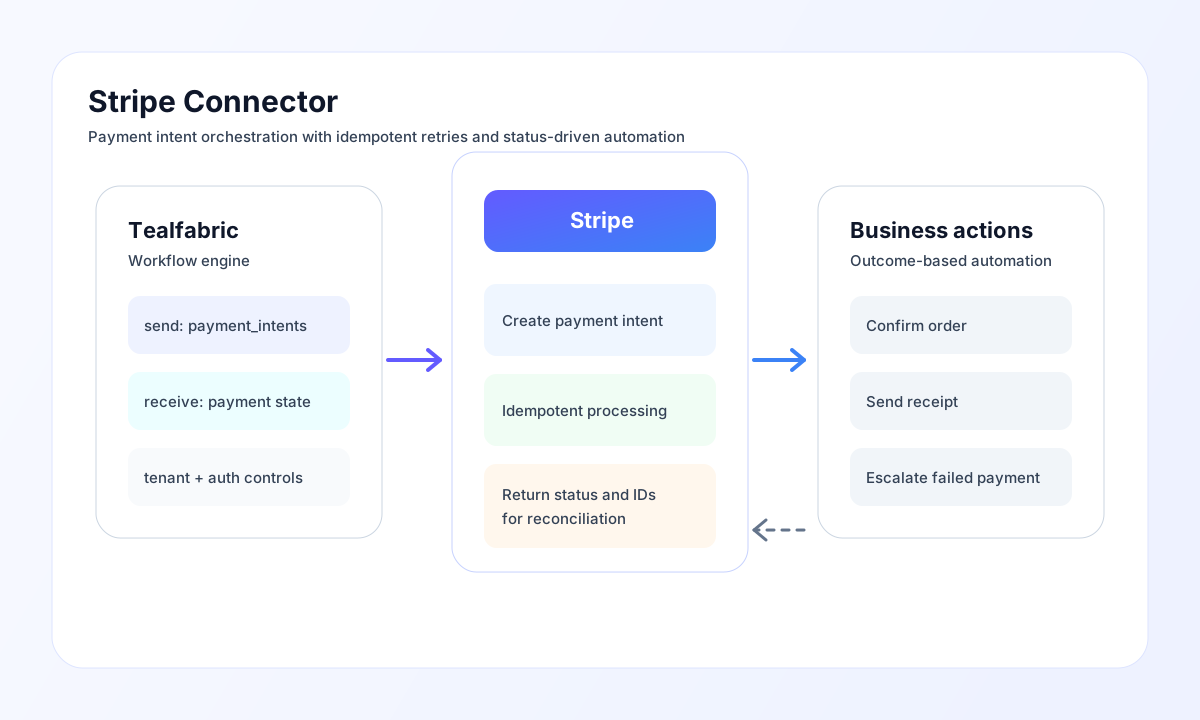
The Stripe connector lets Tealfabric workflows create and manage payment operations with Stripe. It is well suited for checkout flows, subscription billing triggers, payment status checks, and automated post-payment actions.
Document information
| Field | Value |
|---|---|
| Canonical URL | /docs/04_connecting-systems/connectors/s/stripe |
| Version (published date) | 2026-05-08 |
| Tags | connectors, reference, stripe |
| Connector ID | stripe-1.0.0 |
Configure Stripe credentials
Set api_key with your Stripe secret key and keep test and live keys separated by environment. Use test keys while building and validating workflows, then move to live keys only when the full payment path is verified.
Optionally set publishable_key for workflows that coordinate with front-end payment collection, and adjust timeout_seconds based on network and API behavior. Run test after configuration to confirm authentication before enabling production traffic.
Create a Payment Intent with send
Use send for create and update operations, including Payment Intent creation. Always include a unique idempotency key per payment attempt to prevent duplicate charges when retries occur.
const baseUrl = "https://api.example.com/api/v1";
const tenantId = "<TENANT_ID>";
const apiKey = "<API_KEY>";

async function createPaymentIntent(integrationId: string) {
  const response = await fetch(`${baseUrl}/integrations/${encodeURIComponent(integrationId)}/execute`, {
    method: "POST",
    headers: {
      "X-API-Key": apiKey,
      "X-Tenant-ID": tenantId,
      "Content-Type": "application/json",
    },
    body: JSON.stringify({
      operation: "send",
      endpoint: "payment_intents",
      method: "POST",
      data: {
        amount: 2599,
        currency: "usd",
        payment_method_types: ["card"],
        metadata: {
          order_id: "ORD-100045"
        },
        idempotency_key: "pi-ord-100045-01"
      }
    }),
  });
  if (!response.ok) throw new Error(`Request failed: ${response.status}`);
  return response.json();
}
curl -X POST "https://api.example.com/api/v1/integrations/<ENTITY_ID>/execute" \
-H "X-API-Key: <API_KEY>" \
-H "X-Tenant-ID: <TENANT_ID>" \
-H "Content-Type: application/json" \
-d '{
"operation": "send",
"endpoint": "payment_intents",
"method": "POST",
"data": {
"amount": 2599,
"currency": "usd",
"payment_method_types": ["card"],
"metadata": {
"order_id": "ORD-100045"
},
"idempotency_key": "pi-ord-100045-01"
}
}'
{
  "success": true,
  "data": {
    "message_count": 1,
    "data": {
      "id": "pi_3NxExample",
      "object": "payment_intent",
      "status": "requires_payment_method",
      "amount": 2599,
      "currency": "usd"
    },
    "response": {
      "id": "pi_3NxExample",
      "object": "payment_intent",
      "status": "requires_payment_method",
      "amount": 2599,
      "currency": "usd"
    }
  }
}
Retrieve payment data with receive
Use receive to list or fetch payment objects such as Payment Intents, Charges, Customers, and Invoices. Apply pagination parameters for larger datasets so workflow runtime and payload size remain predictable.
{
  "operation": "receive",
  "endpoint": "payment_intents",
  "query": {
    "limit": 10
  }
}
{
  "success": true,
  "data": {
    "message_count": 1,
    "data": [
      {
        "id": "pi_3NxExample",
        "object": "payment_intent",
        "status": "succeeded",
        "amount": 2599,
        "currency": "usd"
      }
    ],
    "total_size": 1,
    "has_more": false
  }
}
Test connectivity with test
test validates the secret key by calling GET charges?limit=1 and returns the resolved API base URL.
{
  "success": true,
  "data": {
    "message": "Stripe connection test successful",
    "details": {
      "api_base_url": "https://api.stripe.com/v1",
      "has_charges": true
    }
  }
}
Reliability and payment safety guidance
Most production issues come from incorrect key environment pairing, malformed request fields, and retries without idempotency protection. Validate credentials and payload shape first, then confirm idempotency behavior in test mode.
For stable operations, keep amounts in the smallest currency unit, log Stripe object IDs for reconciliation, and use backoff for transient API failures. This keeps payment workflows resilient and auditable.