SAP SuccessFactors Connector Guide
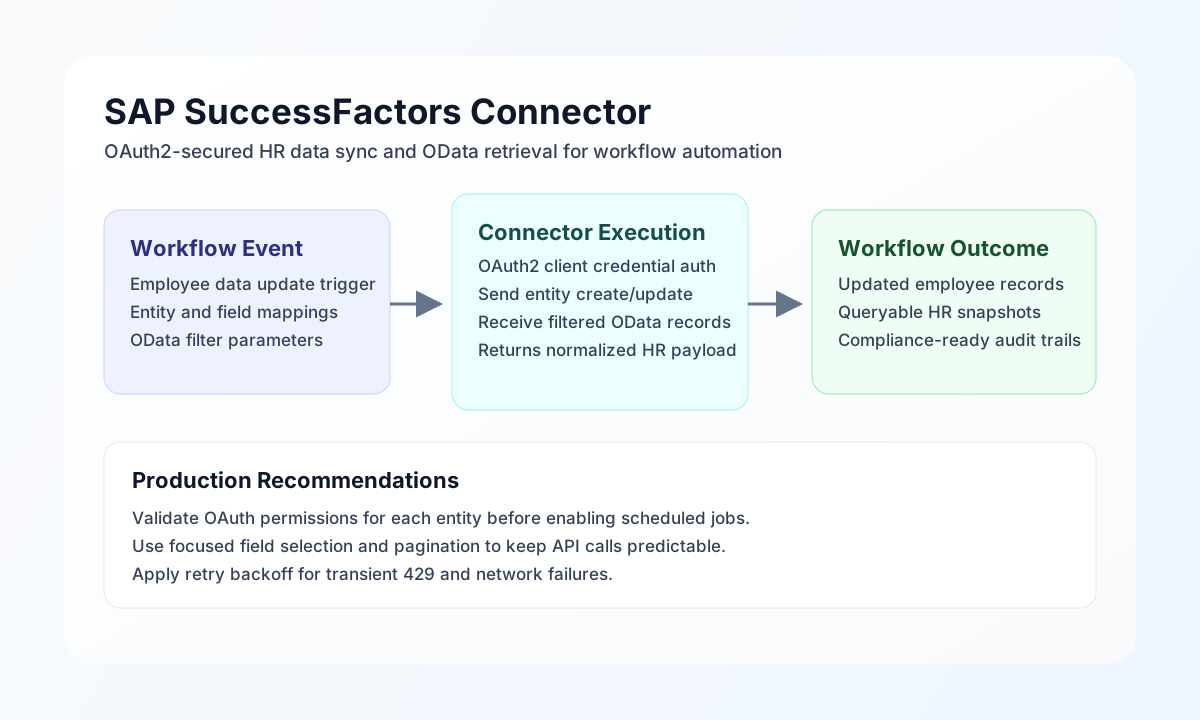
The SAP SuccessFactors connector lets Tealfabric workflows read and update HR data through the SuccessFactors OData API. It is commonly used for employee profile synchronization, organizational updates, and downstream process automation based on workforce events.
Document information
| Field | Value |
|---|---|
| Canonical URL | /docs/04_connecting-systems/connectors/s/sap-successfactors |
| Version (published date) | 2026-05-08 |
| Tags | connectors, reference, sap-successfactors |
| Connector ID | sap-successfactors-1.0.0 |
Configuration and OAuth setup
Configure the connector with your SuccessFactors API URL, company identifier, and OAuth client credentials so workflow requests can authenticate securely. This setup allows integrations to run without embedding secrets in process payloads.
Required values are base_url, client_id, client_secret, and company_id. You can optionally tune timeout_seconds for larger query windows or batch updates. After setup, run test to validate token issuance and API connectivity before production jobs. The connector obtains OAuth2 access tokens from {base_url}/oauth/token using the client-credentials grant.
Create or update HR entities with send
Use send to create or update OData entities such as PerPersonal and Position. send requires endpoint (path relative to base_url, without a leading slash) and defaults to HTTP POST when method is omitted. Provide the JSON body in data when possible; when data is omitted, the full call object may be forwarded as the request body (legacy parity).
const baseUrl = "https://api.example.com/api/v1";
const tenantId = "<TENANT_ID>";
const apiKey = "<API_KEY>";

async function createEmployeeProfile(integrationId: string) {
  const response = await fetch(`${baseUrl}/integrations/${encodeURIComponent(integrationId)}/execute`, {
    method: "POST",
    headers: {
      "X-API-Key": apiKey,
      "X-Tenant-ID": tenantId,
      "Content-Type": "application/json",
    },
    body: JSON.stringify({
      operation: "send",
      endpoint: "odata/v2/PerPersonal",
      method: "POST",
      data: {
        personIdExternal: "EMP-12045",
        firstName: "Avery",
        lastName: "Miller",
        gender: "F",
        dateOfBirth: "1994-11-20",
        countryOfBirth: "US"
      }
    }),
  });
  if (!response.ok) throw new Error(`Request failed: ${response.status}`);
  return response.json();
}
curl -X POST "https://api.example.com/api/v1/integrations/<ENTITY_ID>/execute" \
-H "X-API-Key: <API_KEY>" \
-H "X-Tenant-ID: <TENANT_ID>" \
-H "Content-Type: application/json" \
-d '{
"operation": "send",
"endpoint": "odata/v2/PerPersonal",
"method": "POST",
"data": {
"personIdExternal": "EMP-12045",
"firstName": "Avery",
"lastName": "Miller",
"gender": "F",
"dateOfBirth": "1994-11-20",
"countryOfBirth": "US"
}
}'
{
  "success": true,
  "data": {
    "message": "SuccessFactors operation completed successfully",
    "result": {
      "d": {
        "personIdExternal": "EMP-12045"
      }
    }
  }
}
Retrieve HR records with receive
Use receive to query records with OData filters, selected fields, and pagination options. Pass OData query options in the query object (for example $filter, $select, $top, $skip). When the API returns d.results, the connector normalizes items into data.items and sets data.employee_count.
const baseUrl = "https://api.example.com/api/v1";
const tenantId = "<TENANT_ID>";
const apiKey = "<API_KEY>";

async function listRecentHires(integrationId: string) {
  const response = await fetch(`${baseUrl}/integrations/${encodeURIComponent(integrationId)}/execute`, {
    method: "POST",
    headers: {
      "X-API-Key": apiKey,
      "X-Tenant-ID": tenantId,
      "Content-Type": "application/json",
    },
    body: JSON.stringify({
      operation: "receive",
      endpoint: "odata/v2/PerPersonal",
      query: {
        "$filter": "lastModifiedDateTime ge datetime'2026-05-01T00:00:00'",
        "$select": "personIdExternal,firstName,lastName,lastModifiedDateTime",
        "$orderby": "lastModifiedDateTime desc",
        "$top": "25",
        "$skip": "0"
      }
    }),
  });
  if (!response.ok) throw new Error(`Request failed: ${response.status}`);
  return response.json();
}
curl -X POST "https://api.example.com/api/v1/integrations/<ENTITY_ID>/execute" \
-H "X-API-Key: <API_KEY>" \
-H "X-Tenant-ID: <TENANT_ID>" \
-H "Content-Type: application/json" \
-d '{
"operation": "receive",
"endpoint": "odata/v2/PerPersonal",
"query": {
"$filter": "lastModifiedDateTime ge datetime'\''2026-05-01T00:00:00'\''",
"$select": "personIdExternal,firstName,lastName,lastModifiedDateTime",
"$orderby": "lastModifiedDateTime desc",
"$top": "25",
"$skip": "0"
}
}'
{
  "success": true,
  "data": {
    "message": "SuccessFactors data retrieved successfully",
    "employee_count": 2,
    "items": [
      {
        "personIdExternal": "EMP-12045",
        "firstName": "Avery",
        "lastName": "Miller",
        "lastModifiedDateTime": "2026-05-08T15:21:10"
      }
    ]
  }
}
Execute arbitrary API methods with execute
Use execute when you need a specific HTTP method and endpoint combination. The request body is taken from body when set, otherwise from data, matching legacy body ?? data ?? [] semantics. JSON bodies are sent only for POST/PUT/PATCH when non-empty.
{
  "operation": "execute",
  "endpoint": "odata/v2/User('jsmith')",
  "method": "GET"
}
Test connection with test
test validates configuration, obtains an OAuth token, and probes GET odata/v2/EmpJob. It returns data.details.records_found from d.results when present.
{
  "success": true,
  "data": {
    "message": "SuccessFactors connection test successful",
    "details": {
      "base_url": "https://api.successfactors.com",
      "company_id": "ACME",
      "records_found": 12
    }
  }
}
Reliability guidance
Most production failures are caused by permission gaps, invalid entity or field names, and malformed OData filters. Validate with test, verify entity availability in your tenant, and log query payloads for faster diagnosis.
For resilient HR automation, page through large result sets, apply exponential backoff for 429 responses, and align data handling with privacy requirements. These practices keep SuccessFactors workflows stable and compliant.