Siemens MindSphere Connector Guide
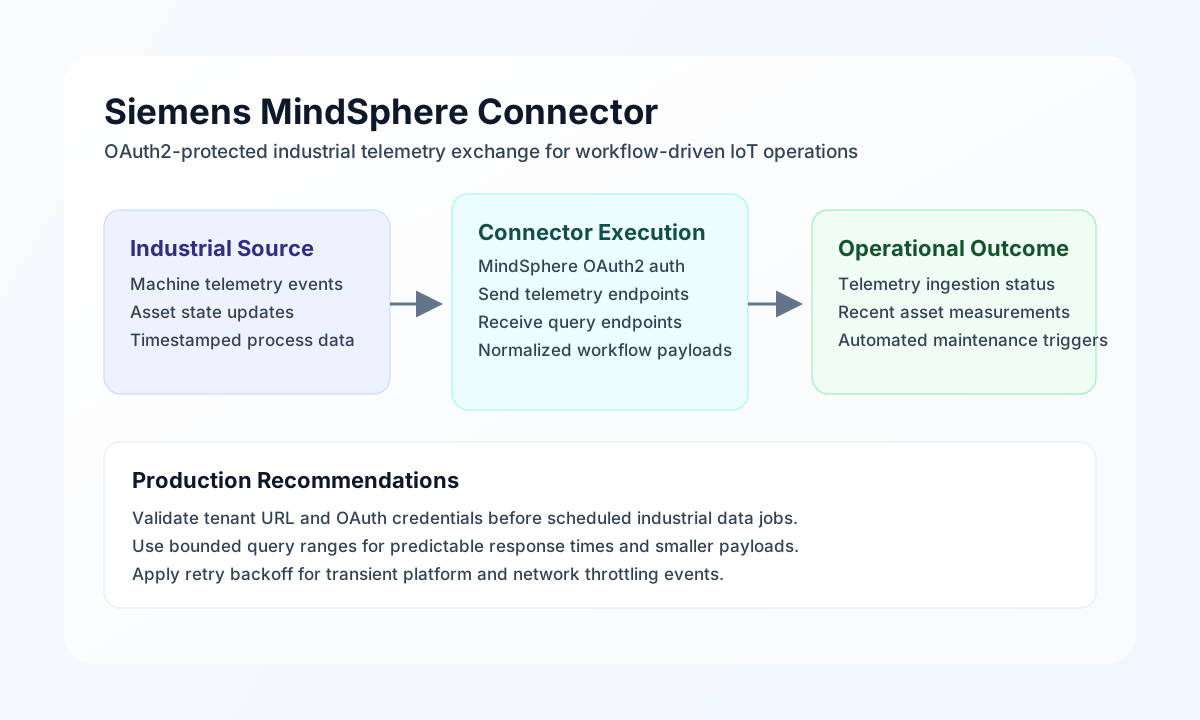
The Siemens MindSphere connector lets Tealfabric workflows exchange industrial asset and telemetry data with MindSphere APIs. It is useful for automations that push machine events into cloud analytics pipelines and retrieve recent operational values to drive alerts, work orders, or exception handling.
Document information
| Field | Value |
|---|---|
| Canonical URL | /docs/04_connecting-systems/connectors/s/siemens-mindsphere |
| Version (published date) | 2026-05-08 |
| Tags | connectors, reference, siemens-mindsphere |
| Connector ID | siemens-mindsphere-1.0.0 |
Configuration and authentication
Configure the connector with your MindSphere tenant URL and OAuth credentials so workflow requests can authenticate securely. This keeps sensitive credentials centralized in integration settings rather than execution payloads.
Required values are base_url, client_id, client_secret, and tenant. You can optionally tune timeout_seconds for slower industrial networks or larger payload operations. After setup, run test to confirm connectivity and token issuance before enabling production schedules.
Send telemetry with send
Use send to post industrial metrics or event data to MindSphere endpoints. Keep payload structure consistent across assets and plants so downstream analytics and alert logic remain reliable.
const baseUrl = "https://api.example.com/api/v1";
const tenantId = "<TENANT_ID>";
const apiKey = "<API_KEY>";

async function sendTelemetry(integrationId: string) {
  const response = await fetch(`${baseUrl}/integrations/${encodeURIComponent(integrationId)}/execute`, {
    method: "POST",
    headers: {
      "X-API-Key": apiKey,
      "X-Tenant-ID": tenantId,
      "Content-Type": "application/json",
    },
    body: JSON.stringify({
      operation: "send",
      endpoint: "api/iottimeseries/v3/timeseries/<ENTITY_ID>",
      method: "POST",
      data: {
        temperature_c: 73.8,
        vibration_mm_s: 2.1,
        status: "running",
        timestamp: "2026-05-08T15:24:00Z"
      }
    }),
  });
  if (!response.ok) throw new Error(`Request failed: ${response.status}`);
  return response.json();
}
curl -X POST "https://api.example.com/api/v1/integrations/<ENTITY_ID>/execute" \
-H "X-API-Key: <API_KEY>" \
-H "X-Tenant-ID: <TENANT_ID>" \
-H "Content-Type: application/json" \
-d '{
"operation": "send",
"endpoint": "api/iottimeseries/v3/timeseries/<ENTITY_ID>",
"method": "POST",
"data": {
"temperature_c": 73.8,
"vibration_mm_s": 2.1,
"status": "running",
"timestamp": "2026-05-08T15:24:00Z"
}
}'
{
  "success": true,
  "data": {
    "accepted": true,
    "ingested_points": 1
  }
}
Retrieve asset data with receive
Use receive to fetch recent asset or telemetry values for workflow decisions. Narrow each query by endpoint, filter, or limit to keep response times low and avoid unnecessary processing.
const baseUrl = "https://api.example.com/api/v1";
const tenantId = "<TENANT_ID>";
const apiKey = "<API_KEY>";

async function getRecentTelemetry(integrationId: string) {
  const response = await fetch(`${baseUrl}/integrations/${encodeURIComponent(integrationId)}/execute`, {
    method: "POST",
    headers: {
      "X-API-Key": apiKey,
      "X-Tenant-ID": tenantId,
      "Content-Type": "application/json",
    },
    body: JSON.stringify({
      operation: "receive",
      endpoint: "api/iottimeseries/v3/timeseries/<ENTITY_ID>",
      query: {
        from: "2026-05-08T14:54:00Z",
        to: "2026-05-08T15:24:00Z",
        limit: 20
      }
    }),
  });
  if (!response.ok) throw new Error(`Request failed: ${response.status}`);
  return response.json();
}
curl -X POST "https://api.example.com/api/v1/integrations/<ENTITY_ID>/execute" \
-H "X-API-Key: <API_KEY>" \
-H "X-Tenant-ID: <TENANT_ID>" \
-H "Content-Type: application/json" \
-d '{
"operation": "receive",
"endpoint": "api/iottimeseries/v3/timeseries/<ENTITY_ID>",
"query": {
"from": "2026-05-08T14:54:00Z",
"to": "2026-05-08T15:24:00Z",
"limit": 20
}
}'
{
  "success": true,
  "data": [
    {
      "timestamp": "2026-05-08T15:24:00Z",
      "temperature_c": 73.8,
      "vibration_mm_s": 2.1,
      "status": "running"
    }
  ],
  "record_count": 1
}
Reliability guidance
Most production issues come from invalid OAuth credentials, tenant mismatches, or malformed endpoint payloads. Validate with test, keep endpoint paths explicit, and monitor response errors so operations teams can troubleshoot quickly.
For resilient industrial automation, apply exponential backoff on transient failures, tune timeouts to network conditions, and keep query windows focused. These practices improve reliability while preserving workflow responsiveness.