Slack Events API Connector Guide
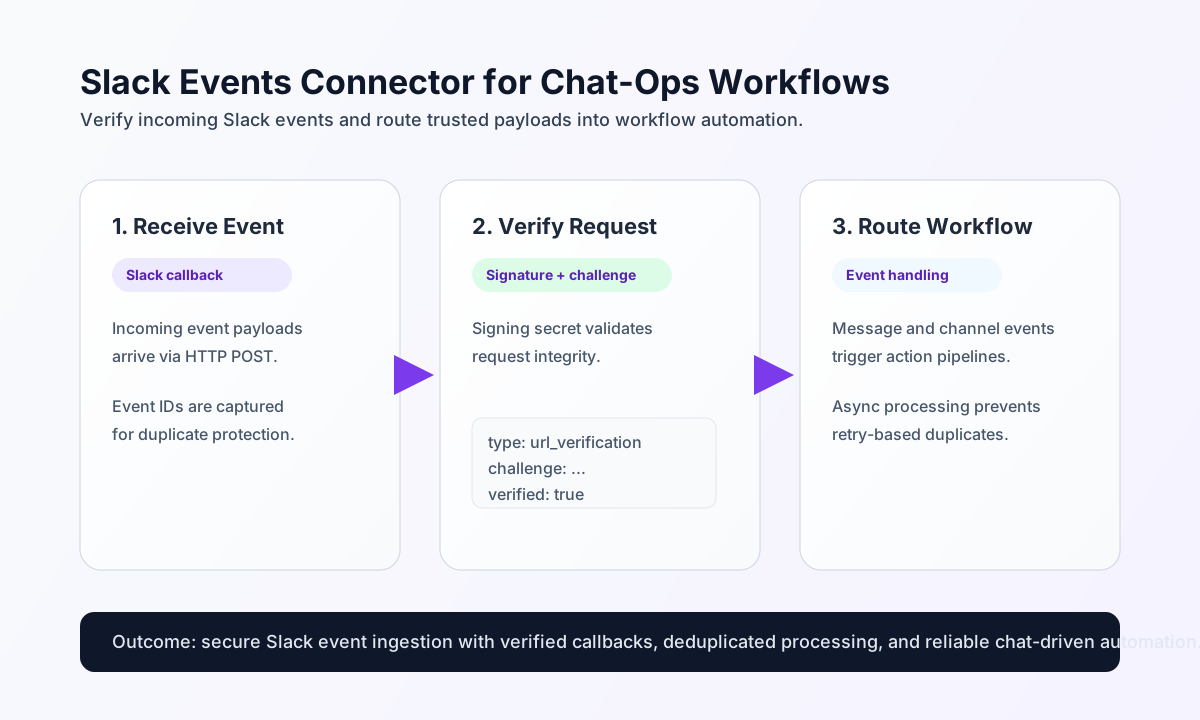
The Slack Events API connector lets Tealfabric workflows ingest Slack event callbacks, answer URL verification challenges, and probe event authorizations via the Slack Web API. It verifies request signatures when signature, timestamp, and body are supplied together, matching legacy PHP behavior.
Document information
| Field | Value |
|---|---|
| Canonical URL | /docs/04_connecting-systems/connectors/s/slack-events-api |
| Version (published date) | 2026-06-17 |
| Tags | connectors, reference, slack-events-api |
| Connector ID | slack-events-api-1.0.0 |
Configuration
Store these settings in the integration profile (not in per-operation call data):
bot_token(required): Slack bot token (xoxb-...). Alias:token.signing_secret(required): Slack app signing secret used for HMACv0signature verification on inbound events.app_id(optional): Slack app ID.team_id(optional): Slack workspace/team ID.timeout_seconds(optional): HTTP timeout for Slack Web API calls (default30).
Run test before production rollout. Only test performs full configuration validation and returns Configuration validation failed when required credentials are missing.
Receive Slack events with receive
Use receive to normalize an Events API callback. When signature, timestamp, and body are all present, the connector verifies the Slack v0 HMAC signature and rejects replayed requests outside a five-minute window. For url_verification payloads, the connector returns the challenge token (same as verify). Otherwise it returns normalized event fields.
const baseUrl = "https://api.example.com/api/v1";
const tenantId = "<TENANT_ID>";
const apiKey = "<API_KEY>";

type ReceiveResult = {
  event_count: number;
  event_type: string;
  event_subtype: string;
  event: Record<string, unknown>;
};

async function receiveSlackEvent(integrationId: string): Promise<ReceiveResult> {
  const response = await fetch(
    `${baseUrl}/integrations/${encodeURIComponent(integrationId)}/execute`,
    {
      method: "POST",
      headers: {
        "X-API-Key": apiKey,
        "X-Tenant-ID": tenantId,
        "Content-Type": "application/json",
      },
      body: JSON.stringify({
        operation: "receive",
        event: {
          type: "message",
          channel: "C123456",
          text: "Deploy completed in production",
        },
      }),
    }
  );
  if (!response.ok) throw new Error(`Request failed: ${response.status}`);
  const payload = (await response.json()) as { success?: boolean; data?: ReceiveResult };
  if (!payload.success || !payload.data) throw new Error("Slack receive failed");
  return payload.data;
}
curl -X POST "https://api.example.com/api/v1/integrations/<ENTITY_ID>/execute" \
-H "X-API-Key: <API_KEY>" \
-H "X-Tenant-ID: <TENANT_ID>" \
-H "Content-Type: application/json" \
-d '{
"operation": "receive",
"event": {
"type": "message",
"channel": "C123456",
"text": "Deploy completed in production"
}
}'
{
  "success": true,
  "data": {
    "event_count": 1,
    "event_type": "message",
    "event_subtype": "",
    "event": {
      "type": "message",
      "channel": "C123456",
      "text": "Deploy completed in production"
    }
  }
}
To verify a signed webhook payload, include the raw body and Slack headers as call data:
{
  "operation": "receive",
  "signature": "v0=<HMAC_HEX>",
  "timestamp": "1715188800",
  "body": "{\"type\":\"event_callback\",\"event\":{...}}",
  "event": { "type": "message", "channel": "C123456", "text": "hello" }
}
Answer URL verification with verify
Use verify during Slack app setup to return the url_verification challenge token. Provide challenge directly or nested under event.challenge. Signature verification belongs on receive, not verify.
async function verifySlackChallenge(integrationId: string, challenge: string) {
  const response = await fetch(
    `${baseUrl}/integrations/${encodeURIComponent(integrationId)}/execute`,
    {
      method: "POST",
      headers: {
        "X-API-Key": apiKey,
        "X-Tenant-ID": tenantId,
        "Content-Type": "application/json",
      },
      body: JSON.stringify({
        operation: "verify",
        challenge,
      }),
    }
  );
  if (!response.ok) throw new Error(`Request failed: ${response.status}`);
  const payload = (await response.json()) as { success?: boolean; data?: { challenge: string } };
  if (!payload.success || !payload.data) throw new Error("Slack verify failed");
  return payload.data;
}
curl -X POST "https://api.example.com/api/v1/integrations/<ENTITY_ID>/execute" \
-H "X-API-Key: <API_KEY>" \
-H "X-Tenant-ID: <TENANT_ID>" \
-H "Content-Type: application/json" \
-d '{"operation": "verify", "challenge": "<CHALLENGE_TOKEN>"}'
{
  "success": true,
  "data": {
    "challenge": "<CHALLENGE_TOKEN>"
  }
}
Probe event authorizations with subscribe
subscribe requires a non-empty events array (event type names for workflow context) and calls GET apps.event.authorizations.list to return current authorizations. It does not register new event subscriptions in Slack; configure those in the Slack app settings.
{
  "operation": "subscribe",
  "events": ["message.channels", "app_mention"]
}
{
  "success": true,
  "data": {
    "event_count": 2,
    "events": ["message.channels", "app_mention"],
    "data": {
      "ok": true,
      "authorizations": []
    }
  }
}
Validate credentials with test
test validates bot_token and signing_secret, then calls GET auth.test.
curl -X POST "https://api.example.com/api/v1/integrations/<ENTITY_ID>/execute" \
  -H "X-API-Key: <API_KEY>" \
  -H "X-Tenant-ID: <TENANT_ID>" \
  -H "Content-Type: application/json" \
  -d '{"operation": "test"}'
{
  "success": true,
  "data": {
    "message": "Slack Events API connection test successful",
    "details": {
      "team": "Example Workspace",
      "user": "example_bot",
      "team_id": "T123456"
    }
  }
}
Reliability guidance
Most Slack event issues come from failed signature verification, duplicate event delivery retries, or expired token scopes. If processing fails, validate signing checks first, then confirm bot token permissions, and finally ensure your deduplication strategy handles repeated event_id values.
For stable chat-ops automations, keep event parsing strict, return quick acknowledgments to Slack, and process heavy logic asynchronously inside workflows. This reduces timeout retries and prevents duplicate side effects.