Sage API Connector Guide
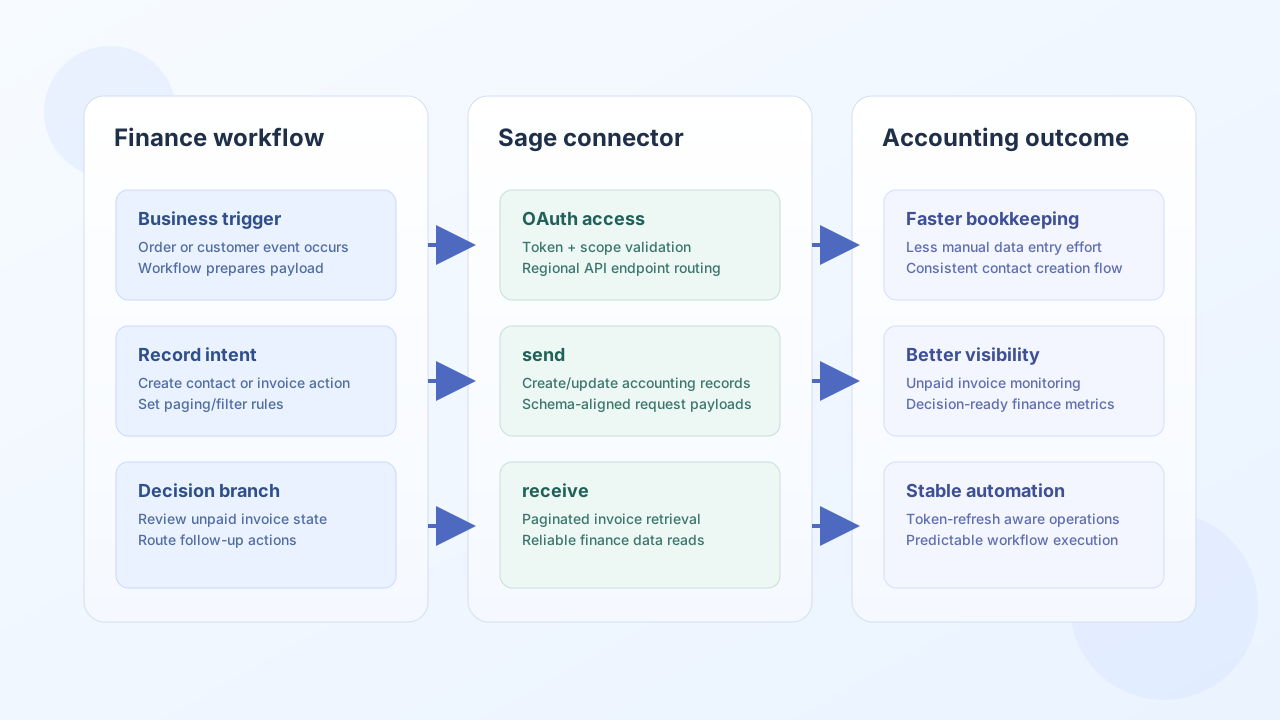
The Sage connector lets Tealfabric workflows create and retrieve accounting records such as contacts and invoices through Sage APIs. It is commonly used for finance automation scenarios like customer synchronization, invoice lifecycle tracking, and reconciliation workflows.
Document information
| Field | Value |
|---|---|
| Canonical URL | /docs/04_connecting-systems/connectors/s/sage |
| Version (published date) | 2026-05-08 |
| Tags | connectors, reference, sage |
| Connector ID | sage-1.0.0 |
Configuration and OAuth setup
Configure the connector with Sage OAuth credentials and your regional API base URL so token exchange and subsequent requests resolve correctly. In production, request only the scopes required for your workflow operations and rotate app secrets regularly.
client_id(required): Sage OAuth client ID.client_secret(required): Sage OAuth client secret.redirect_uri(required): callback URI configured in the Sage app.base_url(required): regional Sage API base URL.access_token(optional): active OAuth token.refresh_token(optional): token used for refresh flow.scope(optional): requested OAuth scopes.timeout_seconds(optional): request timeout value.
Before enabling high-volume workflows, validate authentication and required API permissions with a small test call.
Create accounting records with send
Use send when a workflow needs to create or update resources such as customer contacts. Keep request payloads aligned with Sage schema requirements to avoid validation failures.
const baseUrl = "https://api.example.com/api/v1";
const tenantId = "<TENANT_ID>";
const apiKey = "<API_KEY>";

async function createSageCustomer(integrationId: string) {
  const response = await fetch(`${baseUrl}/integrations/${encodeURIComponent(integrationId)}/execute`, {
    method: "POST",
    headers: {
      "X-API-Key": apiKey,
      "X-Tenant-ID": tenantId,
      "Content-Type": "application/json",
    },
    body: JSON.stringify({
      operation: "send",
      endpoint: "contacts",
      method: "POST",
      data: {
        contact: {
          name: "Northwind Equipment Ltd",
          email: "billing@northwind.example",
          telephone: "+44-20-5555-1000"
        }
      }
    }),
  });
  if (!response.ok) throw new Error(`Request failed: ${response.status}`);
  return response.json();
}
curl -X POST "https://api.example.com/api/v1/integrations/<ENTITY_ID>/execute" \
-H "X-API-Key: <API_KEY>" \
-H "X-Tenant-ID: <TENANT_ID>" \
-H "Content-Type: application/json" \
-d '{
"operation": "send",
"endpoint": "contacts",
"method": "POST",
"data": {
"contact": {
"name": "Northwind Equipment Ltd",
"email": "billing@northwind.example",
"telephone": "+44-20-5555-1000"
}
}
}'
{
  "success": true,
  "data": {
    "id": "c42d6b88-11c4-4d4e-8ad2-f8f0d1530a02",
    "name": "Northwind Equipment Ltd"
  }
}
Retrieve financial records with receive
Use receive to list invoice or contact records for reconciliation, reporting, and follow-up business logic. Pagination controls help keep responses predictable as data volume grows.
const baseUrl = "https://api.example.com/api/v1";
const tenantId = "<TENANT_ID>";
const apiKey = "<API_KEY>";

async function listUnpaidInvoices(integrationId: string) {
  const response = await fetch(`${baseUrl}/integrations/${encodeURIComponent(integrationId)}/execute`, {
    method: "POST",
    headers: {
      "X-API-Key": apiKey,
      "X-Tenant-ID": tenantId,
      "Content-Type": "application/json",
    },
    body: JSON.stringify({
      operation: "receive",
      endpoint: "sales_invoices",
      query: {
        items_per_page: 20,
        page: 1,
        status_id: "UNPAID"
      }
    }),
  });
  if (!response.ok) throw new Error(`Request failed: ${response.status}`);
  const payload = await response.json();
  return payload.data ?? [];
}
curl -X POST "https://api.example.com/api/v1/integrations/<ENTITY_ID>/execute" \
-H "X-API-Key: <API_KEY>" \
-H "X-Tenant-ID: <TENANT_ID>" \
-H "Content-Type: application/json" \
-d '{
"operation": "receive",
"endpoint": "sales_invoices",
"query": {
"items_per_page": 20,
"page": 1,
"status_id": "UNPAID"
}
}'
{
  "success": true,
  "total_size": 2,
  "data": [
    {"id": "inv-1001", "status_id": "UNPAID", "total_amount": 480.0},
    {"id": "inv-1002", "status_id": "UNPAID", "total_amount": 1250.0}
  ]
}
Reliability guidance
Most failures in Sage integrations are caused by OAuth token expiration, missing scopes, or pagination assumptions in large datasets. Validate connection and permissions first, handle token refresh proactively, and process paged responses explicitly for reliable long-running automations.
These practices keep finance workflows accurate and operationally stable.