SnapLogic iPaaS Connector Guide
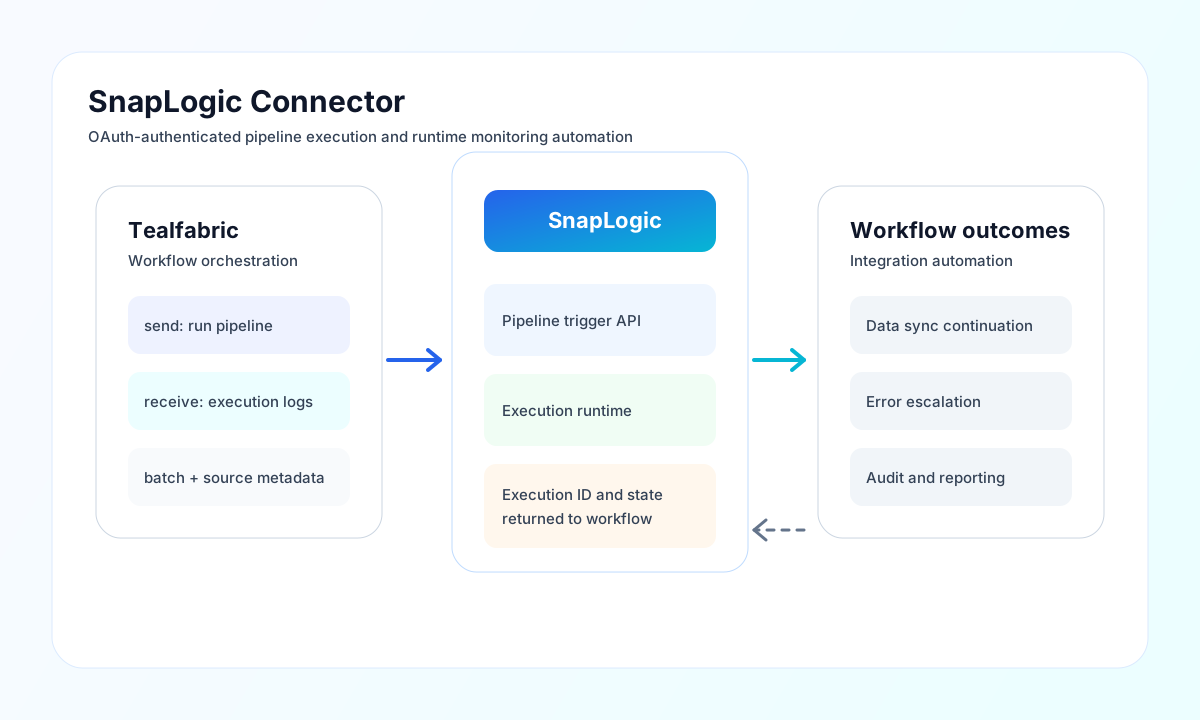
The SnapLogic connector lets Tealfabric workflows execute and monitor SnapLogic pipelines using API-driven automation. It is useful for orchestrating data movement, triggering integration jobs, and collecting execution outcomes for downstream processing.
Document information
| Field | Value |
|---|---|
| Canonical URL | /docs/04_connecting-systems/connectors/s/snaplogic |
| Version (published date) | 2026-05-08 |
| Tags | connectors, reference, snaplogic |
| Connector ID | snaplogic-1.0.0 |
Configure SnapLogic OAuth credentials
Set base_url, client_id, and client_secret from your SnapLogic API access configuration. Use a service client with least-privilege permissions for the projects and pipelines that your workflow must access.
Set timeout_seconds based on expected API response latency, especially when querying execution history. Run test after setup to verify OAuth authentication and endpoint access before enabling production workloads. Only the test operation validates required configuration (base_url, client_id, client_secret); other operations proceed to the SnapLogic API and surface auth or network errors from the remote call.
Trigger pipelines with send
Use send to execute pipelines or create and update pipeline resources through SnapLogic REST endpoints. Keep pipeline paths and input keys consistent so retries and operational debugging stay straightforward.
const baseUrl = "https://api.example.com/api/v1";
const tenantId = "<TENANT_ID>";
const apiKey = "<API_KEY>";

async function executePipeline(integrationId: string) {
  const response = await fetch(`${baseUrl}/integrations/${encodeURIComponent(integrationId)}/execute`, {
    method: "POST",
    headers: {
      "X-API-Key": apiKey,
      "X-Tenant-ID": tenantId,
      "Content-Type": "application/json",
    },
    body: JSON.stringify({
      operation: "send",
      endpoint: "api/1/rest/sl/execute",
      method: "POST",
      data: {
        pipeline: "projects/Finance/pipelines/InvoiceSync",
        input: {
          batch_id: "BATCH-2026-05-08-01",
          source_system: "erp"
        }
      }
    }),
  });
  if (!response.ok) throw new Error(`Request failed: ${response.status}`);
  return response.json();
}
curl -X POST "https://api.example.com/api/v1/integrations/<ENTITY_ID>/execute" \
-H "X-API-Key: <API_KEY>" \
-H "X-Tenant-ID: <TENANT_ID>" \
-H "Content-Type: application/json" \
-d '{
"operation": "send",
"endpoint": "api/1/rest/sl/execute",
"method": "POST",
"data": {
"pipeline": "projects/Finance/pipelines/InvoiceSync",
"input": {
"batch_id": "BATCH-2026-05-08-01",
"source_system": "erp"
}
}
}'
{
  "success": true,
  "data": {
    "message": "SnapLogic operation completed successfully",
    "result": {
      "response_map": {
        "status": "RUNNING",
        "ruuid": "execution-uuid-here"
      }
    }
  },
  "metadata": {
    "processing_time_ms": 42
  }
}
Retrieve execution status with receive
Use receive to query pipelines, execution history, and runtime status so workflows can make follow-up decisions. Supply endpoint and optional query parameters; the connector unwraps pipelines[] or data[] when present.
const baseUrl = "https://api.example.com/api/v1";
const tenantId = "<TENANT_ID>";
const apiKey = "<API_KEY>";

async function listPipelines(integrationId: string) {
  const response = await fetch(`${baseUrl}/integrations/${encodeURIComponent(integrationId)}/execute`, {
    method: "POST",
    headers: {
      "X-API-Key": apiKey,
      "X-Tenant-ID": tenantId,
      "Content-Type": "application/json",
    },
    body: JSON.stringify({
      operation: "receive",
      endpoint: "api/1/rest/pipelines",
      query: {
        limit: 20
      }
    }),
  });
  if (!response.ok) throw new Error(`Request failed: ${response.status}`);
  return response.json();
}
curl -X POST "https://api.example.com/api/v1/integrations/<ENTITY_ID>/execute" \
-H "X-API-Key: <API_KEY>" \
-H "X-Tenant-ID: <TENANT_ID>" \
-H "Content-Type: application/json" \
-d '{
"operation": "receive",
"endpoint": "api/1/rest/pipelines",
"query": {
"limit": 20
}
}'
{
  "success": true,
  "data": {
    "message": "SnapLogic data retrieved successfully",
    "pipeline_count": 2,
    "items": [
      { "snode_id": "pipeline-uuid-1", "label": "InvoiceSync" },
      { "snode_id": "pipeline-uuid-2", "label": "CustomerExport" }
    ]
  }
}
Reliability and operations guidance
Common issues include invalid OAuth client credentials, insufficient permission scope, endpoint mismatches, and rate-limit responses. Validate authentication first, then confirm endpoint paths and payload schema for the selected API operation.
For robust automation, treat pipeline execution as asynchronous, poll status with backoff, and log execution IDs for traceability. This improves observability and simplifies incident response in production.