Slack RTM API Connector Guide
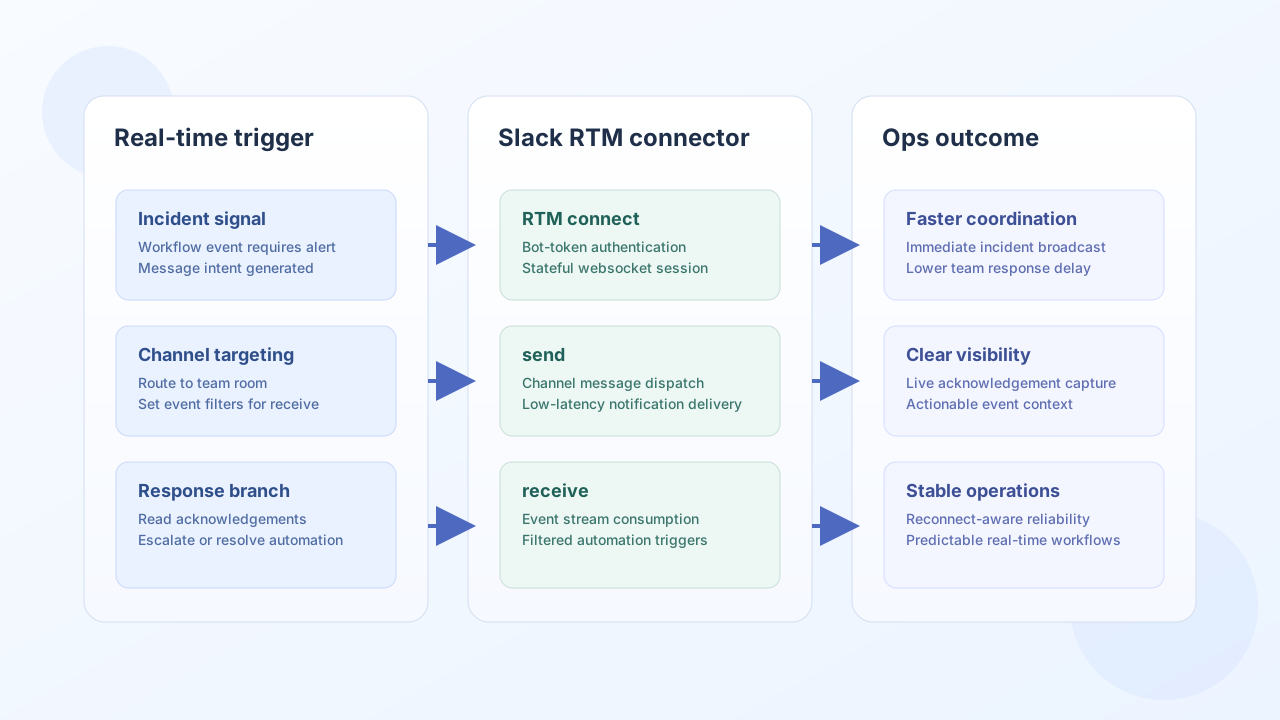
The Slack RTM API connector lets Tealfabric workflows obtain an RTM WebSocket URL, send outbound messages via the Slack Web API fallback (chat.postMessage), and normalize inbound RTM event objects. Like the legacy PHP connector, it does not maintain a live WebSocket session; connect calls rtm.start to retrieve the URL and receive passes through a caller-supplied event payload.
Document information
| Field | Value |
|---|---|
| Canonical URL | /docs/04_connecting-systems/connectors/s/slack-rtm-api |
| Version (published date) | 2026-05-08 |
| Tags | connectors, reference, slack-rtm-api |
| Connector ID | slack-rtm-api-1.0.0 |
When to use this connector
Use this connector when you need legacy RTM-era semantics (connect/send/receive/disconnect/test) in a workflow. Slack has deprecated RTM in favor of the Events API and Socket Mode; prefer the Slack Events API or Slack API connectors for new integrations.
Configuration
Store these settings in the integration profile (not in per-operation call data):
bot_token(required): Slack bot token (xoxb-...). Alias:token.timeout_seconds(optional): HTTP timeout for Slack Web API calls (default30).reconnect_attempts(optional): Reconnect budget surfaced onconnectresponses (default5).
Run test before production rollout. Only test performs full configuration validation and returns Configuration validation failed when bot_token is missing.
Obtain RTM WebSocket URL with connect
connect calls GET rtm.start and returns the WebSocket URL. It does not open a persistent socket.
const baseUrl = "https://api.example.com/api/v1";
const tenantId = "<TENANT_ID>";
const apiKey = "<API_KEY>";

type ConnectResult = {
  message_count: number;
  ws_url: string;
  reconnect_attempts: number;
  message: string;
};

async function connectSlackRtm(integrationId: string): Promise<ConnectResult> {
  const response = await fetch(
    `${baseUrl}/integrations/${encodeURIComponent(integrationId)}/execute`,
    {
      method: "POST",
      headers: {
        "X-API-Key": apiKey,
        "X-Tenant-ID": tenantId,
        "Content-Type": "application/json",
      },
      body: JSON.stringify({ operation: "connect" }),
    }
  );
  if (!response.ok) throw new Error(`Request failed: ${response.status}`);
  const payload = (await response.json()) as { success?: boolean; data?: ConnectResult };
  if (!payload.success || !payload.data) throw new Error("Slack RTM connect failed");
  return payload.data;
}
curl -X POST "https://api.example.com/api/v1/integrations/<ENTITY_ID>/execute" \
-H "X-API-Key: <API_KEY>" \
-H "X-Tenant-ID: <TENANT_ID>" \
-H "Content-Type: application/json" \
-d '{"operation":"connect"}'
{
  "success": true,
  "data": {
    "message_count": 0,
    "ws_url": "wss://wss-primary.slack.com/link/?ticket=...",
    "reconnect_attempts": 5,
    "message": "WebSocket connection URL obtained. Full WebSocket implementation requires WebSocket client library."
  }
}
Send messages with send
send posts via chat.postMessage (Web API fallback). Provide channel and text (alias message).
async function sendSlackRtmMessage(integrationId: string, channelId: string, text: string) {
  const response = await fetch(
    `${baseUrl}/integrations/${encodeURIComponent(integrationId)}/execute`,
    {
      method: "POST",
      headers: {
        "X-API-Key": apiKey,
        "X-Tenant-ID": tenantId,
        "Content-Type": "application/json",
      },
      body: JSON.stringify({
        operation: "send",
        channel: channelId,
        text,
      }),
    }
  );
  if (!response.ok) throw new Error(`Request failed: ${response.status}`);
  const payload = await response.json();
  if (!payload.success || !payload.data) throw new Error("Slack RTM send failed");
  return payload.data;
}
curl -X POST "https://api.example.com/api/v1/integrations/<ENTITY_ID>/execute" \
-H "X-API-Key: <API_KEY>" \
-H "X-Tenant-ID: <TENANT_ID>" \
-H "Content-Type: application/json" \
-d '{
"operation": "send",
"channel": "C0123456789",
"text": "Incident detected: API latency above threshold."
}'
{
  "success": true,
  "data": {
    "message_count": 1,
    "data": {
      "ok": true,
      "channel": "C0123456789",
      "ts": "1715174400.000100"
    }
  }
}
Normalize inbound events with receive
receive echoes the supplied event object (legacy placeholder behavior). It does not poll Slack or read from a WebSocket.
{
  "operation": "receive",
  "event": {
    "type": "message",
    "channel": "C0123456789",
    "text": "Acknowledged.",
    "user": "U0123456789"
  }
}
{
  "success": true,
  "data": {
    "message_count": 1,
    "event": {
      "type": "message",
      "channel": "C0123456789",
      "text": "Acknowledged.",
      "user": "U0123456789"
    }
  }
}
Close session with disconnect
disconnect acknowledges teardown without a remote API call (legacy no-op when no socket is open).
{
  "success": true,
  "data": {
    "message_count": 0
  }
}
Validate credentials with test
test validates configuration, then calls GET rtm.start and returns workspace URL, team name, and bot user name.
{
  "success": true,
  "data": {
    "message": "Slack RTM API connection test successful",
    "details": {
      "url": "wss://wss-primary.slack.com/link/?ticket=...",
      "team": "Example Workspace",
      "user": "ops-bot"
    }
  }
}
Reliability guidance
RTM is deprecated by Slack. Validate token scopes with test, treat connect as URL discovery only, and use the Slack Events API connector for production event ingestion. For outbound messaging, the Slack API connector offers fuller Web API coverage.