Sage Intacct Connector Guide
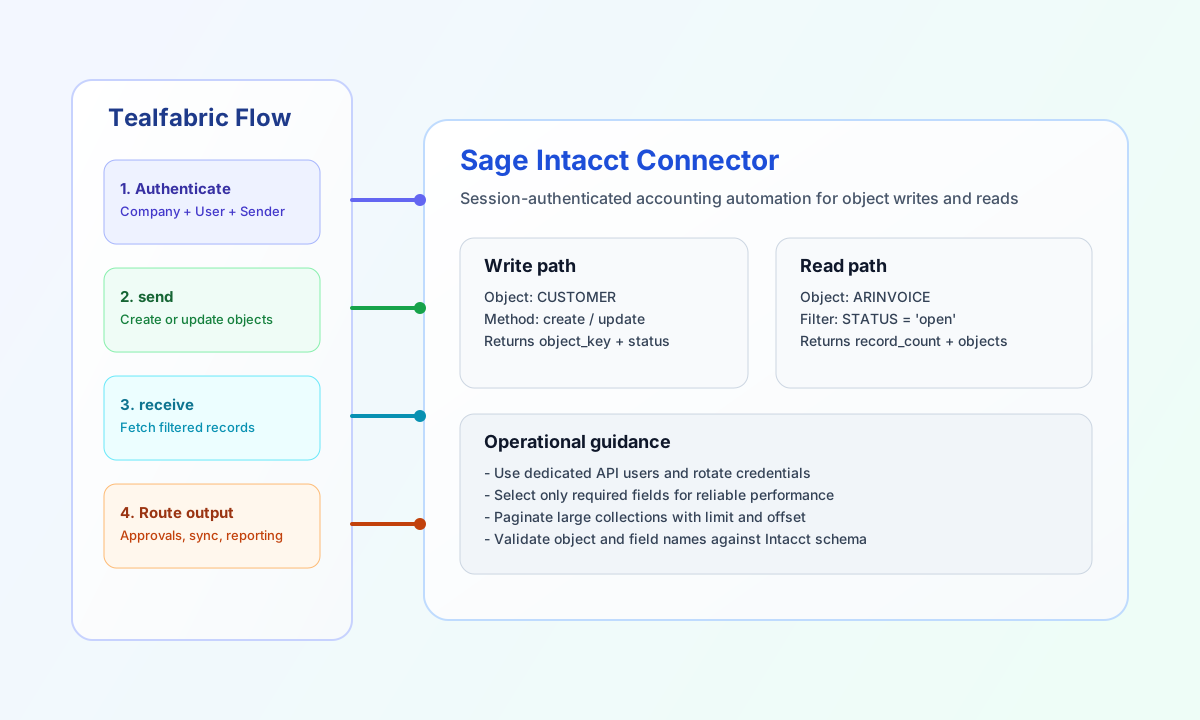
The Sage Intacct connector lets Tealfabric workflows create and retrieve accounting records through the Intacct XML Web Services gateway. It is useful for automating customer and invoice lifecycles, syncing financial objects, and enriching downstream workflow logic with accounting state.
Document information
| Field | Value |
|---|---|
| Canonical URL | /docs/04_connecting-systems/connectors/s/sage-intacct |
| Version (published date) | 2026-05-08 |
| Tags | connectors, reference, sage-intacct |
| Connector ID | sage-intacct-1.0.0 |
Configure authentication credentials
Configure the connector with company_id, user_id, user_password, sender_id, and sender_password so requests can authenticate through Sage Intacct integration credentials. These values are required for session establishment before any object operations run.
Set timeout_seconds based on expected response time for object queries and write workloads. Dedicated API users with scoped permissions reduce operational risk and simplify auditability.
company_id(required): Sage Intacct company identifier.user_id(required): Web Services user ID.user_password(required): Web Services user password.sender_id(required): Web Services sender ID.sender_password(required): Web Services sender password.timeout_seconds(optional): Request timeout in seconds, default30.
The test operation validates all required credentials before calling getCompanyInfo. Other operations (send, receive, execute) authenticate with available config values and rely on Intacct for runtime credential errors, matching legacy connector behavior.
Create or update objects with send
Use send when workflows need to write accounting data. Provide an object type to invoke create_{object}, or pass an explicit Intacct function name. Function parameters belong in data (preferred) or at the top level when data is omitted.
const baseUrl = "https://api.example.com/api/v1";
const tenantId = "<TENANT_ID>";
const apiKey = "<API_KEY>";

async function createCustomer(integrationId: string) {
  const response = await fetch(`${baseUrl}/integrations/${encodeURIComponent(integrationId)}/execute`, {
    method: "POST",
    headers: {
      "X-API-Key": apiKey,
      "X-Tenant-ID": tenantId,
      "Content-Type": "application/json",
    },
    body: JSON.stringify({
      operation: "send",
      object: "customer",
      data: {
        CUSTOMERID: "CUST-10425",
        NAME: "Northwind Manufacturing",
        STATUS: "active"
      }
    }),
  });
  if (!response.ok) throw new Error(`Request failed: ${response.status}`);
  return response.json();
}
curl -X POST "https://api.example.com/api/v1/integrations/<ENTITY_ID>/execute" \
-H "X-API-Key: <API_KEY>" \
-H "X-Tenant-ID: <TENANT_ID>" \
-H "Content-Type: application/json" \
-d '{
"operation": "send",
"object": "customer",
"data": {
"CUSTOMERID": "CUST-10425",
"NAME": "Northwind Manufacturing",
"STATUS": "active"
}
}'
{
  "success": true,
  "data": {
    "message": "Sage Intacct function executed successfully",
    "result": {
      "operation": {
        "result": {
          "status": "success"
        }
      }
    }
  }
}
Retrieve financial objects with receive
Use receive to fetch records for reconciliation, approval routing, or reporting steps. Provide object (required) and optional function (defaults to read, producing read_{object}). Pass Intacct query fields in the query object.
const baseUrl = "https://api.example.com/api/v1";
const tenantId = "<TENANT_ID>";
const apiKey = "<API_KEY>";

async function listCustomers(integrationId: string) {
  const response = await fetch(`${baseUrl}/integrations/${encodeURIComponent(integrationId)}/execute`, {
    method: "POST",
    headers: {
      "X-API-Key": apiKey,
      "X-Tenant-ID": tenantId,
      "Content-Type": "application/json",
    },
    body: JSON.stringify({
      operation: "receive",
      object: "customer",
      query: {
        filter: { equalto: { field: "STATUS", value: "active" } },
        fields: "CUSTOMERID,NAME,STATUS",
        pagesize: 10
      }
    }),
  });
  if (!response.ok) throw new Error(`Request failed: ${response.status}`);
  return response.json();
}
curl -X POST "https://api.example.com/api/v1/integrations/<ENTITY_ID>/execute" \
-H "X-API-Key: <API_KEY>" \
-H "X-Tenant-ID: <TENANT_ID>" \
-H "Content-Type: application/json" \
-d '{
"operation": "receive",
"object": "customer",
"query": {
"filter": { "equalto": { "field": "STATUS", "value": "active" } },
"fields": "CUSTOMERID,NAME,STATUS",
"pagesize": 10
}
}'
{
  "success": true,
  "data": {
    "message": "Sage Intacct function executed successfully",
    "result": {
      "data": {
        "customer": {
          "CUSTOMERID": "CUST-10425",
          "NAME": "Northwind Manufacturing",
          "STATUS": "active"
        }
      }
    }
  }
}
Execute Intacct functions with execute
Use execute when you need a specific Intacct function name and parameter map, such as getCompanyInfo or custom Web Services functions.
{
  "operation": "execute",
  "function": "getCompanyInfo",
  "parameters": {}
}
Successful responses use the same envelope as send and receive: data.message plus parsed XML in data.result.
Test connection with test
The test operation validates required credentials, establishes a session, and calls getCompanyInfo.
{
  "operation": "test"
}
{
  "success": true,
  "data": {
    "message": "Sage Intacct connection test successful",
    "details": {
      "api_base_url": "https://api.intacct.com/ia/xml/xmlgw.phtml",
      "company_id": "<COMPANY_ID>"
    }
  }
}
Reliability guidance
Most failures come from credential mismatches, object-field validation errors, or malformed payload structures. If requests fail, verify all authentication values first, then confirm object names and required fields for the target Intacct entity.
For production consistency, use dedicated API users, constrain read fields, and paginate high-volume queries. This improves response performance and keeps financial automation workflows predictable.