SAP Asset Management Connector Guide
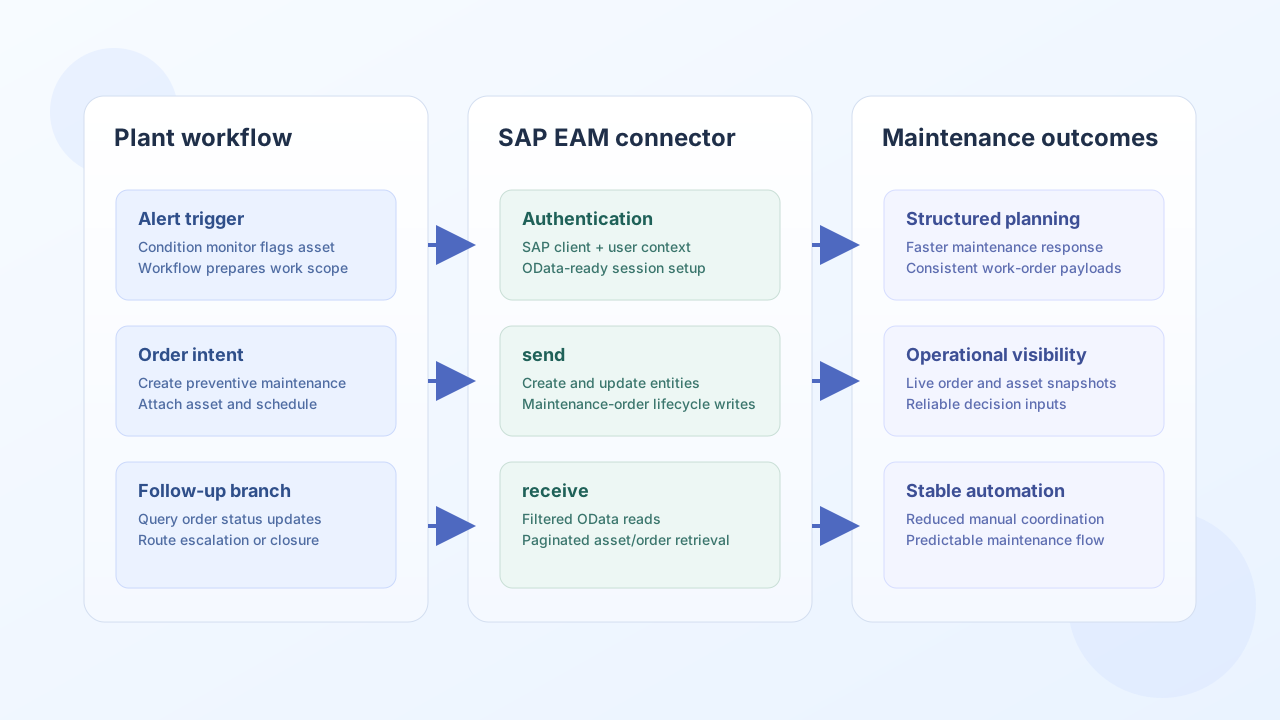
The SAP Asset Management connector helps Tealfabric workflows create and retrieve asset and maintenance records in SAP S/4HANA EAM. It is designed for operational automations such as maintenance-order creation, asset synchronization, and equipment-state reporting.
Document information
| Field | Value |
|---|---|
| Canonical URL | /docs/04_connecting-systems/connectors/s/sap-asset-management |
| Version (published date) | 2026-05-08 |
| Tags | connectors, reference, sap-asset-management |
| Connector ID | sap-asset-management-1.0.0 |
Configuration and access setup
Set the connector to your SAP S/4HANA base URL and client so requests resolve to the correct tenant and OData service context. Use an SAP API user that has only the permissions required for targeted asset and maintenance entities.
base_url(required): SAP S/4HANA host, including protocol and port if needed.username(required): SAP user for API access.password(required): credential for the SAP user.client(required): SAP client number (mandant), such as100.timeout_seconds(optional): timeout for requests (default60).
The connector uses Basic authentication with an X-SAP-Client header on every request. Configuration parameters are not passed as call data.
test validates that base_url, username, password, and client are present; when configuration is incomplete it returns success: false with error.message of Configuration validation failed. Other operations (send, receive, execute) do not pre-validate configuration the way legacy PHP does.
Create maintenance records with send
Use send when a workflow needs to create or update asset-management entities via OData. Provide an endpoint path relative to base_url, an HTTP method (default POST), and a data object for the JSON body.
const baseUrl = "https://api.example.com/api/v1";
const tenantId = "<TENANT_ID>";
const apiKey = "<API_KEY>";

async function createMaintenanceOrder(integrationId: string) {
  const response = await fetch(`${baseUrl}/integrations/${encodeURIComponent(integrationId)}/execute`, {
    method: "POST",
    headers: {
      "X-API-Key": apiKey,
      "X-Tenant-ID": tenantId,
      "Content-Type": "application/json",
    },
    body: JSON.stringify({
      operation: "send",
      endpoint: "sap/opu/odata/sap/API_ASSETMANAGEMENT_SRV/MaintenanceOrderSet",
      method: "POST",
      data: {
        Order: "MO-240508-01",
        Asset: "ASSET-10045",
        OrderType: "PM",
        Description: "Monthly lubrication and inspection",
        PlannedStartDate: "2026-05-10",
        PlannedEndDate: "2026-05-10"
      }
    }),
  });
  if (!response.ok) throw new Error(`Request failed: ${response.status}`);
  const payload = await response.json();
  return payload.data?.result;
}
curl -X POST "https://api.example.com/api/v1/integrations/<ENTITY_ID>/execute" \
-H "X-API-Key: <API_KEY>" \
-H "X-Tenant-ID: <TENANT_ID>" \
-H "Content-Type: application/json" \
-d '{
"operation": "send",
"endpoint": "sap/opu/odata/sap/API_ASSETMANAGEMENT_SRV/MaintenanceOrderSet",
"method": "POST",
"data": {
"Order": "MO-240508-01",
"Asset": "ASSET-10045",
"OrderType": "PM",
"Description": "Monthly lubrication and inspection",
"PlannedStartDate": "2026-05-10",
"PlannedEndDate": "2026-05-10"
}
}'
{
  "success": true,
  "data": {
    "message": "SAP Asset Management operation completed successfully",
    "result": {
      "d": {
        "Order": "MO-240508-01"
      }
    }
  }
}
Retrieve assets and orders with receive
Use receive to query SAP entities with a GET request. Pass OData query options in query (for example $filter, $top, $skip). List responses prefer d.results[] or results[]; a single entity is returned as a one-item items array.
const baseUrl = "https://api.example.com/api/v1";
const tenantId = "<TENANT_ID>";
const apiKey = "<API_KEY>";

async function listOpenMaintenanceOrders(integrationId: string) {
  const response = await fetch(`${baseUrl}/integrations/${encodeURIComponent(integrationId)}/execute`, {
    method: "POST",
    headers: {
      "X-API-Key": apiKey,
      "X-Tenant-ID": tenantId,
      "Content-Type": "application/json",
    },
    body: JSON.stringify({
      operation: "receive",
      endpoint: "sap/opu/odata/sap/API_ASSETMANAGEMENT_SRV/MaintenanceOrderSet",
      query: {
        "$filter": "OrderType eq 'PM'",
        "$top": "25",
        "$skip": "0",
        "$orderby": "PlannedStartDate desc"
      }
    }),
  });
  if (!response.ok) throw new Error(`Request failed: ${response.status}`);
  const payload = await response.json();
  return payload.data?.items ?? [];
}
curl -X POST "https://api.example.com/api/v1/integrations/<ENTITY_ID>/execute" \
-H "X-API-Key: <API_KEY>" \
-H "X-Tenant-ID: <TENANT_ID>" \
-H "Content-Type: application/json" \
-d '{
"operation": "receive",
"endpoint": "sap/opu/odata/sap/API_ASSETMANAGEMENT_SRV/MaintenanceOrderSet",
"query": {
"$filter": "OrderType eq '\''PM'\''",
"$top": "25",
"$skip": "0",
"$orderby": "PlannedStartDate desc"
}
}'
{
  "success": true,
  "data": {
    "message": "SAP Asset Management data retrieved successfully",
    "record_count": 2,
    "items": [
      {"Order": "MO-240508-01", "Asset": "ASSET-10045", "OrderType": "PM", "PlannedStartDate": "2026-05-10"},
      {"Order": "MO-240508-02", "Asset": "ASSET-10077", "OrderType": "PM", "PlannedStartDate": "2026-05-12"}
    ]
  }
}
Test connection with test
test performs GET sap/opu/odata/sap/API_ASSETMANAGEMENT_SRV/$metadata using configured credentials. On success it returns data.details with base_url and client.
Reliability guidance
Most integration failures come from authentication issues, incorrect OData paths, or malformed $filter expressions. Validate access with test, then run a small receive query before adding filters and pagination incrementally.