Slack Webhook Connector Guide
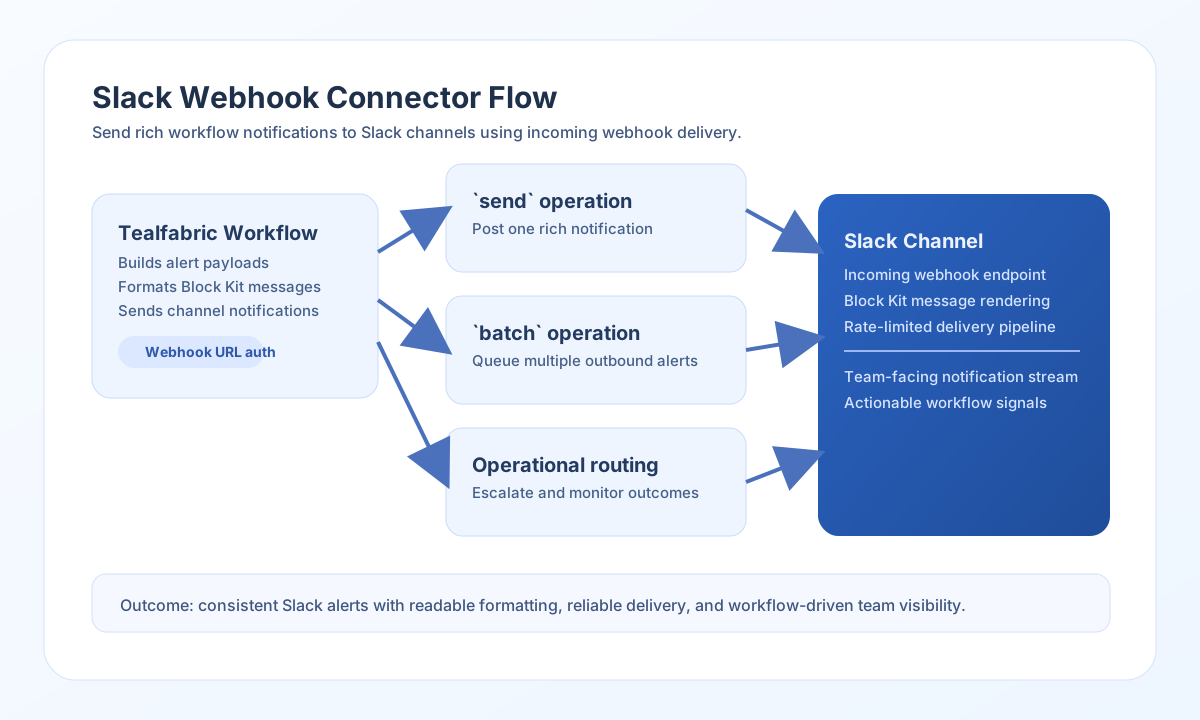
The Slack Webhook connector sends outbound notifications from Tealfabric workflows into Slack channels. It supports plain-text alerts, Block Kit layouts, and batched message delivery for operational messaging use cases.
Document information
| Field | Value |
|---|---|
| Canonical URL | /docs/04_connecting-systems/connectors/s/slack-webhook |
| Version (published date) | 2026-05-08 |
| Tags | connectors, reference, slack-webhook |
| Connector ID | slack-webhook-1.0.0 |
Configure webhook delivery
Set webhook_url to the Incoming Webhook endpoint created in your Slack app. You can optionally set defaults for username, icon_url, and channel, then override them per message when needed.
Use timeout_seconds for environments with strict network controls, and run test to confirm Slack accepts payloads before production automation begins.
Send notifications with send
Use send for operational alerts, approvals, and event notifications. Include fallback text even when sending rich blocks so clients without full block rendering can still display the message clearly.
const baseUrl = "https://api.example.com/api/v1";
const tenantId = "<TENANT_ID>";
const apiKey = "<API_KEY>";

async function sendSlackNotification(integrationId: string) {
  const response = await fetch(`${baseUrl}/integrations/${encodeURIComponent(integrationId)}/execute`, {
    method: "POST",
    headers: {
      "X-API-Key": apiKey,
      "X-Tenant-ID": tenantId,
      "Content-Type": "application/json",
    },
    body: JSON.stringify({
      operation: "send",
      text: "Order processing update",
      blocks: [
        {
          type: "section",
          text: {
            type: "mrkdwn",
            text: "*Order <ENTITY_ID>* has moved to fulfillment."
          }
        }
      }
    }),
  });
  if (!response.ok) throw new Error(`Request failed: ${response.status}`);
  return response.json();
}
curl -X POST "https://api.example.com/api/v1/integrations/<ENTITY_ID>/execute" \
-H "X-API-Key: <API_KEY>" \
-H "X-Tenant-ID: <TENANT_ID>" \
-H "Content-Type: application/json" \
-d '{
"operation": "send",
"text": "Order processing update",
"blocks": [
{
"type": "section",
"text": {
"type": "mrkdwn",
"text": "*Order <ENTITY_ID>* has moved to fulfillment."
}
}
]
}'
{
  "success": true,
  "data": {
    "message_count": 1,
    "data": {
      "status_code": 200,
      "body": "ok"
    },
    "http_status": 200
  }
}
Validate delivery with test
Use test to confirm the configured webhook_url accepts payloads before enabling production workflows. The connector posts a fixed probe message and requires HTTP 200 from Slack.
curl -X POST "https://api.example.com/api/v1/integrations/<ENTITY_ID>/execute" \
  -H "X-API-Key: <API_KEY>" \
  -H "X-Tenant-ID: <TENANT_ID>" \
  -H "Content-Type: application/json" \
  -d '{"operation": "test"}'
{
  "success": true,
  "data": {
    "message": "Slack Webhook connection test successful",
    "details": {
      "webhook_url": "https://hooks.slack.com/services/...",
      "http_status": 200
    }
  }
}
Send multiple alerts with batch
Use batch when workflows need to post several related notifications in one step, such as nightly summaries or multi-entity status updates. Pass operations or items (legacy alias); each entry is sent as a raw webhook JSON body (operation.data when present, otherwise the item object). Keep payload volume aligned to Slack webhook rate limits to avoid throttling.
const baseUrl = "https://api.example.com/api/v1";
const tenantId = "<TENANT_ID>";
const apiKey = "<API_KEY>";

async function sendBatchNotifications(integrationId: string) {
  const response = await fetch(`${baseUrl}/integrations/${encodeURIComponent(integrationId)}/execute`, {
    method: "POST",
    headers: {
      "X-API-Key": apiKey,
      "X-Tenant-ID": tenantId,
      "Content-Type": "application/json",
    },
    body: JSON.stringify({
      operation: "batch",
      operations: [
        { text: "Job A completed" },
        { text: "Job B completed" }
      ]
    }),
  });
  if (!response.ok) throw new Error(`Request failed: ${response.status}`);
  return response.json();
}
curl -X POST "https://api.example.com/api/v1/integrations/<ENTITY_ID>/execute" \
-H "X-API-Key: <API_KEY>" \
-H "X-Tenant-ID: <TENANT_ID>" \
-H "Content-Type: application/json" \
-d '{
"operation": "batch",
"operations": [
{"text": "Job A completed"},
{"text": "Job B completed"}
]
}'
{
  "success": true,
  "data": {
    "message_count": 2,
    "total_operations": 2,
    "successful_operations": 2,
    "results": [
      { "index": 0, "success": true, "result": { "status_code": 200, "body": "ok" } },
      { "index": 1, "success": true, "result": { "status_code": 200, "body": "ok" } }
    ]
  }
}
Reliability guidance
Most failures come from revoked webhooks, channel permission mismatches, or aggressive send rates. Confirm webhook validity and channel access first when troubleshooting delivery issues.
For dependable alerts, include fallback text, keep block payloads concise, and throttle high-volume notification bursts. This improves readability and reduces Slack-side rejections.