SharePoint Online Connector Guide
The SharePoint Online connector helps Tealfabric workflows manage documents and list items in Microsoft 365 collaboration environments. It is useful for scenarios such as publishing generated reports, ingesting files from team libraries, and synchronizing operational records with SharePoint lists.
Document information
| Field | Value |
|---|---|
| Canonical URL | /docs/04_connecting-systems/connectors/s/sharepoint-online |
| Version (published date) | 2026-05-08 |
| Tags | connectors, reference, sharepoint-online |
| Connector ID | sharepoint-online-1.0.0 |
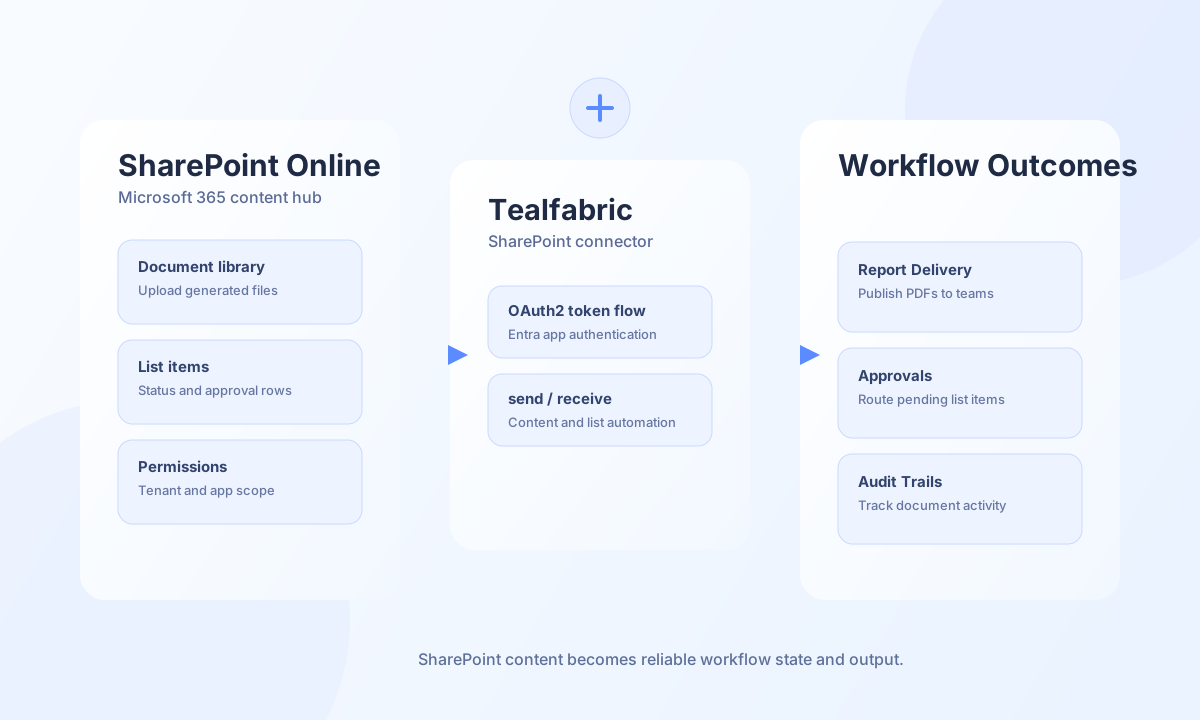
Configuration and prerequisites
Before creating the integration, register an app in Microsoft Entra ID and grant it the SharePoint permissions required for your site and operations. Use application permissions only where needed, and validate access in a non-production site first. The connector uses tenant, client, and secret credentials to obtain an OAuth2 client-credentials token (scope https://graph.microsoft.com/.default), then issues Bearer-authenticated SharePoint REST requests to {site_url}/{endpoint}.
tenant_id(required): Microsoft Entra tenant ID.client_id(required): Application (client) ID.client_secret(required): Application client secret.site_url(required): SharePoint site URL (for examplehttps://contoso.sharepoint.com/sites/finance).timeout_seconds(optional): Request timeout in seconds (default30).
endpoint values are paths relative to site_url (no leading slash), such as _api/web/lists/getbytitle('Documents')/items.
Create or update resources with send
Use send to create or update SharePoint list items, files, or other REST resources. send requires endpoint and defaults to HTTP POST when method is omitted. When data is omitted, the full operation input object is sent as the JSON body (legacy parity).
const baseUrl = "https://api.example.com/api/v1";
const tenantId = "<TENANT_ID>";
const apiKey = "<API_KEY>";

async function createListItem(integrationId: string) {
  const response = await fetch(`${baseUrl}/integrations/${encodeURIComponent(integrationId)}/execute`, {
    method: "POST",
    headers: {
      "X-API-Key": apiKey,
      "X-Tenant-ID": tenantId,
      "Content-Type": "application/json",
    },
    body: JSON.stringify({
      operation: "send",
      endpoint: "_api/web/lists/getbytitle('Approvals')/items",
      method: "POST",
      data: {
        __metadata: { type: "SP.Data.ApprovalsListItem" },
        Title: "Q2 Budget Review",
        Status: "Pending",
      },
    }),
  });
  if (!response.ok) throw new Error(`Request failed: ${response.status}`);
  const payload = await response.json();
  return payload.data?.result;
}
curl -X POST "https://api.example.com/api/v1/integrations/<ENTITY_ID>/execute" \
-H "X-API-Key: <API_KEY>" \
-H "X-Tenant-ID: <TENANT_ID>" \
-H "Content-Type: application/json" \
-d '{
"operation": "send",
"endpoint": "_api/web/lists/getbytitle('\''Approvals'\'')/items",
"method": "POST",
"data": {
"Title": "Q2 Budget Review",
"Status": "Pending"
}
}'
{
  "success": true,
  "data": {
    "message": "SharePoint operation completed successfully",
    "result": {
      "Id": 84,
      "Title": "Q2 Budget Review"
    }
  }
}
Retrieve list items with receive
Use receive to fetch SharePoint list rows for approvals, routing, and data reconciliation workflows. receive performs GET against {site_url}/{endpoint} and normalizes OData collection responses: when the API returns a top-level value array, the connector exposes data.items and data.item_count.
const baseUrl = "https://api.example.com/api/v1";
const tenantId = "<TENANT_ID>";
const apiKey = "<API_KEY>";

async function listPendingApprovals(integrationId: string) {
  const response = await fetch(`${baseUrl}/integrations/${encodeURIComponent(integrationId)}/execute`, {
    method: "POST",
    headers: {
      "X-API-Key": apiKey,
      "X-Tenant-ID": tenantId,
      "Content-Type": "application/json",
    },
    body: JSON.stringify({
      operation: "receive",
      endpoint: "_api/web/lists/getbytitle('Approvals')/items",
      query: {
        $filter: "Status eq 'Pending'",
        $top: 25,
      },
    }),
  });
  if (!response.ok) throw new Error(`Request failed: ${response.status}`);
  const payload = await response.json();
  return payload.data?.items ?? [];
}
curl -X POST "https://api.example.com/api/v1/integrations/<ENTITY_ID>/execute" \
-H "X-API-Key: <API_KEY>" \
-H "X-Tenant-ID: <TENANT_ID>" \
-H "Content-Type: application/json" \
-d '{
"operation": "receive",
"endpoint": "_api/web/lists/getbytitle('\''Approvals'\'')/items",
"query": {
"$filter": "Status eq '\''Pending'\''",
"$top": 25
}
}'
{
  "success": true,
  "data": {
    "message": "SharePoint data retrieved successfully",
    "item_count": 1,
    "items": [
      {
        "Id": 84,
        "Title": "Q2 Budget Review",
        "Status": "Pending"
      }
    ]
  }
}
Execute arbitrary REST methods with execute
Use execute when you need explicit HTTP method control with body or data aliases. execute defaults to GET when method is omitted. Empty JSON bodies are omitted on POST/PUT/PATCH when the body is falsy, matching legacy connector behavior.
{
  "operation": "execute",
  "endpoint": "_api/web/lists/getbytitle('Approvals')/items(84)",
  "method": "GET"
}
Success responses use data.result with the raw SharePoint REST payload.
Test connection with test
test validates required configuration, obtains an access token, and probes GET {site_url}/_api/web.
{
  "operation": "test"
}
{
  "success": true,
  "data": {
    "message": "SharePoint connection test successful",
    "details": {
      "site_url": "https://contoso.sharepoint.com/sites/finance",
      "site_title": "Finance"
    }
  }
}
Reliability guidance
Most production issues come from missing Graph/SharePoint application permissions, invalid site/list identifiers, or throttling during heavy polling windows. Validate connector permissions during onboarding, use bounded OData queries ($top, $filter), and retry transient 429 and 5xx responses with backoff. These patterns keep SharePoint automation predictable and supportable.