SAP S/4HANA Connector Guide
The SAP S/4HANA connector helps Tealfabric workflows interact with business data in SAP through API-driven operations. It is best suited for scenarios such as customer synchronization, order updates, and master-data retrieval where SAP remains the system of record.
Document information
| Field | Value |
|---|---|
| Canonical URL | /docs/04_connecting-systems/connectors/s/sap-s4hana |
| Version (published date) | 2026-05-08 |
| Tags | connectors, reference, sap-s4hana |
| Connector ID | sap-s4hana-1.0.0 |
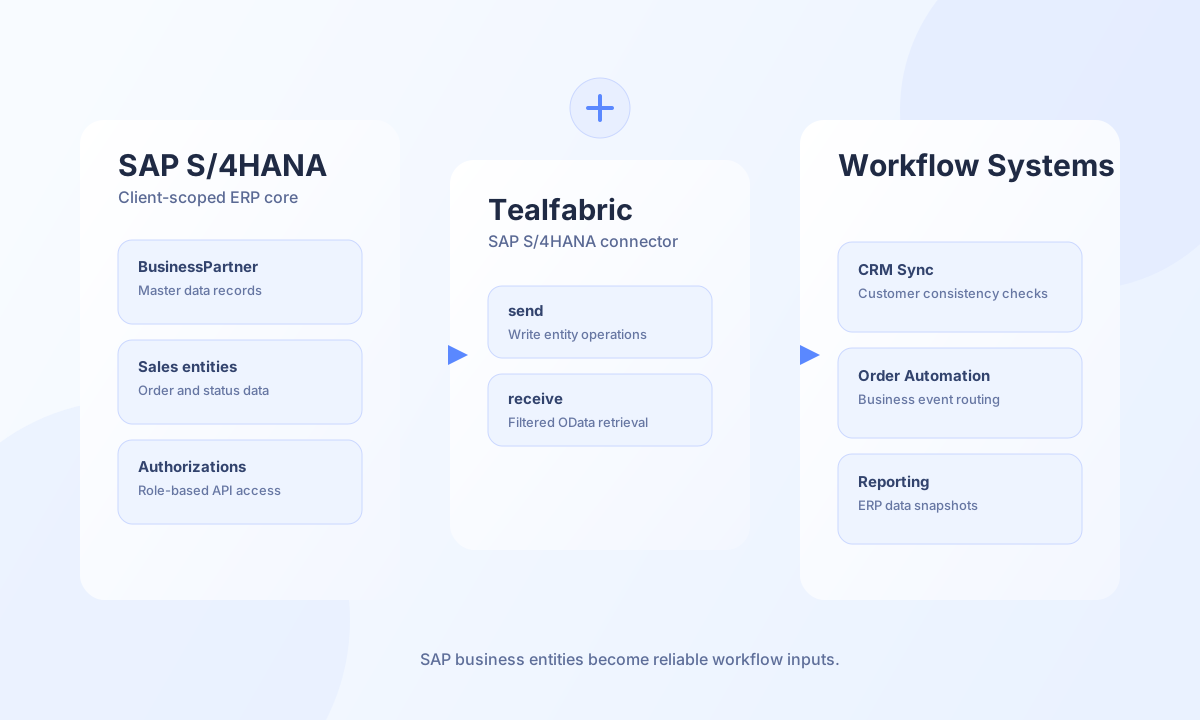
Configuration and access
Before creating the integration, confirm your SAP base URL, client number, and API user credentials with the required authorizations. For most modern implementations, use odata as the API type to simplify entity operations and filtering. Keep credentials scoped to least privilege and rotate them under your standard ERP security policy.
base_url(required): SAP S/4HANA endpoint, such ashttps://sap.example.com:44300(trailing slashes are trimmed).username(required): SAP API user.password(required): Password for the SAP API user.client(required): SAP client number, for example100.api_type(optional):odata(default),soap, orrest. Selects thetestprobe path only; HTTP requests always use JSONContent-Type.timeout_seconds(optional): Request timeout in seconds, default60.
The connector uses Basic Authentication plus the X-SAP-Client header. Only test validates required configuration fields; send, receive, and execute follow legacy behavior and do not pre-validate configuration.
Create or update entities with send
Use send when your workflow needs to write business data such as customers or sales entities in SAP. Paths are relative to base_url (no leading slash). The default HTTP method is POST. Provide data for the JSON body, or omit data to send the full call payload as the body, matching legacy behavior. Empty bodies are omitted on POST/PUT/PATCH, matching PHP !empty($body) semantics.
const baseUrl = "https://api.example.com/api/v1";
const tenantId = "<TENANT_ID>";
const apiKey = "<API_KEY>";

async function createBusinessPartner(integrationId: string) {
  const response = await fetch(`${baseUrl}/integrations/${encodeURIComponent(integrationId)}/execute`, {
    method: "POST",
    headers: {
      "X-API-Key": apiKey,
      "X-Tenant-ID": tenantId,
      "Content-Type": "application/json",
    },
    body: JSON.stringify({
      operation: "send",
      endpoint: "sap/opu/odata/sap/API_BUSINESS_PARTNER/A_BusinessPartner",
      method: "POST",
      data: {
        BusinessPartner: "BP900123",
        BusinessPartnerName: "Acme Distribution GmbH",
        BusinessPartnerCategory: "2",
      },
    }),
  });
  if (!response.ok) throw new Error(`Request failed: ${response.status}`);
  const payload = await response.json();
  return payload.data?.result;
}
curl -X POST "https://api.example.com/api/v1/integrations/<ENTITY_ID>/execute" \
-H "X-API-Key: <API_KEY>" \
-H "X-Tenant-ID: <TENANT_ID>" \
-H "Content-Type: application/json" \
-d '{
"operation": "send",
"endpoint": "sap/opu/odata/sap/API_BUSINESS_PARTNER/A_BusinessPartner",
"method": "POST",
"data": {
"BusinessPartner": "BP900123",
"BusinessPartnerName": "Acme Distribution GmbH",
"BusinessPartnerCategory": "2"
}
}'
{
  "success": true,
  "data": {
    "message": "SAP S/4HANA operation completed successfully",
    "result": {
      "d": {
        "BusinessPartner": "BP900123"
      }
    }
  }
}
Retrieve SAP records with receive
Use receive to fetch OData entity sets or filtered lists. Provide endpoint and optional query as flat OData parameters ($filter, $top, $skip, etc.). List responses prefer d.results[] or results[]; otherwise the full payload is returned as a single-item array.
async function listUsBusinessPartners(integrationId: string) {
  const response = await fetch(`${baseUrl}/integrations/${encodeURIComponent(integrationId)}/execute`, {
    method: "POST",
    headers: {
      "X-API-Key": apiKey,
      "X-Tenant-ID": tenantId,
      "Content-Type": "application/json",
    },
    body: JSON.stringify({
      operation: "receive",
      endpoint: "sap/opu/odata/sap/API_BUSINESS_PARTNER/A_BusinessPartner",
      query: {
        "$filter": "Country eq 'US'",
        "$select": "BusinessPartner,BusinessPartnerName,Country",
        "$top": "25",
        "$skip": "0",
      },
    }),
  });
  if (!response.ok) throw new Error(`Request failed: ${response.status}`);
  const payload = await response.json();
  return payload.data?.items ?? [];
}
{
"success": true,
"data": {
"message": "SAP S/4HANA data retrieved successfully",
"record_count": 1,
"items": [
{
"BusinessPartner": "BP900123",
"BusinessPartnerName": "Acme Distribution GmbH",
"Country": "US"
}
]
}
}
Execute arbitrary SAP API calls with execute
Use execute for custom HTTP methods and endpoints. Provide body or data for the JSON request body; when both are omitted the connector sends no body on mutable methods (legacy default []).
{
  "operation": "execute",
  "endpoint": "sap/opu/odata/sap/API_BUSINESS_PARTNER/A_BusinessPartner('BP900123')",
  "method": "PATCH",
  "body": {
    "BusinessPartnerName": "Acme Distribution LLC"
  }
}
Test connectivity with test
test validates required configuration (base_url, username, password, client) and probes SAP:
api_typeodata(default):GET sap/opu/odata/sap/API_BUSINESS_PARTNER/$metadatasoaporrest:GET sap/bc/rest
{
  "success": true,
  "data": {
    "message": "SAP S/4HANA connection test successful",
    "details": {
      "base_url": "https://sap.example.com:44300",
      "client": "100",
      "api_type": "odata"
    }
  }
}
When configuration is incomplete, test returns success: false with error.message of Configuration validation failed.
Reliability guidance
Most production failures are caused by authorization gaps, invalid entity mappings, or heavy unbounded queries. Test connectivity and permissions before go-live, apply pagination for large datasets, and add retry/backoff logic for transient API failures. XML/SOAP responses are returned as { "xml_response": "..." } when JSON parsing fails and the body contains <?xml.