ServiceNow Service Management Connector Guide
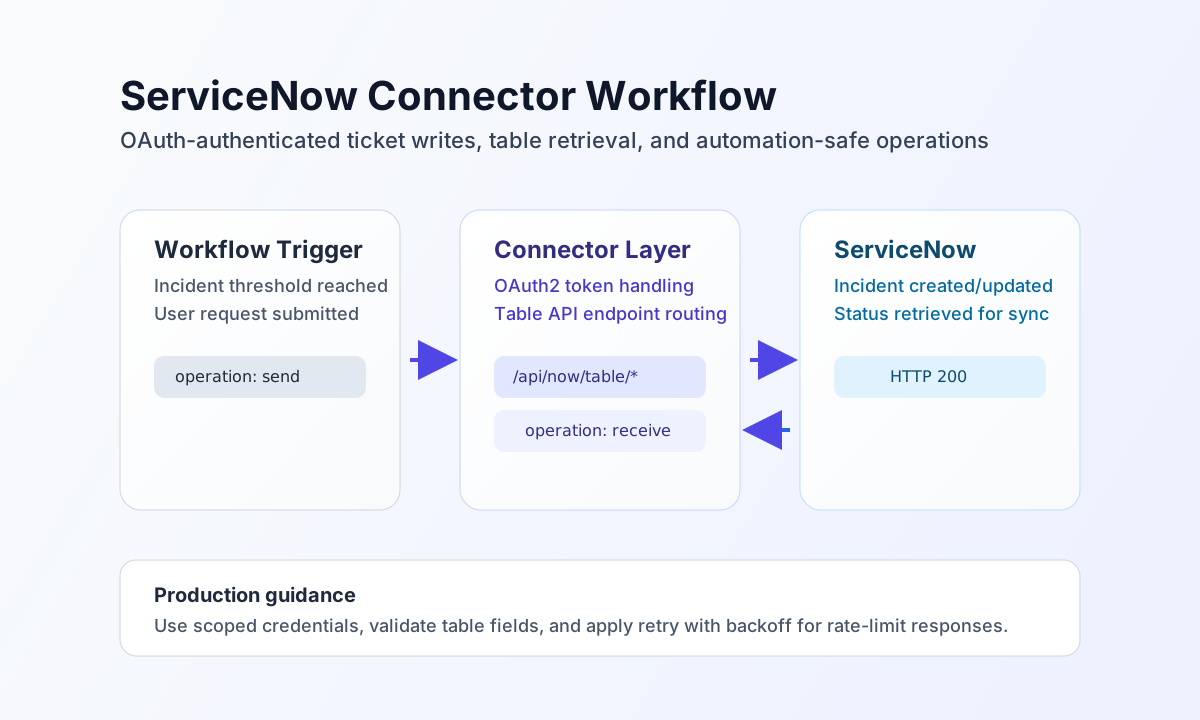
The ServiceNow connector lets Tealfabric workflows create, update, and retrieve ITSM records such as incidents and requests. It is useful for incident intake automation, ticket synchronization, and service operations workflows.
Document information
| Field | Value |
|---|---|
| Canonical URL | /docs/04_connecting-systems/connectors/s/servicenow |
| Version (published date) | 2026-05-08 |
| Tags | connectors, reference, servicenow |
| Connector ID | servicenow-1.0.0 |
Configure instance and OAuth credentials
Set instance_url to your ServiceNow instance and provide client_id and client_secret from an integration application with permission to the tables you plan to automate. Use a dedicated integration identity so access scopes, ownership, and audit history stay clear across environments.
Set timeout_seconds based on expected table operation latency and network conditions. Run the test operation after configuration so you can validate connectivity and credentials before enabling production triggers.
Create records with send
Use send when your workflow needs to create or update ServiceNow records, such as incidents, requests, or work tasks. Keep the endpoint, HTTP method, and request payload aligned with your ServiceNow table schema to reduce validation errors.
const baseUrl = "https://api.example.com/api/v1";
const tenantId = "<TENANT_ID>";
const apiKey = "<API_KEY>";

async function createIncident(integrationId: string) {
  const response = await fetch(`${baseUrl}/integrations/${encodeURIComponent(integrationId)}/execute`, {
    method: "POST",
    headers: {
      "X-API-Key": apiKey,
      "X-Tenant-ID": tenantId,
      "Content-Type": "application/json",
    },
    body: JSON.stringify({
      operation: "send",
      endpoint: "api/now/table/incident",
      method: "POST",
      data: {
        short_description: "Payment API latency above threshold",
        urgency: "2",
        impact: "2",
        category: "software"
      }
    }),
  });
  if (!response.ok) throw new Error(`Request failed: ${response.status}`);
  return response.json();
}
curl -X POST "https://api.example.com/api/v1/integrations/<ENTITY_ID>/execute" \
-H "X-API-Key: <API_KEY>" \
-H "X-Tenant-ID: <TENANT_ID>" \
-H "Content-Type: application/json" \
-d '{
"operation": "send",
"endpoint": "api/now/table/incident",
"method": "POST",
"data": {
"short_description": "Payment API latency above threshold",
"urgency": "2",
"impact": "2",
"category": "software"
}
}'
{
  "success": true,
  "data": {
    "message": "ServiceNow operation completed successfully",
    "result": {
      "result": {
        "sys_id": "<ENTITY_ID>",
        "number": "INC0012345",
        "state": "1"
      }
    }
  }
}
send returns the full Table API JSON payload in data.result. Create responses typically nest the record under result.result.
Retrieve records with receive
Use receive to read ticket status, pull queues, or sync records into downstream systems. Add query filters that match your operational workflow so you only fetch the data needed for the next step.
const baseUrl = "https://api.example.com/api/v1";
const tenantId = "<TENANT_ID>";
const apiKey = "<API_KEY>";

async function fetchOpenIncidents(integrationId: string) {
  const response = await fetch(`${baseUrl}/integrations/${encodeURIComponent(integrationId)}/execute`, {
    method: "POST",
    headers: {
      "X-API-Key": apiKey,
      "X-Tenant-ID": tenantId,
      "Content-Type": "application/json",
    },
    body: JSON.stringify({
      operation: "receive",
      endpoint: "api/now/table/incident",
      query: {
        sysparm_query: "state=1^priority=2",
        sysparm_limit: 20
      }
    }),
  });
  if (!response.ok) throw new Error(`Request failed: ${response.status}`);
  return response.json();
}
curl -X POST "https://api.example.com/api/v1/integrations/<ENTITY_ID>/execute" \
-H "X-API-Key: <API_KEY>" \
-H "X-Tenant-ID: <TENANT_ID>" \
-H "Content-Type: application/json" \
-d '{
"operation": "receive",
"endpoint": "api/now/table/incident",
"query": {
"sysparm_query": "state=1^priority=2",
"sysparm_limit": 20
}
}'
{
  "success": true,
  "data": {
    "message": "ServiceNow data retrieved successfully",
    "record_count": 1,
    "items": [
      {
        "sys_id": "<ENTITY_ID>",
        "number": "INC0012345",
        "short_description": "Payment API latency above threshold",
        "state": "1"
      }
    ]
  }
}
receive unwraps Table API result[] into data.items and sets data.record_count.
Run arbitrary methods with execute
Use execute when you need full control over HTTP method and body. body takes precedence over data when both are present (legacy PHP alias order).
{
  "operation": "execute",
  "endpoint": "api/now/table/incident/<SYS_ID>",
  "method": "PATCH",
  "body": {
    "work_notes": "Investigating latency spike from finance workflow."
  }
}
{
  "success": true,
  "data": {
    "message": "ServiceNow method executed successfully",
    "result": {
      "result": {
        "sys_id": "<SYS_ID>",
        "number": "INC0012345",
        "work_notes": "Investigating latency spike from finance workflow."
      }
    }
  }
}
Validate connectivity with test
Run test after configuring instance_url, client_id, and client_secret. The connector obtains an OAuth token and performs GET api/now/table/incident.
{
  "operation": "test"
}
{
  "success": true,
  "data": {
    "message": "ServiceNow connection test successful",
    "details": {
      "instance_url": "https://your-instance.service-now.com",
      "incidents_found": 3
    }
  }
}
Operate safely in production
ServiceNow enforces API rate limits and returns 429 when your integration exceeds the allowed request volume. Add retry logic with backoff, keep request scopes narrow, and use filtered queries to reduce unnecessary load.
Authentication failures usually indicate invalid OAuth credentials or missing table permissions. Keep credentials in secure storage, avoid writing secrets to logs, and use environment-specific integration apps so test and production access remain isolated.
Related resources
For endpoint details, table schemas, and ACL guidance, see the ServiceNow Developer documentation.