Stability AI Connector Guide
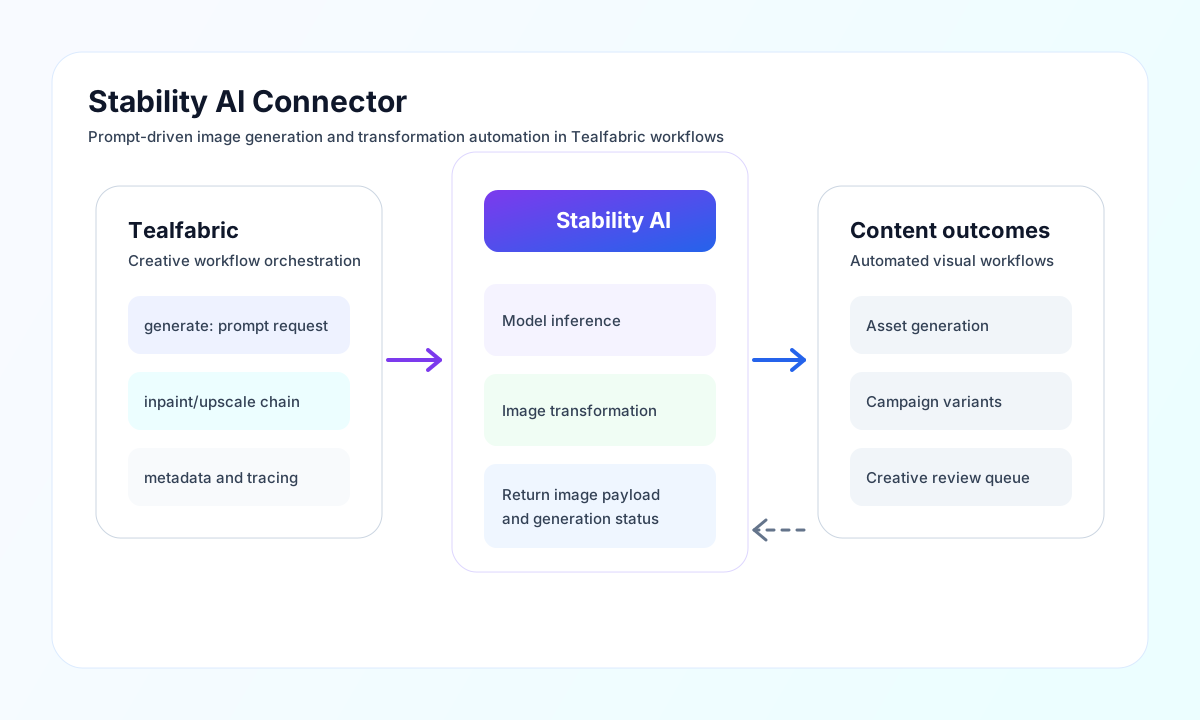
The Stability AI connector lets Tealfabric workflows generate and transform images with diffusion models. It is useful for creative automation, content generation, and workflow-driven image processing where prompts and style controls are important.
Document information
| Field | Value |
|---|---|
| Canonical URL | /docs/04_connecting-systems/connectors/s/stability-ai |
| Version (published date) | 2026-05-08 |
| Tags | connectors, reference, stability-ai |
| Connector ID | stability-ai-1.0.0 |
Configure API access and model defaults
Set api_key from your Stability AI account and keep the key scoped and rotated for production security. Set model to your preferred generation model, then adjust based on quality, latency, and cost requirements.
Use timeout_seconds high enough for your image size and quality settings, since generation can take longer for larger outputs. Run test after setup to confirm authentication and endpoint access before production use.
Generate images with generate
Use generate for text-to-image creation with prompts and optional negative prompts. Keep prompt format consistent in your workflow so generated output remains predictable and easier to evaluate.
const baseUrl = "https://api.example.com/api/v1";
const tenantId = "<TENANT_ID>";
const apiKey = "<API_KEY>";

async function generateImage(integrationId: string) {
  const response = await fetch(`${baseUrl}/integrations/${encodeURIComponent(integrationId)}/execute`, {
    method: "POST",
    headers: {
      "X-API-Key": apiKey,
      "X-Tenant-ID": tenantId,
      "Content-Type": "application/json",
    },
    body: JSON.stringify({
      operation: "generate",
      prompt: "A modern city skyline at sunrise, cinematic lighting, ultra-detailed",
      negative_prompt: "blurry, low quality, artifacts",
      width: 1024,
      height: 1024,
      steps: 30
    }),
  });
  if (!response.ok) throw new Error(`Request failed: ${response.status}`);
  return response.json();
}
curl -X POST "https://api.example.com/api/v1/integrations/<ENTITY_ID>/execute" \
-H "X-API-Key: <API_KEY>" \
-H "X-Tenant-ID: <TENANT_ID>" \
-H "Content-Type: application/json" \
-d '{
"operation": "generate",
"prompt": "A modern city skyline at sunrise, cinematic lighting, ultra-detailed",
"negative_prompt": "blurry, low quality, artifacts",
"width": 1024,
"height": 1024,
"steps": 30
}'
{
  "success": true,
  "data": {
    "image_count": 1,
    "artifacts": [
      {
        "base64": "<base64-png>",
        "seed": 1234567890,
        "finishReason": "SUCCESS"
      }
    ],
    "data": {
      "artifacts": [
        {
          "base64": "<base64-png>",
          "seed": 1234567890,
          "finishReason": "SUCCESS"
        }
      ]
    }
  }
}
Use data.artifacts[0].base64 (or the nested data.data.artifacts mirror) for the generated image payload. Override model per request when you need a different engine than the integration default.
Test authentication with test
Use test after configuring api_key to confirm the key is valid via GET /user/account.
const baseUrl = "https://api.example.com/api/v1";
const tenantId = "<TENANT_ID>";
const apiKey = "<API_KEY>";

async function testStabilityConnection(integrationId: string) {
  const response = await fetch(`${baseUrl}/integrations/${encodeURIComponent(integrationId)}/execute`, {
    method: "POST",
    headers: {
      "X-API-Key": apiKey,
      "X-Tenant-ID": tenantId,
      "Content-Type": "application/json",
    },
    body: JSON.stringify({ operation: "test" }),
  });
  if (!response.ok) throw new Error(`Request failed: ${response.status}`);
  return response.json();
}
curl -X POST "https://api.example.com/api/v1/integrations/<ENTITY_ID>/execute" \
-H "X-API-Key: <API_KEY>" \
-H "X-Tenant-ID: <TENANT_ID>" \
-H "Content-Type: application/json" \
-d '{ "operation": "test" }'
{
  "success": true,
  "data": {
    "message": "Stability AI connection test successful",
    "details": {
      "endpoint": "https://api.stability.ai/v1",
      "model": "stable-diffusion-xl-1024-v1-0"
    }
  }
}
Multipart operations (image-to-image, inpainting, upscale)
Legacy and native connectors validate required inputs for image-to-image, inpainting, and upscale, then return an error indicating multipart form uploads are not implemented in this connector. Use the Stability AI SDK or direct multipart API calls when you need those workflows.
Reliability and output quality guidance
Common failures include invalid API keys, unsupported model names, rate-limit responses, and timeouts on high-resolution generations. Validate authentication and model availability first, then tune dimensions and steps for your performance target.
For stable production behavior, use retries with backoff for transient failures, version prompt templates, and store generation metadata with each output. This improves traceability and helps maintain consistent image quality over time.