SAP Manufacturing (ME/MII) Connector Guide
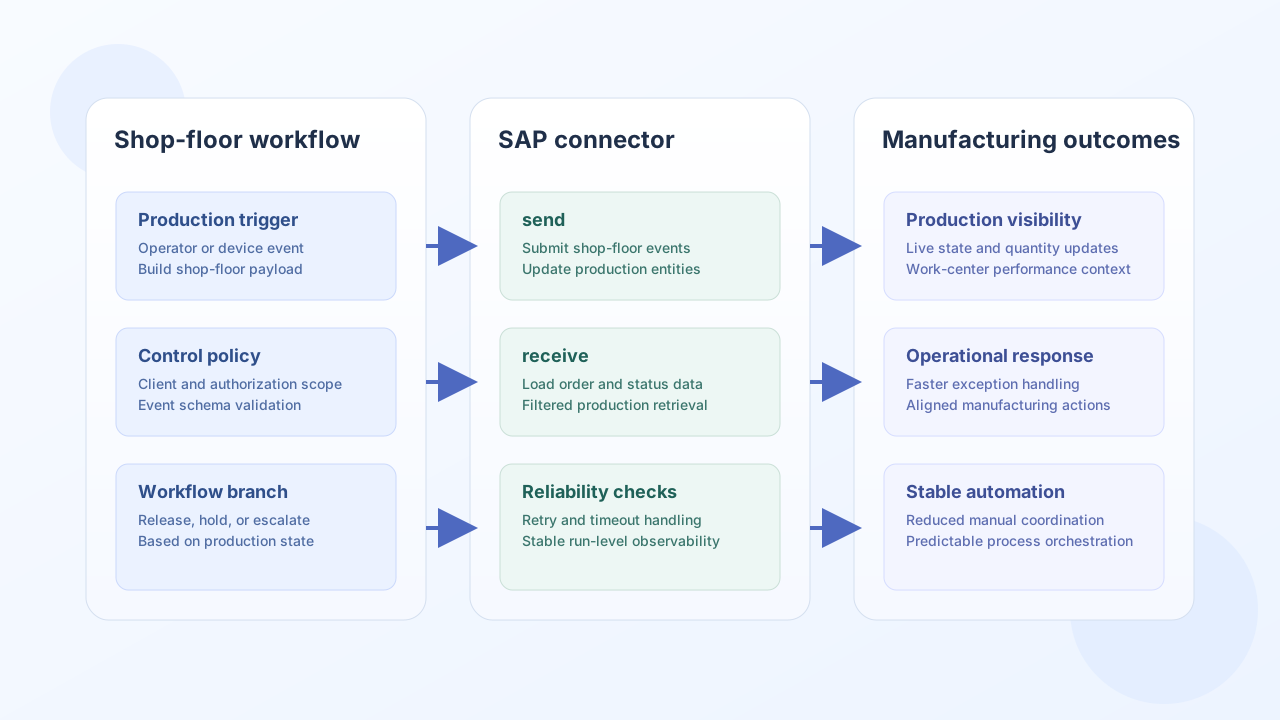
The SAP Manufacturing connector helps Tealfabric workflows exchange production events and order state with SAP ME and SAP MII systems. It is designed for shop-floor and manufacturing orchestration where process timing, work-center visibility, and production status updates matter.
Document information
| Field | Value |
|---|---|
| Canonical URL | /docs/04_connecting-systems/connectors/s/sap-manufacturing |
| Version (published date) | 2026-05-08 |
| Tags | connectors, reference, sap-manufacturing |
| Connector ID | sap-manufacturing-1.0.0 |
Configuration and authentication
Configure SAP endpoint and tenant context so workflow calls target the correct manufacturing client and authorization scope. Use a dedicated integration user whenever possible to simplify access governance and auditability.
base_url(required): SAP ME/MII instance URL.username(required): SAP integration username.password(required): password for the integration user.client(required): SAP client number.timeout_seconds(optional): request timeout value.
The connector typically uses Basic Authentication, with OAuth-based setups possible in some SAP landscapes. Run test after configuration changes to validate access before production use.
Submit production updates with send
Use send to post shop-floor events or update manufacturing entities such as production orders. Keep event and order identifiers consistent so downstream systems can correlate actions reliably.
const baseUrl = "https://api.example.com/api/v1";
const tenantId = "<TENANT_ID>";
const apiKey = "<API_KEY>";

async function reportProductionStart(integrationId: string) {
  const response = await fetch(`${baseUrl}/integrations/${encodeURIComponent(integrationId)}/execute`, {
    method: "POST",
    headers: {
      "X-API-Key": apiKey,
      "X-Tenant-ID": tenantId,
      "Content-Type": "application/json",
    },
    body: JSON.stringify({
      operation: "send",
      event_type: "ProductionStart",
      event_data: {
        productionOrder: "PO-001",
        workCenter: "WC-001",
        material: "MAT-001",
        quantity: 100,
        timestamp: "2026-05-08T14:40:00Z",
        operator: "OP-001",
      },
    }),
  });
  if (!response.ok) throw new Error(`Request failed: ${response.status}`);
  const payload = await response.json();
  return payload.result;
}
curl -X POST "https://api.example.com/api/v1/integrations/<ENTITY_ID>/execute" \
-H "X-API-Key: <API_KEY>" \
-H "X-Tenant-ID: <TENANT_ID>" \
-H "Content-Type: application/json" \
-d '{
"operation": "send",
"event_type": "ProductionStart",
"event_data": {
"productionOrder": "PO-001",
"workCenter": "WC-001",
"material": "MAT-001",
"quantity": 100,
"timestamp": "2026-05-08T14:40:00Z",
"operator": "OP-001"
}
}'
{
  "success": true,
  "event_id": "<ENTITY_ID>",
  "result": {
    "status": "accepted",
    "productionOrder": "PO-001"
  }
}
Retrieve production data with receive
Use receive to load production order and event state into workflow logic for exception handling, scheduling, and reporting. Filter and paginate queries to keep performance predictable on busy manufacturing systems.
const baseUrl = "https://api.example.com/api/v1";
const tenantId = "<TENANT_ID>";
const apiKey = "<API_KEY>";

async function listInProgressOrders(integrationId: string) {
  const response = await fetch(`${baseUrl}/integrations/${encodeURIComponent(integrationId)}/execute`, {
    method: "POST",
    headers: {
      "X-API-Key": apiKey,
      "X-Tenant-ID": tenantId,
      "Content-Type": "application/json",
    },
    body: JSON.stringify({
      operation: "receive",
      entity: "ProductionOrder",
      filter: "status eq 'InProgress'",
      fields: ["orderNumber", "material", "quantity", "status"],
      top: 25,
      skip: 0,
    }),
  });
  if (!response.ok) throw new Error(`Request failed: ${response.status}`);
  const payload = await response.json();
  return payload.entities ?? [];
}
curl -X POST "https://api.example.com/api/v1/integrations/<ENTITY_ID>/execute" \
-H "X-API-Key: <API_KEY>" \
-H "X-Tenant-ID: <TENANT_ID>" \
-H "Content-Type: application/json" \
-d '{
"operation": "receive",
"entity": "ProductionOrder",
"filter": "status eq '\''InProgress'\''",
"fields": ["orderNumber", "material", "quantity", "status"],
"top": 25,
"skip": 0
}'
{
  "success": true,
  "record_count": 2,
  "entities": [
    {
      "orderNumber": "PO-001",
      "material": "MAT-001",
      "quantity": 100,
      "status": "InProgress"
    }
  ]
}
Reliability guidance
Most manufacturing integration failures come from authorization drift, invalid event payloads, and high-volume polling without filters. Validate credentials and client targeting with test, enforce event schema checks before send, and apply backoff-based retries for transient failures.
These practices keep shop-floor orchestration stable and easier to operate at scale.