Scaleway API Connector Guide
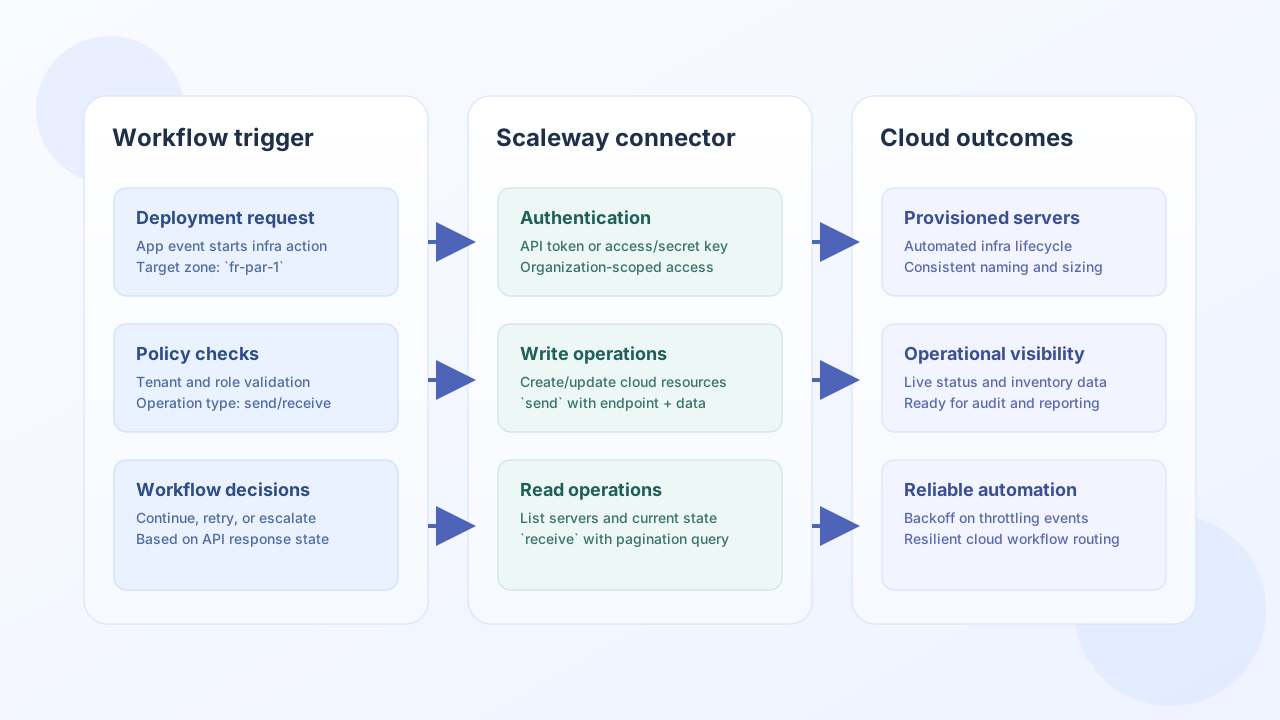
The Scaleway API connector lets your Tealfabric workflows call Scaleway services for infrastructure lifecycle and inventory automation. You can use it to create or update cloud resources with send, then fetch current state with receive for approval gates, reconciliation, and reporting.
Document information
| Field | Value |
|---|---|
| Canonical URL | /docs/04_connecting-systems/connectors/s/scaleway-api |
| Version (published date) | 2026-05-08 |
| Tags | connectors, reference, scaleway-api |
| Connector ID | scaleway-api-1.0.0 |
Configuration and authentication
Start by configuring organization context and authentication so the connector can access the right Scaleway account. Choose one authentication method per connector configuration to avoid ambiguous credential handling.
organization_id(required): Scaleway organization identifier.- Authentication (required): either
api_tokenor bothaccess_keyandsecret_key. base_url(optional): defaults tohttps://api.scaleway.com.region(optional): defaults tofr-par.timeout_seconds(optional): defaults to30.
Use scoped credentials with least privilege and rotate keys on a regular schedule. This reduces operational risk while keeping workflow access predictable.
Create resources with send
Use send for provisioning and update flows where your workflow must create or modify Scaleway resources. This example creates a server in a specific zone using the connector execution endpoint.
const baseUrl = "https://api.example.com/api/v1";
const tenantId = "<TENANT_ID>";
const apiKey = "<API_KEY>";

async function createScalewayServer(integrationId: string) {
  const response = await fetch(`${baseUrl}/integrations/${encodeURIComponent(integrationId)}/execute`, {
    method: "POST",
    headers: {
      "X-API-Key": apiKey,
      "X-Tenant-ID": tenantId,
      "Content-Type": "application/json",
    },
    body: JSON.stringify({
      operation: "send",
      endpoint: "instance/v1/zones/fr-par-1/servers",
      method: "POST",
      data: {
        name: "workflow-web-01",
        commercial_type: "PLAY2-PICO",
        image: "11111111-2222-3333-4444-555555555555",
      },
    }),
  });
  if (!response.ok) throw new Error(`Request failed: ${response.status}`);
  const payload = await response.json();
  return payload.data?.response ?? payload.data;
}
curl -X POST "https://api.example.com/api/v1/integrations/<ENTITY_ID>/execute" \
-H "X-API-Key: <API_KEY>" \
-H "X-Tenant-ID: <TENANT_ID>" \
-H "Content-Type: application/json" \
-d '{
"operation": "send",
"endpoint": "instance/v1/zones/fr-par-1/servers",
"method": "POST",
"data": {
"name": "workflow-web-01",
"commercial_type": "PLAY2-PICO",
"image": "11111111-2222-3333-4444-555555555555"
}
}'
{
  "success": true,
  "data": {
    "message_count": 1,
    "response": {
      "id": "<ENTITY_ID>",
      "name": "workflow-web-01",
      "state": "starting",
      "zone": "fr-par-1"
    },
    "http_status": 200
  }
}
Retrieve infrastructure data with receive
Use receive when your workflow needs current infrastructure state, such as listing active servers before scaling actions or validating deployment outcomes. Keep query scopes tight to improve response time and reduce API pressure.
const baseUrl = "https://api.example.com/api/v1";
const tenantId = "<TENANT_ID>";
const apiKey = "<API_KEY>";

async function listScalewayServers(integrationId: string) {
  const response = await fetch(`${baseUrl}/integrations/${encodeURIComponent(integrationId)}/execute`, {
    method: "POST",
    headers: {
      "X-API-Key": apiKey,
      "X-Tenant-ID": tenantId,
      "Content-Type": "application/json",
    },
    body: JSON.stringify({
      operation: "receive",
      endpoint: "instance/v1/zones/fr-par-1/servers",
      query: {
        page: 1,
        per_page: 20,
      },
    }),
  });
  if (!response.ok) throw new Error(`Request failed: ${response.status}`);
  const payload = await response.json();
  return payload.data?.data ?? [];
}
curl -X POST "https://api.example.com/api/v1/integrations/<ENTITY_ID>/execute" \
-H "X-API-Key: <API_KEY>" \
-H "X-Tenant-ID: <TENANT_ID>" \
-H "Content-Type: application/json" \
-d '{
"operation": "receive",
"endpoint": "instance/v1/zones/fr-par-1/servers",
"query": {
"page": 1,
"per_page": 20
}
}'
{
  "success": true,
  "data": {
    "message_count": 2,
    "data": [
      {"id": "<ENTITY_ID>", "name": "workflow-web-01", "state": "running"},
      {"id": "<ENTITY_ID>", "name": "workflow-web-02", "state": "stopped"}
    ],
    "total_size": 2,
    "http_status": 200,
    "total_count": 2
  }
}
Operations, testing, and reliability
Besides send and receive, the connector supports sync for paired outbound and inbound behavior and test for connectivity checks against iam/v1alpha1/organizations. For sync, results.outbound and results.inbound contain the same operation payloads returned by standalone send and receive calls (message_count, response or data, http_status, and related fields)—not nested success/data connector envelopes.
For resilient automation, handle authentication failures, 4xx/5xx responses, and rate limits with retries and backoff policies based on operation criticality.
This approach keeps infrastructure workflows observable and predictable as your cloud footprint grows.