Greenhouse Connector Guide
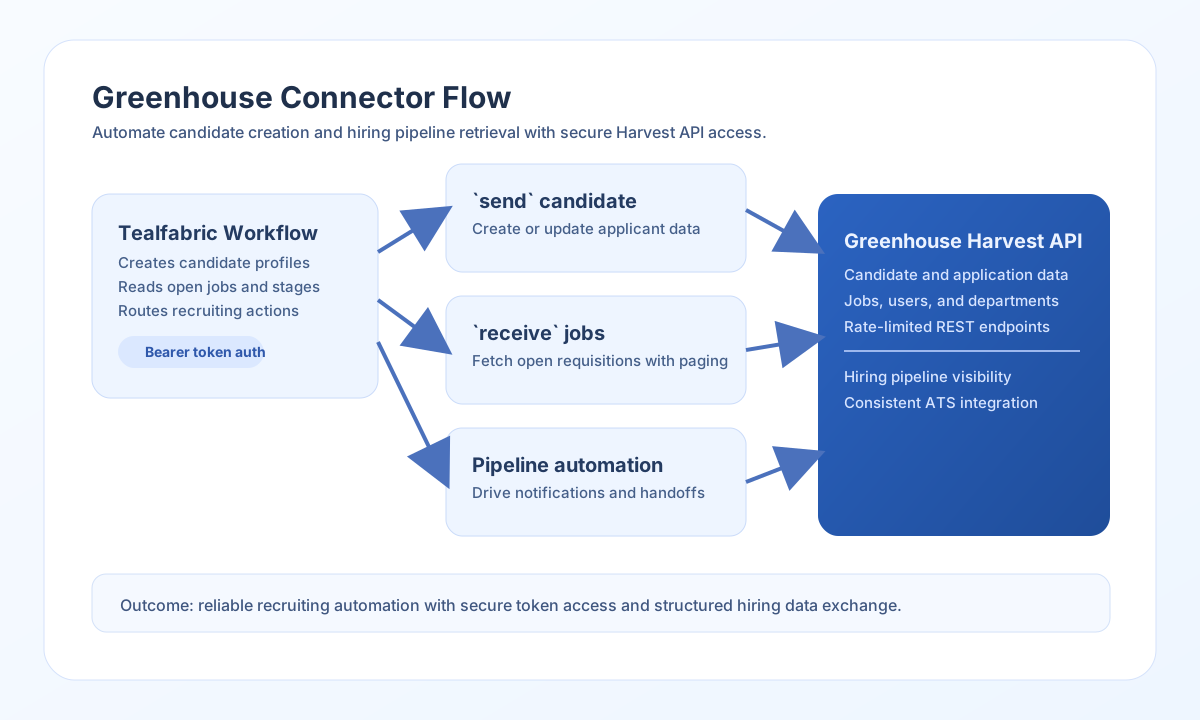
The Greenhouse connector helps Tealfabric workflows automate recruiting operations such as creating candidates, submitting applications, and retrieving job or candidate data. It is built for Greenhouse Harvest API integrations that use token-based authentication.
Document information
| Field | Value |
|---|---|
| Canonical URL | /docs/04_connecting-systems/connectors/g/greenhouse |
| Version (published date) | 2026-05-08 |
| Tags | connectors, reference, greenhouse |
| Connector ID | greenhouse-1.0.0 |
Configure authentication
Set token to a Greenhouse Harvest API credential with permission to the resources your workflows will access. Keep base_url as the default (https://harvest.greenhouse.io/v1) unless your environment requires a specific endpoint.
Use timeout_seconds for long-running bulk calls. test validates required configuration before probing the API; other operations rely on the configured token at request time.
Create candidates with send
Use send when your workflow needs to push candidate or application data into Greenhouse. This is common in lead-to-applicant or cross-system talent synchronization automations.
const baseUrl = "https://api.example.com/api/v1";
const tenantId = "<TENANT_ID>";
const apiKey = "<API_KEY>";

async function createCandidate(integrationId: string) {
  const response = await fetch(`${baseUrl}/integrations/${encodeURIComponent(integrationId)}/execute`, {
    method: "POST",
    headers: {
      "X-API-Key": apiKey,
      "X-Tenant-ID": tenantId,
      "Content-Type": "application/json",
    },
    body: JSON.stringify({
      operation: "send",
      endpoint: "candidates",
      method: "POST",
      data: {
        first_name: "Avery",
        last_name: "Morgan",
        email_addresses: [{ value: "avery.morgan@example.com", type: "personal" }],
        applications: [{ job_id: 120045, source_id: 11 }]
      }
    }),
  });
  if (!response.ok) throw new Error(`Request failed: ${response.status}`);
  return response.json();
}
curl -X POST "https://api.example.com/api/v1/integrations/<ENTITY_ID>/execute" \
-H "X-API-Key: <API_KEY>" \
-H "X-Tenant-ID: <TENANT_ID>" \
-H "Content-Type: application/json" \
-d '{
"operation": "send",
"endpoint": "candidates",
"method": "POST",
"data": {
"first_name": "Avery",
"last_name": "Morgan",
"email_addresses": [{"value":"avery.morgan@example.com","type":"personal"}],
"applications": [{"job_id":120045,"source_id":11}]
}
}'
{
  "success": true,
  "data": {
    "message_count": 1,
    "data": {
      "id": "<ENTITY_ID>",
      "first_name": "Avery",
      "last_name": "Morgan"
    },
    "response": {
      "id": "<ENTITY_ID>",
      "first_name": "Avery",
      "last_name": "Morgan"
    }
  }
}
Retrieve recruiting data with receive
Use receive to pull candidates, jobs, or applications for workflow decisions and reporting. Pagination and filters help you process large pipelines safely.
const baseUrl = "https://api.example.com/api/v1";
const tenantId = "<TENANT_ID>";
const apiKey = "<API_KEY>";

async function listOpenJobs(integrationId: string) {
  const response = await fetch(`${baseUrl}/integrations/${encodeURIComponent(integrationId)}/execute`, {
    method: "POST",
    headers: {
      "X-API-Key": apiKey,
      "X-Tenant-ID": tenantId,
      "Content-Type": "application/json",
    },
    body: JSON.stringify({
      operation: "receive",
      endpoint: "jobs",
      query: {
        status: "open",
        per_page: 25,
        page: 1
      }
    }),
  });
  if (!response.ok) throw new Error(`Request failed: ${response.status}`);
  return response.json();
}
curl -X POST "https://api.example.com/api/v1/integrations/<ENTITY_ID>/execute" \
-H "X-API-Key: <API_KEY>" \
-H "X-Tenant-ID: <TENANT_ID>" \
-H "Content-Type: application/json" \
-d '{
"operation": "receive",
"endpoint": "jobs",
"query": {
"status": "open",
"per_page": 25,
"page": 1
}
}'
{
  "success": true,
  "data": {
    "message_count": 2,
    "data": [
      {
        "id": "<ENTITY_ID>",
        "name": "Senior Backend Engineer",
        "status": "open"
      }
    ],
    "total_size": 2
  }
}
Test connectivity with test
test validates required token configuration and calls GET users/current_user to confirm Harvest API access.
{
  "success": true,
  "data": {
    "message": "Greenhouse connection test successful",
    "details": {
      "api_base_url": "https://harvest.greenhouse.io/v1",
      "user_id": 12345,
      "email": "recruiter@example.com"
    }
  }
}
Reliability guidance
Most failures come from token scope issues, request shape mismatches, or API rate limits. Validate token permissions and endpoint payload requirements against Greenhouse Harvest API documentation before rollout.
For stable production behavior, paginate large reads, use incremental filters (updated_after), and apply retry/backoff for transient errors. This keeps hiring workflows accurate and resilient.