Google BigQuery Connector Guide
The Google BigQuery connector lets Tealfabric workflows run analytical SQL and stream structured rows into BigQuery tables. It is commonly used for reporting pipelines, near-real-time event ingestion, and warehouse-backed decision automation.
Document information
| Field | Value |
|---|---|
| Canonical URL | /docs/04_connecting-systems/connectors/g/google-bigquery |
| Version (published date) | 2026-05-08 |
| Tags | connectors, reference, google-bigquery |
| Connector ID | google-bigquery-1.0.0 |
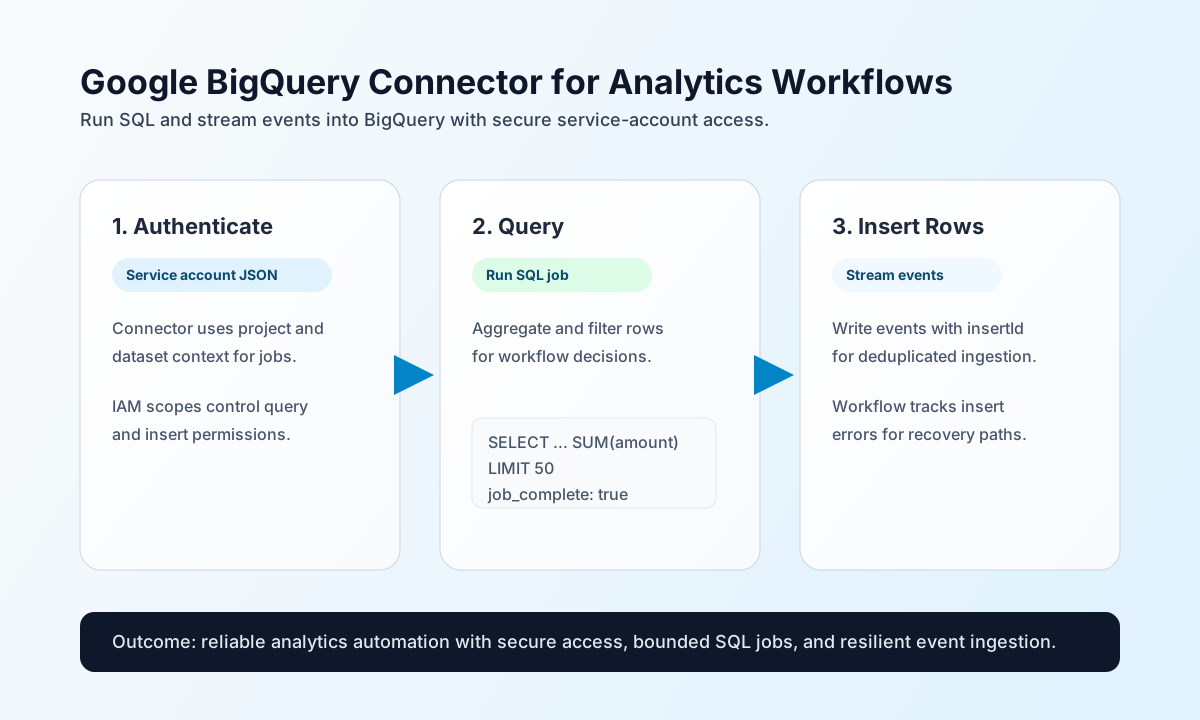
Configure BigQuery access
Configure the connector with your BigQuery project, dataset, and service account credentials so workflows can execute queries and insert rows without exposing secrets in each step. This keeps warehouse access centralized and operationally consistent.
Required settings are project_id, dataset_id, and credentials_json. Optional timeout_seconds helps control long-running jobs. For most workflows, grant least-privilege roles such as roles/bigquery.jobUser and table-scoped data write/read permissions as needed.
Use test after setup to confirm service-account credentials and project access before production workflows.
Run analytical SQL with query
Use query when workflows need aggregated metrics, filtered snapshots, or decision-driving analytics from BigQuery. Keep query text explicit and bounded (LIMIT, date filters) to control cost and latency.
const baseUrl = "https://api.example.com/api/v1";
const tenantId = "<TENANT_ID>";
const apiKey = "<API_KEY>";

async function runRevenueQuery(integrationId: string) {
  const response = await fetch(`${baseUrl}/integrations/${encodeURIComponent(integrationId)}/execute`, {
    method: "POST",
    headers: {
      "X-API-Key": apiKey,
      "X-Tenant-ID": tenantId,
      "Content-Type": "application/json",
    },
    body: JSON.stringify({
      operation: "query",
      query: "SELECT customer_id, SUM(amount) AS total_amount FROM `my-project.analytics.orders` WHERE order_date >= DATE '2026-05-01' GROUP BY customer_id ORDER BY total_amount DESC LIMIT 50"
    }),
  });
  if (!response.ok) throw new Error(`Request failed: ${response.status}`);
  return response.json();
}
curl -X POST "https://api.example.com/api/v1/integrations/<ENTITY_ID>/execute" \
-H "X-API-Key: <API_KEY>" \
-H "X-Tenant-ID: <TENANT_ID>" \
-H "Content-Type: application/json" \
-d '{
"operation": "query",
"query": "SELECT customer_id, SUM(amount) AS total_amount FROM `my-project.analytics.orders` WHERE order_date >= DATE '\''2026-05-01'\'' GROUP BY customer_id ORDER BY total_amount DESC LIMIT 50"
}'
{
  "success": true,
  "data": {
    "row_count": 1,
    "data": {
      "rows": [
        {
          "f": [
            { "v": "cust_001" },
            { "v": "24120.50" }
          ]
        }
      ],
      "schema": {
        "fields": [
          { "name": "customer_id", "type": "STRING" },
          { "name": "total_amount", "type": "NUMERIC" }
        ]
      },
      "jobComplete": true
    }
  }
}
Stream rows with insert
Use insert for near-real-time event writes into BigQuery tables. Include insertId values to support deduplication during retries.
const baseUrl = "https://api.example.com/api/v1";
const tenantId = "<TENANT_ID>";
const apiKey = "<API_KEY>";

async function insertEventRows(integrationId: string) {
  const response = await fetch(`${baseUrl}/integrations/${encodeURIComponent(integrationId)}/execute`, {
    method: "POST",
    headers: {
      "X-API-Key": apiKey,
      "X-Tenant-ID": tenantId,
      "Content-Type": "application/json",
    },
    body: JSON.stringify({
      operation: "insert",
      table: "events",
      rows: [
        {
          insertId: "evt-<ENTITY_ID>",
          json: {
            event_name: "user_signup",
            user_id: "<ENTITY_ID>",
            occurred_at: "2026-05-08T16:13:00Z"
          }
        }
      }
    }),
  });
  if (!response.ok) throw new Error(`Request failed: ${response.status}`);
  return response.json();
}
curl -X POST "https://api.example.com/api/v1/integrations/<ENTITY_ID>/execute" \
-H "X-API-Key: <API_KEY>" \
-H "X-Tenant-ID: <TENANT_ID>" \
-H "Content-Type: application/json" \
-d '{
"operation": "insert",
"table": "events",
"rows": [
{
"insertId": "evt-<ENTITY_ID>",
"json": {
"event_name": "user_signup",
"user_id": "<ENTITY_ID>",
"occurred_at": "2026-05-08T16:13:00Z"
}
}
]
}'
{
  "success": true,
  "data": {
    "row_count": 1,
    "data": {
      "insertErrors": []
    }
  }
}
Validate credentials with test
Use test to confirm service-account authentication and project dataset access. The connector calls GET .../projects/{project_id}/datasets and returns configured project_id and dataset_id in data.details.
curl -X POST "https://api.example.com/api/v1/integrations/<ENTITY_ID>/execute" \
  -H "X-API-Key: <API_KEY>" \
  -H "X-Tenant-ID: <TENANT_ID>" \
  -H "Content-Type: application/json" \
  -d '{
    "operation": "test"
  }'
{
  "success": true,
  "data": {
    "message": "BigQuery connection test successful",
    "details": {
      "project_id": "my-project",
      "dataset_id": "analytics"
    }
  }
}
Reliability guidance
Most failures come from invalid service account JSON, insufficient IAM roles, or malformed SQL/row schemas. If an operation fails, validate credentials first, then verify dataset/table permissions, and finally inspect query text or row shape against table schema.
For stable production pipelines, bound query scans, monitor job latency, and use deterministic insertId values for streaming writes. These practices improve cost control and reduce duplicate analytical records.