GraphQL Connector Guide
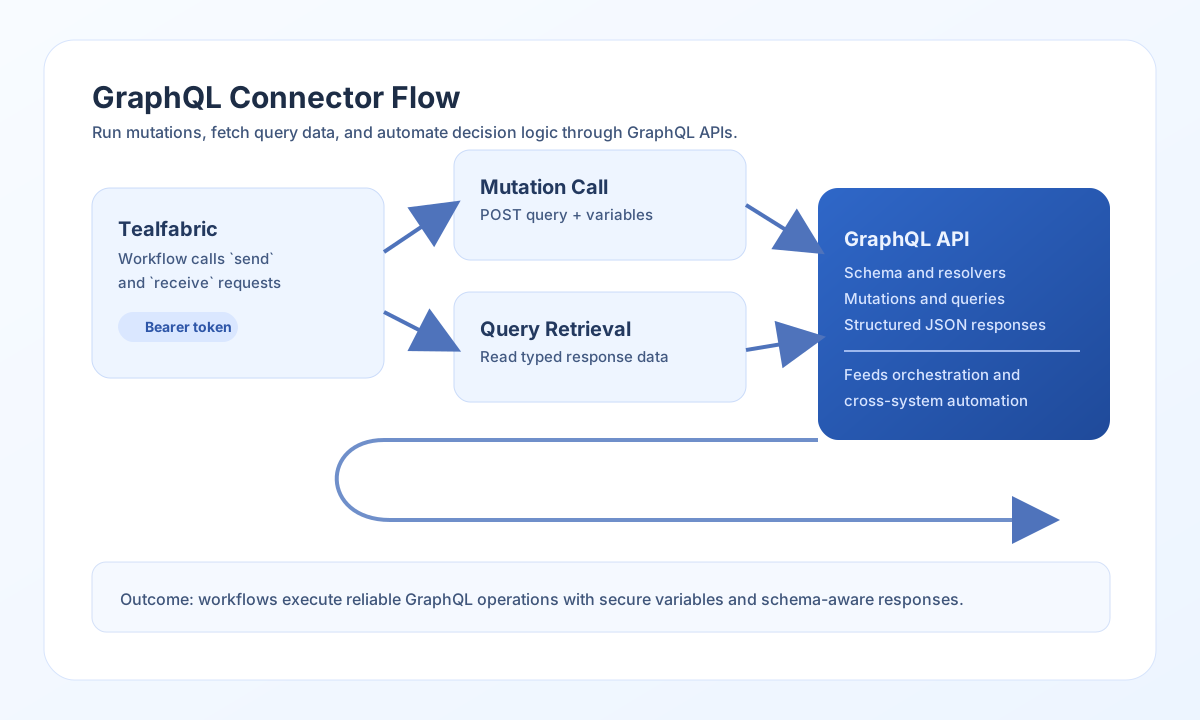
The GraphQL connector lets Tealfabric workflows execute GraphQL queries and mutations against external APIs. It is useful when you need a generic integration layer for read/write operations across services that expose GraphQL schemas.
Document information
| Field | Value |
|---|---|
| Canonical URL | /docs/04_connecting-systems/connectors/g/graphql |
| Version (published date) | 2026-09-20 |
| Tags | connectors, reference, graphql |
| Connector ID | graphql-1.0.0 |
Configure the endpoint
base_url is required. Set it to the GraphQL HTTP POST URL (for example https://api.example.com/graphql). When the path does not contain /graphql, the connector appends /graphql. If the vendor uses a nested path such as Digitraffic https://rata.digitraffic.fi/api/v2/graphql/graphql, paste that full URL so it is used as-is.
token is optional. Leave it empty for unauthenticated GraphQL APIs. When set, the connector sends Authorization: Bearer <token>. Requests always send Accept-Encoding: gzip and decode gzip response bodies (including when Node fetch leaves compressed bytes intact).
Use timeout_seconds (default 30) for slow or complex operations. When a token is used, ensure it has schema-level permissions required for the fields and mutations your workflow executes.
Execute mutations with send
Use send for GraphQL mutations that create, update, or delete records. Keep mutation text and variables separate so your workflow stays clear and secure.
const baseUrl = "https://api.example.com/api/v1";
const tenantId = "<TENANT_ID>";
const apiKey = "<API_KEY>";

async function createUser(integrationId: string) {
  const response = await fetch(`${baseUrl}/integrations/${encodeURIComponent(integrationId)}/execute`, {
    method: "POST",
    headers: {
      "X-API-Key": apiKey,
      "X-Tenant-ID": tenantId,
      "Content-Type": "application/json",
    },
    body: JSON.stringify({
      operation: "send",
      mutation: `
        mutation CreateUser(name: String!, email: String!) {
          createUser(name: name, email: email) {
            id
            name
            email
          }
        }
      `,
      variables: {
        name: "Alex Taylor",
        email: "alex.taylor@example.com"
      }
    }),
  });
  if (!response.ok) throw new Error(`Request failed: ${response.status}`);
  return response.json();
}
curl -X POST "https://api.example.com/api/v1/integrations/<ENTITY_ID>/execute" \
  -H "X-API-Key: <API_KEY>" \
  -H "X-Tenant-ID: <TENANT_ID>" \
  -H "Content-Type: application/json" \
  -d '{
    "operation": "send",
    "mutation": "mutation CreateUser($name: String!, email: String!) { createUser(name: $name, email: email) { id name email } }",
    "variables": {
      "name": "Alex Taylor",
      "email": "alex.taylor@example.com"
    }
  }'
{
  "success": true,
  "data": {
    "message_count": 1,
    "data": {
      "createUser": {
        "id": "<ENTITY_ID>",
        "name": "Alex Taylor",
        "email": "alex.taylor@example.com"
      }
    },
    "response": {
      "data": {
        "createUser": {
          "id": "<ENTITY_ID>",
          "name": "Alex Taylor",
          "email": "alex.taylor@example.com"
        }
      }
    }
  }
}
Execute queries with receive
Use receive for GraphQL queries that fetch entities and related fields for workflow decisions. Variables help keep requests reusable and avoid unsafe string interpolation.
const baseUrl = "https://api.example.com/api/v1";
const tenantId = "<TENANT_ID>";
const apiKey = "<API_KEY>";

async function getUser(integrationId: string) {
  const response = await fetch(`${baseUrl}/integrations/${encodeURIComponent(integrationId)}/execute`, {
    method: "POST",
    headers: {
      "X-API-Key": apiKey,
      "X-Tenant-ID": tenantId,
      "Content-Type": "application/json",
    },
    body: JSON.stringify({
      operation: "receive",
      query: `
        query GetUser(id: ID!) {
          user(id: id) {
            id
            name
            email
          }
        }
      `,
      variables: {
        id: "<ENTITY_ID>"
      }
    }),
  });
  if (!response.ok) throw new Error(`Request failed: ${response.status}`);
  return response.json();
}
curl -X POST "https://api.example.com/api/v1/integrations/<ENTITY_ID>/execute" \
  -H "X-API-Key: <API_KEY>" \
  -H "X-Tenant-ID: <TENANT_ID>" \
  -H "Content-Type: application/json" \
  -d '{
    "operation": "receive",
    "query": "query GetUser($id: ID!) { user(id: $id) { id name email } }",
    "variables": {
      "id": "<ENTITY_ID>"
    }
  }'
{
  "success": true,
  "data": {
    "message_count": 1,
    "data": [
      {
        "id": "<ENTITY_ID>",
        "name": "Alex Taylor",
        "email": "alex.taylor@example.com"
      }
    ],
    "total_size": 1
  }
}
Bidirectional sync
Use sync to run an optional outbound mutation and/or inbound query in one call. Empty outbound or inbound objects are skipped (PHP !empty semantics).
{
  "operation": "sync",
  "outbound": {
    "mutation": "mutation { updateUser(id: \"1\", name: \"Alex\") { id name } }"
  },
  "inbound": {
    "query": "query { user(id: \"1\") { id name email } }"
  }
}
Sequential batch
Use batch to run multiple send or receive sub-operations. Each entry supports operation or type (default receive) and optional nested data.
Connection test
test runs the introspection query { __schema { queryType { name } } } against the configured endpoint. base_url must be set before any GraphQL request. token is not required for unauthenticated APIs.
{
  "success": true,
  "data": {
    "message": "GraphQL connection test successful",
    "details": {
      "api_base_url": "https://api.example.com"
    }
  }
}
Reliability guidance
Most GraphQL failures come from an incomplete base_url, token permission issues on authenticated APIs, schema mismatches, or variable type errors. Confirm the POST endpoint first, then authentication if the API requires it, then fields, arguments, and variable shapes against the API schema.
For stable production workflows, request only required fields, handle errors responses explicitly, and use pagination for large collections. This keeps GraphQL operations predictable and efficient.