Gmail API Connector Guide
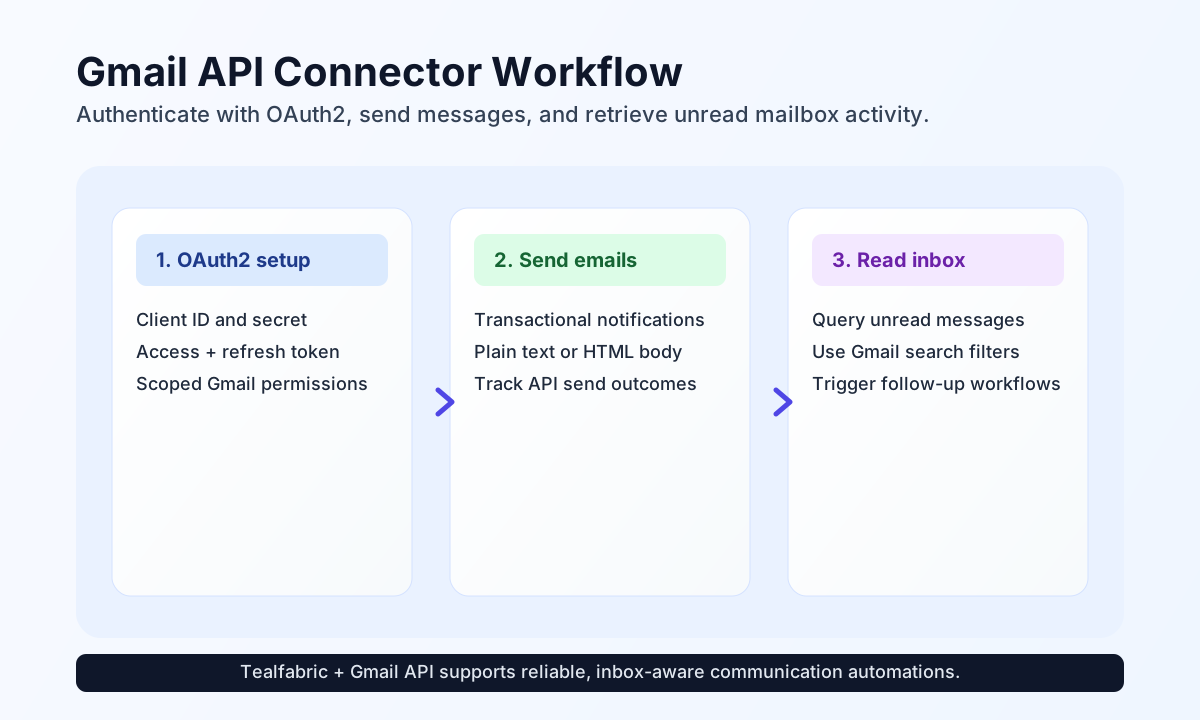
The Gmail API connector helps Tealfabric workflows send email and retrieve mailbox data from Google Workspace or Gmail accounts. It is useful for customer messaging, notification flows, and inbox-driven automations that need reliable OAuth-authenticated access.
Document information
| Field | Value |
|---|---|
| Canonical URL | /docs/04_connecting-systems/connectors/g/gmail-api |
| Version (published date) | 2026-05-08 |
| Tags | connectors, reference, gmail-api |
| Connector ID | gmail-api-1.0.0 |
Configure OAuth access
Set up the connector with Google OAuth credentials that match the operations your workflow performs. Most installations require client_id, client_secret, access_token, refresh_token, and redirect_uri, along with scopes such as https://www.googleapis.com/auth/gmail.send for sending and https://www.googleapis.com/auth/gmail.readonly for read operations.
If you use SMTP fallback, include SMTP settings such as smtp_host, smtp_port, and mailbox credentials. Keep scopes minimal and permission-specific so access is limited to the actions your workflows actually need.
The test operation validates full OAuth app configuration (client_id, client_secret, smtp_host, optional redirect_uri format). Other operations require only a valid access_token at runtime.
Send an email with send
Use send for transactional notifications, status updates, or customer-facing confirmations. Set use_smtp: true to send through configured SMTP (nodemailer) instead of the Gmail API users/me/messages/send endpoint.
const baseUrl = "https://api.example.com/api/v1";
const tenantId = "<TENANT_ID>";
const apiKey = "<API_KEY>";

async function sendIncidentEmail(integrationId: string) {
  const response = await fetch(`${baseUrl}/integrations/${encodeURIComponent(integrationId)}/execute`, {
    method: "POST",
    headers: {
      "X-API-Key": apiKey,
      "X-Tenant-ID": tenantId,
      "Content-Type": "application/json",
    },
    body: JSON.stringify({
      operation: "send",
      to: "ops-team@example.com",
      subject: "Incident update: queue latency recovered",
      body: "Queue latency returned to normal at 14:10 UTC.",
      is_html: false
    }),
  });
  if (!response.ok) throw new Error(`Request failed: ${response.status}`);
  return response.json();
}
curl -X POST "https://api.example.com/api/v1/integrations/<ENTITY_ID>/execute" \
-H "X-API-Key: <API_KEY>" \
-H "X-Tenant-ID: <TENANT_ID>" \
-H "Content-Type: application/json" \
-d '{
"operation": "send",
"to": "ops-team@example.com",
"subject": "Incident update: queue latency recovered",
"body": "Queue latency returned to normal at 14:10 UTC.",
"is_html": false
}'
{
  "success": true,
  "data": {
    "message_count": 1,
    "data": {
      "id": "191f0b8ef6f8c123",
      "threadId": "191f0b8ef6f8b7f1",
      "labelIds": ["SENT"]
    },
    "message_id": "191f0b8ef6f8c123"
  }
}
Retrieve unread messages with receive
Use receive to query mailbox activity and drive workflow decisions from unread or filtered messages. Gmail search operators in query.q let you target only the messages relevant to each process step. resource_id and id accept string or numeric values.
const baseUrl = "https://api.example.com/api/v1";
const tenantId = "<TENANT_ID>";
const apiKey = "<API_KEY>";

async function getUnreadMessages(integrationId: string) {
  const response = await fetch(`${baseUrl}/integrations/${encodeURIComponent(integrationId)}/execute`, {
    method: "POST",
    headers: {
      "X-API-Key": apiKey,
      "X-Tenant-ID": tenantId,
      "Content-Type": "application/json",
    },
    body: JSON.stringify({
      operation: "receive",
      endpoint: "users/me/messages",
      query: {
        q: "is:unread subject:invoice",
        maxResults: 10
      }
    }),
  });
  if (!response.ok) throw new Error(`Request failed: ${response.status}`);
  return response.json();
}
curl -X POST "https://api.example.com/api/v1/integrations/<ENTITY_ID>/execute" \
-H "X-API-Key: <API_KEY>" \
-H "X-Tenant-ID: <TENANT_ID>" \
-H "Content-Type: application/json" \
-d '{
"operation": "receive",
"endpoint": "users/me/messages",
"query": {
"q": "is:unread subject:invoice",
"maxResults": 10
}
}'
{
  "success": true,
  "data": {
    "message_count": 1,
    "data": [
      {
        "id": "191f0b8ef6f8c123",
        "threadId": "191f0b8ef6f8b7f1"
      }
    ],
    "total_size": 1
  }
}
Bidirectional sync
Use sync to run optional outbound send and/or inbound receive legs in one call. Empty outbound/inbound objects are skipped using PHP empty() semantics.
{
  "operation": "sync",
  "outbound": {
    "to": "ops-team@example.com",
    "subject": "Sync notification",
    "body": "Outbound leg from sync."
  },
  "inbound": {
    "endpoint": "users/me/messages",
    "query": { "q": "is:unread", "maxResults": 5 }
  }
}
{
  "success": true,
  "data": {
    "message_count": 6,
    "results": {
      "outbound": { "success": true, "data": { "message_count": 1, "message_id": "..." } },
      "inbound": { "success": true, "data": { "message_count": 5, "data": [], "total_size": 5 } }
    }
  }
}
Batch send and receive
Use batch to run multiple send or receive sub-operations sequentially. Each result entry includes index, success, and either a flat result merge or an error string.
{
  "operation": "batch",
  "operations": [
    {
      "operation": "send",
      "data": {
        "to": "a@example.com",
        "subject": "Batch 1",
        "body": "First message"
      }
    },
    {
      "operation": "receive",
      "data": {
        "endpoint": "users/me/messages",
        "query": { "maxResults": 3 }
      }
    }
  ]
}
Test connection with test
test validates OAuth app configuration, then calls GET users/me/profile to confirm the access token.
{
  "success": true,
  "data": {
    "message": "Gmail API connection test successful",
    "details": {
      "api_base_url": "https://gmail.googleapis.com/gmail/v1",
      "email_address": "mailbox@example.com"
    }
  }
}
Reliability guidance
Most Gmail connector issues come from expired tokens, missing scopes, and API quota pressure. If a call fails, confirm token freshness first, then verify the connector has the required Gmail scope for the operation, and finally apply backoff for throttling responses.
For steady production behavior, keep filters explicit, avoid broad mailbox scans, and process message IDs incrementally. This keeps execution time predictable and improves reliability in high-volume inbox workflows.