Google Search API Connector Guide
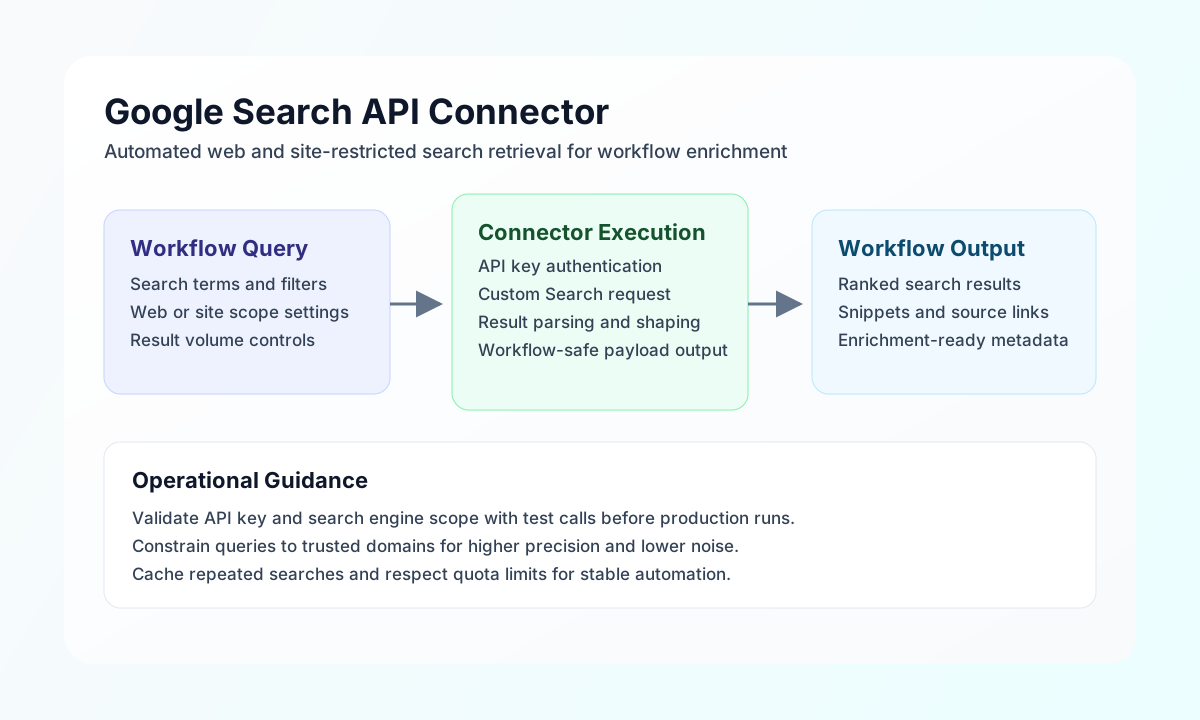
The Google Search API connector lets Tealfabric workflows perform web, image, and site-restricted searches through the Google Custom Search JSON API. It is useful for automations such as market monitoring, content enrichment, and policy checks that rely on current public web results.
Document information
| Field | Value |
|---|---|
| Canonical URL | /docs/04_connecting-systems/connectors/g/google-search-api |
| Version (published date) | 2026-05-08 |
| Tags | connectors, reference, google-search-api |
| Connector ID | google-search-api-1.0.0 |
Configuration and setup
Configure the connector with a Google API key and a Programmable Search Engine ID so workflow calls can execute queries reliably. This setup determines both authentication and search scope, including whether queries run across the web or only selected domains.
Required values are api_key and search_engine_id (cx). You can optionally set timeout_seconds for slower networks. After setup, run test to confirm your key, search engine configuration, and API access are valid.
Run web search with search
Use search to retrieve general web results with optional language, paging, and safety controls. Keep queries specific and set num intentionally so downstream workflows process only relevant result volumes.
const baseUrl = "https://api.example.com/api/v1";
const tenantId = "<TENANT_ID>";
const apiKey = "<API_KEY>";

async function runWebSearch(integrationId: string) {
  const response = await fetch(`${baseUrl}/integrations/${encodeURIComponent(integrationId)}/execute`, {
    method: "POST",
    headers: {
      "X-API-Key": apiKey,
      "X-Tenant-ID": tenantId,
      "Content-Type": "application/json",
    },
    body: JSON.stringify({
      operation: "search",
      query: "tealfabric workflow automation best practices",
      num: 10,
      start: 1,
      lr: "lang_en",
      safe: "active"
    }),
  });
  if (!response.ok) throw new Error(`Request failed: ${response.status}`);
  return response.json();
}
curl -X POST "https://api.example.com/api/v1/integrations/<ENTITY_ID>/execute" \
-H "X-API-Key: <API_KEY>" \
-H "X-Tenant-ID: <TENANT_ID>" \
-H "Content-Type: application/json" \
-d '{
"operation": "search",
"query": "tealfabric workflow automation best practices",
"num": 10,
"start": 1,
"lr": "lang_en",
"safe": "active"
}'
{
  "success": true,
  "data": {
    "message": "Search completed successfully",
    "query": "tealfabric workflow automation best practices",
    "result_count": 1,
    "total_results": "12500",
    "search_time": 0.31,
    "results": [
      {
        "title": "Workflow Automation Guide",
        "link": "https://example.com/workflow-automation-guide",
        "snippet": "Practical patterns for reliable automation pipelines."
      }
    ],
    "spelling": null,
    "data": {
      "searchInformation": {
        "totalResults": "12500",
        "searchTime": 0.31
      }
    }
  }
}
Run image search with image_search
Use image_search when workflows need image-specific filtering such as size, color profile, or usage-rights constraints. This operation maps to Google Custom Search with searchType=image.
const baseUrl = "https://api.example.com/api/v1";
const tenantId = "<TENANT_ID>";
const apiKey = "<API_KEY>";

async function runImageSearch(integrationId: string) {
  const response = await fetch(`${baseUrl}/integrations/${encodeURIComponent(integrationId)}/execute`, {
    method: "POST",
    headers: {
      "X-API-Key": apiKey,
      "X-Tenant-ID": tenantId,
      "Content-Type": "application/json",
    },
    body: JSON.stringify({
      operation: "image_search",
      query: "tealfabric architecture diagram",
      num: 5,
      imgSize: "large",
      imgType: "photo",
      safe: "active"
    }),
  });
  if (!response.ok) throw new Error(`Request failed: ${response.status}`);
  return response.json();
}
curl -X POST "https://api.example.com/api/v1/integrations/<ENTITY_ID>/execute" \
-H "X-API-Key: <API_KEY>" \
-H "X-Tenant-ID: <TENANT_ID>" \
-H "Content-Type: application/json" \
-d '{
"operation": "image_search",
"query": "tealfabric architecture diagram",
"num": 5,
"imgSize": "large",
"imgType": "photo",
"safe": "active"
}'
{
  "success": true,
  "data": {
    "message": "Image search completed successfully",
    "query": "tealfabric architecture diagram",
    "result_count": 1,
    "total_results": "5400",
    "search_time": 0.28,
    "results": [
      {
        "title": "System Architecture Image",
        "link": "https://example.com/assets/architecture.png",
        "image": {
          "contextLink": "https://example.com/architecture"
        }
      }
    ],
    "data": {
      "searchInformation": {
        "totalResults": "5400",
        "searchTime": 0.28
      }
    }
  }
}
Run site-focused search with site_search
Use site_search to restrict results to a specific domain when workflows need high precision. This is effective for compliance, support, or research automations where only trusted sources should be considered.
const baseUrl = "https://api.example.com/api/v1";
const tenantId = "<TENANT_ID>";
const apiKey = "<API_KEY>";

async function runSiteSearch(integrationId: string) {
  const response = await fetch(`${baseUrl}/integrations/${encodeURIComponent(integrationId)}/execute`, {
    method: "POST",
    headers: {
      "X-API-Key": apiKey,
      "X-Tenant-ID": tenantId,
      "Content-Type": "application/json",
    },
    body: JSON.stringify({
      operation: "site_search",
      query: "SLA policy escalation",
      site: "docs.example.com",
      siteSearchFilter: "i",
      num: 5
    }),
  });
  if (!response.ok) throw new Error(`Request failed: ${response.status}`);
  return response.json();
}
curl -X POST "https://api.example.com/api/v1/integrations/<ENTITY_ID>/execute" \
-H "X-API-Key: <API_KEY>" \
-H "X-Tenant-ID: <TENANT_ID>" \
-H "Content-Type: application/json" \
-d '{
"operation": "site_search",
"query": "SLA policy escalation",
"site": "docs.example.com",
"siteSearchFilter": "i",
"num": 5
}'
{
  "success": true,
  "data": {
    "message": "Site search completed successfully",
    "query": "SLA policy escalation",
    "site": "docs.example.com",
    "result_count": 1,
    "total_results": "39",
    "search_time": 0.14,
    "results": [
      {
        "title": "Escalation and SLA Policy",
        "link": "https://docs.example.com/policies/escalation-sla",
        "snippet": "Escalation timings by severity and response commitments."
      }
    ],
    "data": {
      "searchInformation": {
        "totalResults": "39",
        "searchTime": 0.14
      }
    }
  }
}
Reliability guidance
Most failures come from API key restrictions, search engine misconfiguration, or daily quota limits. Validate your key and search engine with test, ensure the Custom Search API is enabled, and tune query scope to avoid unnecessary calls.
For production reliability, cache recurring queries, use pagination intentionally, and apply retry/backoff only for transient failures. These patterns keep search-powered workflows fast, cost-aware, and stable.