GitHub API Connector Guide
The GitHub connector lets Tealfabric workflows automate repository operations such as issue creation, pull request handling, and project reporting. It supports GitHub.com and GitHub Enterprise Server so you can run the same workflow patterns across hosted and self-managed environments.
Document information
| Field | Value |
|---|---|
| Canonical URL | /docs/04_connecting-systems/connectors/g/github |
| Version (published date) | 2026-05-08 |
| Tags | connectors, reference, github |
| Connector ID | github-1.0.0 |
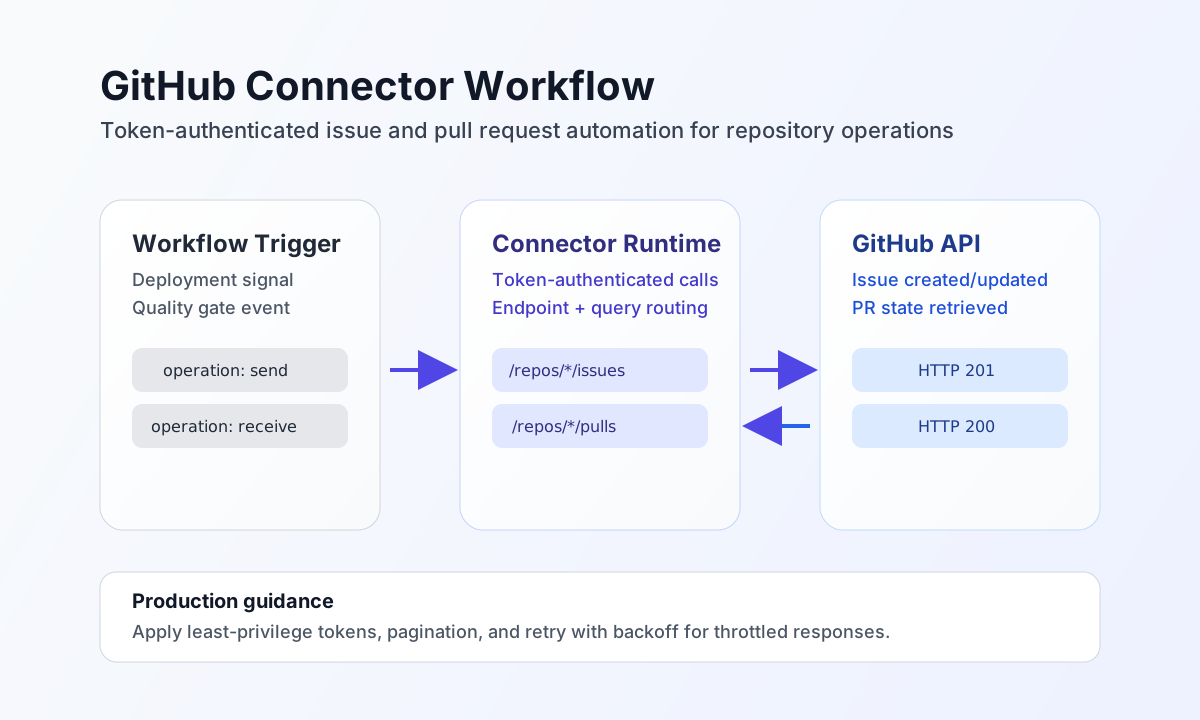
Configure token and API endpoint access
Set token to a GitHub personal access token with scopes required by your workflow, such as repository read/write permissions. If you use GitHub Enterprise Server, set base_url to your enterprise API host; otherwise use the default https://api.github.com.
Set timeout_seconds based on expected operation latency and repository size. Run test after setup to validate authentication and confirm your connector can access the repositories you plan to automate.
Create resources with send
Use send for write operations such as creating issues, opening pull requests, or updating repository metadata. Keep endpoint paths explicit and payloads aligned to the selected GitHub API resource.
const baseUrl = "https://api.example.com/api/v1";
const tenantId = "<TENANT_ID>";
const apiKey = "<API_KEY>";

async function createIssue(integrationId: string) {
  const response = await fetch(`${baseUrl}/integrations/${encodeURIComponent(integrationId)}/execute`, {
    method: "POST",
    headers: {
      "X-API-Key": apiKey,
      "X-Tenant-ID": tenantId,
      "Content-Type": "application/json",
    },
    body: JSON.stringify({
      operation: "send",
      endpoint: "repos/<ENTITY_ID>/<ENTITY_ID>/issues",
      method: "POST",
      data: {
        title: "Bug: API timeout in checkout flow",
        body: "Automated monitor detected repeated timeout responses in checkout endpoint.",
        labels: ["bug", "priority:high"]
      }
    }),
  });
  if (!response.ok) throw new Error(`Request failed: ${response.status}`);
  return response.json();
}
curl -X POST "https://api.example.com/api/v1/integrations/<ENTITY_ID>/execute" \
-H "X-API-Key: <API_KEY>" \
-H "X-Tenant-ID: <TENANT_ID>" \
-H "Content-Type: application/json" \
-d '{
"operation": "send",
"endpoint": "repos/<ENTITY_ID>/<ENTITY_ID>/issues",
"method": "POST",
"data": {
"title": "Bug: API timeout in checkout flow",
"body": "Automated monitor detected repeated timeout responses in checkout endpoint.",
"labels": ["bug", "priority:high"]
}
}'
{
  "success": true,
  "data": {
    "message_count": 1,
    "data": {
      "id": "<ENTITY_ID>",
      "number": 145,
      "title": "Bug: API timeout in checkout flow",
      "state": "open"
    },
    "response": {
      "id": "<ENTITY_ID>",
      "number": 145,
      "title": "Bug: API timeout in checkout flow",
      "state": "open"
    }
  }
}
Retrieve resources with receive
Use receive to list issues, monitor pull requests, or collect commit activity for reporting and automation decisions. Add query filters and pagination so workflows pull only the records required for each run.
const baseUrl = "https://api.example.com/api/v1";
const tenantId = "<TENANT_ID>";
const apiKey = "<API_KEY>";

async function listOpenPullRequests(integrationId: string) {
  const response = await fetch(`${baseUrl}/integrations/${encodeURIComponent(integrationId)}/execute`, {
    method: "POST",
    headers: {
      "X-API-Key": apiKey,
      "X-Tenant-ID": tenantId,
      "Content-Type": "application/json",
    },
    body: JSON.stringify({
      operation: "receive",
      endpoint: "repos/<ENTITY_ID>/<ENTITY_ID>/pulls",
      query: {
        state: "open",
        per_page: 20,
        page: 1
      }
    }),
  });
  if (!response.ok) throw new Error(`Request failed: ${response.status}`);
  return response.json();
}
curl -X POST "https://api.example.com/api/v1/integrations/<ENTITY_ID>/execute" \
-H "X-API-Key: <API_KEY>" \
-H "X-Tenant-ID: <TENANT_ID>" \
-H "Content-Type: application/json" \
-d '{
"operation": "receive",
"endpoint": "repos/<ENTITY_ID>/<ENTITY_ID>/pulls",
"query": {
"state": "open",
"per_page": 20,
"page": 1
}
}'
{
  "success": true,
  "data": {
    "message_count": 1,
    "data": [
      {
        "id": "<ENTITY_ID>",
        "number": 58,
        "title": "Feature: improve retry handling",
        "state": "open"
      }
    ],
    "total_size": 1
  }
}
Test connection with test
Run test after configuring token (and optional base_url for GitHub Enterprise). The connector calls GET user and returns authenticated user details in data.details.
{
  "success": true,
  "data": {
    "message": "GitHub connection test successful",
    "details": {
      "api_base_url": "https://api.github.com",
      "user_login": "octocat",
      "user_id": 1
    }
  }
}
Operate reliably in production
GitHub applies API rate limits, and high-volume workflows can receive throttling responses. Use pagination, retry with backoff, and request scoping to keep execution stable and predictable.
Authorization failures usually come from missing scopes, invalid tokens, or restricted repository access. Use least-privilege tokens, rotate credentials regularly, and avoid logging token values in workflow output.
Related resources
For endpoint details and authentication requirements, see the GitHub REST API documentation and personal access token guidance.