Google Vertex AI Connector Guide
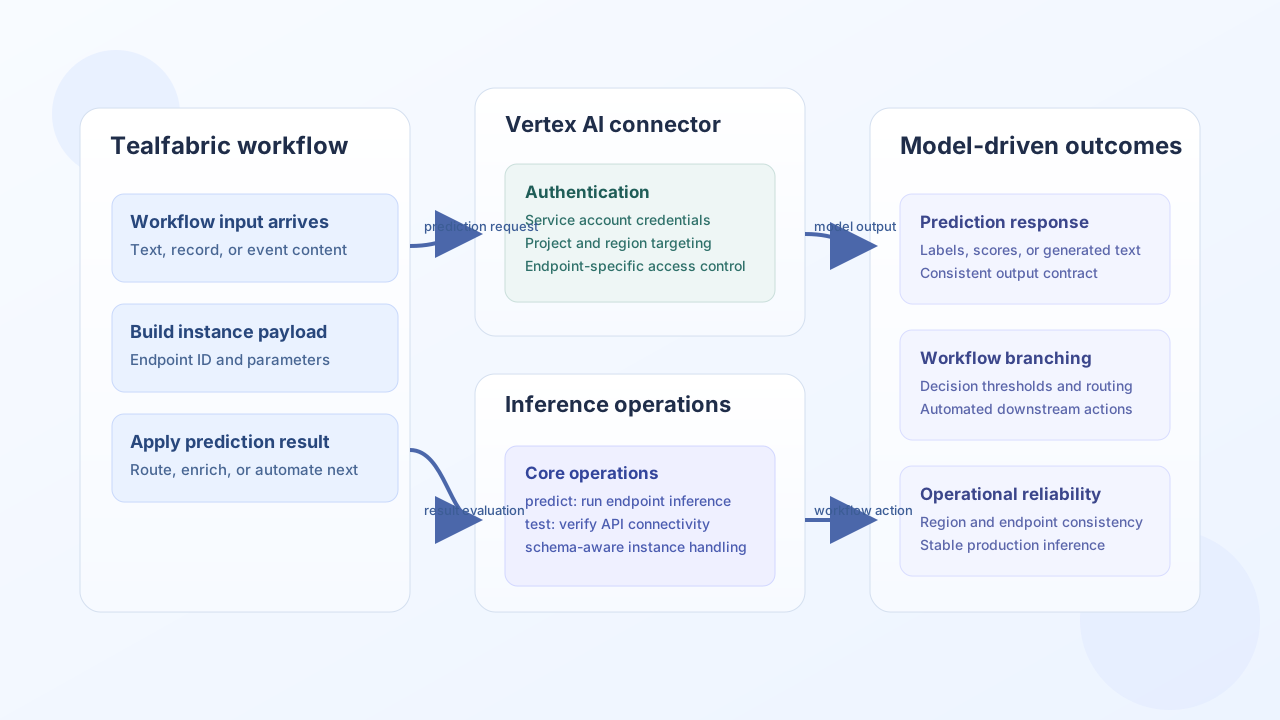
The Google Vertex AI connector lets Tealfabric workflows send inference requests to deployed Vertex AI endpoints using service-account authentication. It is useful for production workflows that enrich data with model output, such as classification, extraction, and recommendation tasks.
Document information
| Field | Value |
|---|---|
| Canonical URL | /docs/04_connecting-systems/connectors/g/google-vertex-ai |
| Version (published date) | 2026-05-08 |
| Tags | connectors, reference, google-vertex-ai |
| Connector ID | google-vertex-ai-1.0.0 |
Configuration and access
Configure the connector with project, region, and service-account credentials that can call Vertex AI prediction endpoints. Keep endpoint defaults scoped per environment so requests are routed to the correct deployment.
project_id(required): Google Cloud project ID.location(required): Vertex AI region (for exampleus-central1).credentials_json(required): Service account key JSON.endpoint_id(optional): Default endpoint for prediction calls.model_name(optional): Default model reference if used by your flow.timeout_seconds(optional): Request timeout in seconds.
Use a service account with at least roles/aiplatform.user and enable the Vertex AI API in the project.
Run inference with predict
Use predict to submit model instances to a deployed endpoint. Provide instances (required) and either endpoint_id in call data or a configured default endpoint_id. The connector returns success with data.prediction_count, data.predictions, and data.data (full Vertex AI predict response).
const baseUrl = "https://api.example.com/api/v1";
const tenantId = "<TENANT_ID>";
const apiKey = "<API_KEY>";

async function classifySupportMessage(integrationId: string) {
  const response = await fetch(`${baseUrl}/integrations/${encodeURIComponent(integrationId)}/execute`, {
    method: "POST",
    headers: {
      "X-API-Key": apiKey,
      "X-Tenant-ID": tenantId,
      "Content-Type": "application/json",
    },
    body: JSON.stringify({
      operation: "predict",
      endpoint_id: "<VERTEX_ENDPOINT_ID>",
      instances: [
        {
          content: "Customer reports repeated login failures after password reset.",
        },
      ],
    }),
  });
  if (!response.ok) throw new Error(`Request failed: ${response.status}`);
  const payload = await response.json();
  return payload.data?.predictions ?? [];
}
curl -X POST "https://api.example.com/api/v1/integrations/<ENTITY_ID>/execute" \
-H "X-API-Key: <API_KEY>" \
-H "X-Tenant-ID: <TENANT_ID>" \
-H "Content-Type: application/json" \
-d '{
"operation": "predict",
"endpoint_id": "<VERTEX_ENDPOINT_ID>",
"instances": [
{
"content": "Customer reports repeated login failures after password reset."
}
]
}'
{
  "success": true,
  "data": {
    "prediction_count": 1,
    "predictions": [
      {
        "label": "account_support",
        "confidence": 0.94
      }
    ],
    "data": {
      "predictions": [
        {
          "label": "account_support",
          "confidence": 0.94
        }
      ]
    }
  }
}
Validate credentials with test
Run test to validate required integration configuration (project_id, location, credentials_json) and probe GET /projects/{project_id}/locations/{location}/models. On configuration failure the connector returns Configuration validation failed.
{
  "success": true,
  "data": {
    "message": "Google Vertex AI connection test successful",
    "details": {
      "project_id": "my-gcp-project",
      "location": "us-central1",
      "models_count": 3
    }
  }
}
Operation support notes
The connector currently focuses on prediction workflows. train and deploy are registered but intentionally return not-yet-implemented errors, matching legacy behavior. Use Vertex AI pipelines, the Google Cloud console, or gcloud tooling for training and deployment, then reference the deployed endpoint from this connector for inference.
Reliability guidance
Most production issues come from permission gaps, region/endpoint mismatches, and invalid instance schemas. Validate the endpoint ID against the configured region, keep instance payloads contract-compatible, and monitor response errors for schema drift after model updates. These practices keep inference automation stable and predictable.