Google Calendar Connector Guide
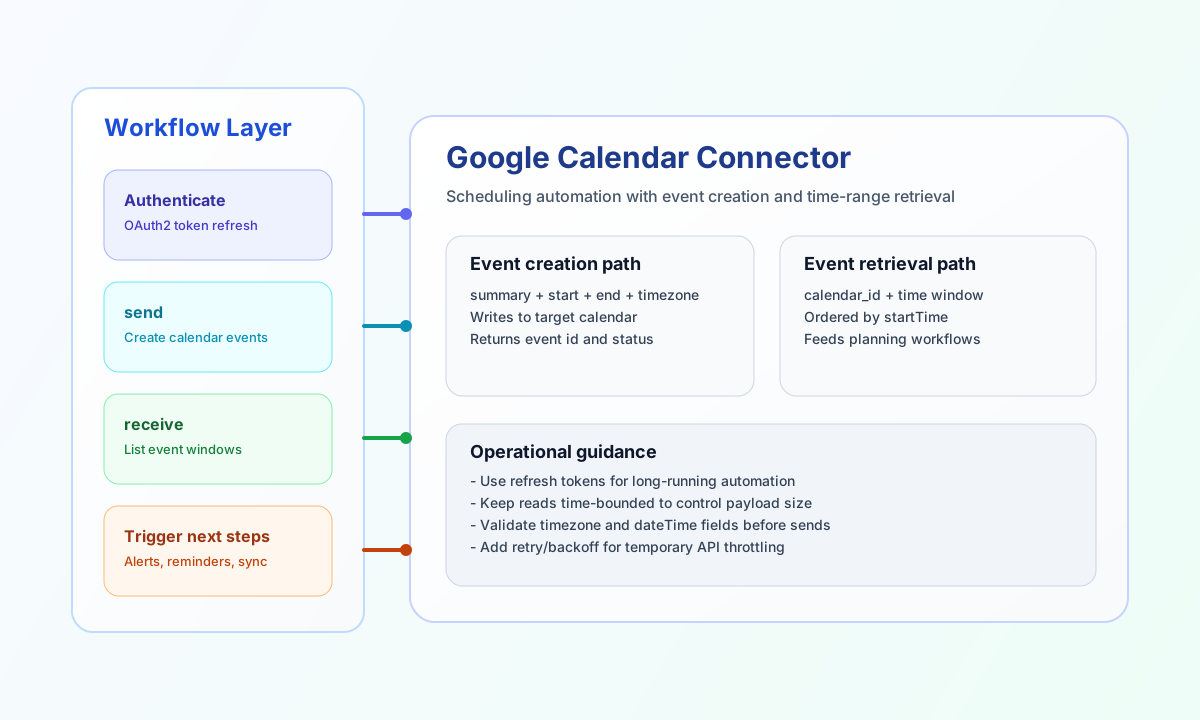
The Google Calendar connector lets Tealfabric workflows create and retrieve calendar events through Google Calendar APIs. It is useful for automating scheduling, operational reminders, and timeline synchronization across business systems.
Document information
| Field | Value |
|---|---|
| Canonical URL | /docs/04_connecting-systems/connectors/g/google-calendar |
| Version (published date) | 2026-05-08 |
| Tags | connectors, reference, google-calendar |
| Connector ID | google-calendar-1.0.0 |
Configure OAuth access
Configure client_id, client_secret, and either access_token or refresh_token from your Google Cloud project. In production, use a refresh token so the connector can renew access automatically without manual token replacement.
Set redirect_uri, scope, and timeout_seconds as needed for your deployment. Before enabling workflows, complete OAuth consent and redirect URI configuration in Google Cloud Console.
Create events with send
Use send when your workflow needs to create meetings or operational events in a target calendar. Keep event payloads explicit for summary, start, end, and timezone fields so downstream participants receive accurate times.
const baseUrl = "https://api.example.com/api/v1";
const tenantId = "<TENANT_ID>";
const apiKey = "<API_KEY>";

async function createCalendarEvent(integrationId: string) {
  const response = await fetch(`${baseUrl}/integrations/${encodeURIComponent(integrationId)}/execute`, {
    method: "POST",
    headers: {
      "X-API-Key": apiKey,
      "X-Tenant-ID": tenantId,
      "Content-Type": "application/json",
    },
    body: JSON.stringify({
      operation: "send",
      calendar_id: "primary",
      method: "POST",
      event: {
        summary: "Weekly Operations Review",
        description: "Review uptime, incidents, and release plan.",
        start: {
          dateTime: "2026-05-12T09:00:00",
          timeZone: "Europe/Oslo"
        },
        end: {
          dateTime: "2026-05-12T09:30:00",
          timeZone: "Europe/Oslo"
        }
      }
    }),
  });
  if (!response.ok) throw new Error(`Request failed: ${response.status}`);
  return response.json();
}
curl -X POST "https://api.example.com/api/v1/integrations/<ENTITY_ID>/execute" \
-H "X-API-Key: <API_KEY>" \
-H "X-Tenant-ID: <TENANT_ID>" \
-H "Content-Type: application/json" \
-d '{
"operation": "send",
"calendar_id": "primary",
"method": "POST",
"event": {
"summary": "Weekly Operations Review",
"description": "Review uptime, incidents, and release plan.",
"start": {
"dateTime": "2026-05-12T09:00:00",
"timeZone": "Europe/Oslo"
},
"end": {
"dateTime": "2026-05-12T09:30:00",
"timeZone": "Europe/Oslo"
}
}
}'
{
  "success": true,
  "result": {
    "id": "2s2h4g5d8ks9m0c1n2q3r4",
    "status": "confirmed"
  }
}
Retrieve event windows with receive
Use receive to list events in a time range for planning and scheduling logic. Time-bounded queries help avoid large payloads and make periodic sync workflows easier to control.
const baseUrl = "https://api.example.com/api/v1";
const tenantId = "<TENANT_ID>";
const apiKey = "<API_KEY>";

async function listUpcomingEvents(integrationId: string) {
  const response = await fetch(`${baseUrl}/integrations/${encodeURIComponent(integrationId)}/execute`, {
    method: "POST",
    headers: {
      "X-API-Key": apiKey,
      "X-Tenant-ID": tenantId,
      "Content-Type": "application/json",
    },
    body: JSON.stringify({
      operation: "receive",
      calendar_id: "primary",
      timeMin: "2026-05-12T00:00:00Z",
      timeMax: "2026-05-19T00:00:00Z",
      singleEvents: true,
      orderBy: "startTime",
      maxResults: 50
    }),
  });
  if (!response.ok) throw new Error(`Request failed: ${response.status}`);
  return response.json();
}
curl -X POST "https://api.example.com/api/v1/integrations/<ENTITY_ID>/execute" \
-H "X-API-Key: <API_KEY>" \
-H "X-Tenant-ID: <TENANT_ID>" \
-H "Content-Type: application/json" \
-d '{
"operation": "receive",
"calendar_id": "primary",
"timeMin": "2026-05-12T00:00:00Z",
"timeMax": "2026-05-19T00:00:00Z",
"singleEvents": true,
"orderBy": "startTime",
"maxResults": 50
}'
{
  "success": true,
  "item_count": 2,
  "items": [
    {
      "id": "2s2h4g5d8ks9m0c1n2q3r4",
      "summary": "Weekly Operations Review"
    }
  ]
}
Reliability guidance
Most failures come from expired OAuth credentials, insufficient calendar scopes, or malformed event payloads. If a request fails, refresh authorization first, then validate required event fields for date-time and timezone consistency.
For production scheduling flows, keep event reads time-bounded, add retry/backoff on 429 responses, and monitor token refresh behavior. This keeps calendar automation stable as request volume grows.