Google Gemini Connector Guide
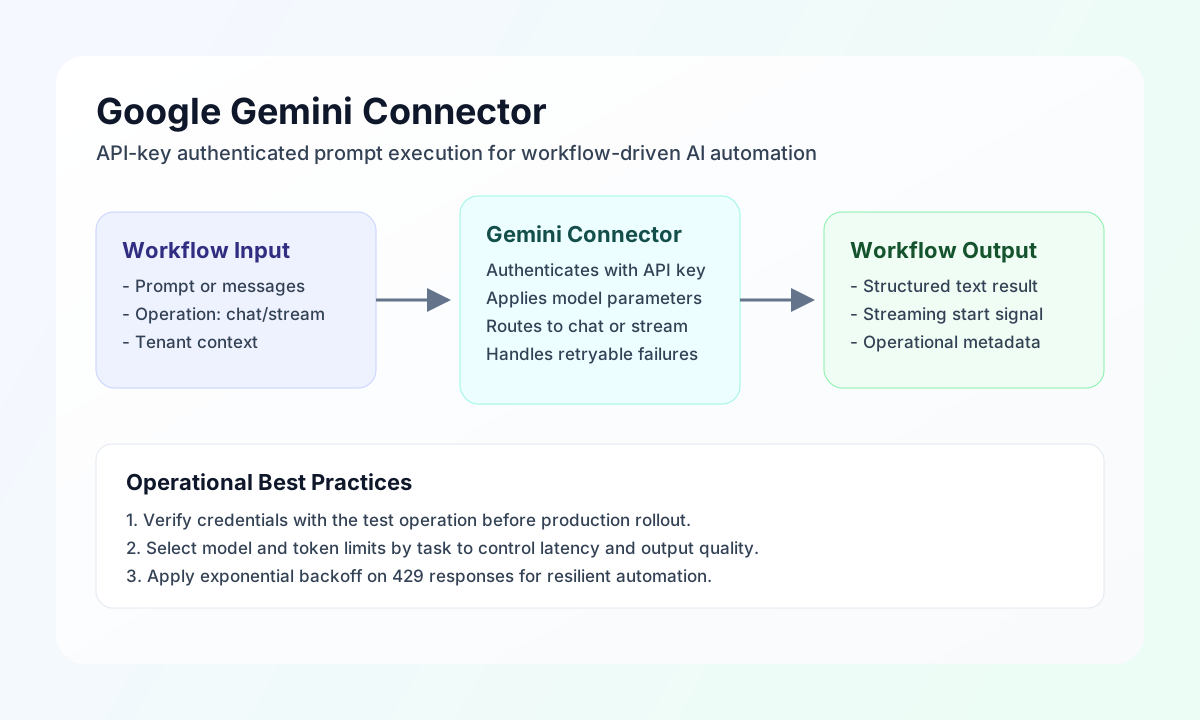
The Google Gemini connector lets Tealfabric workflows generate text responses through the Generative Language API using an API key. It is commonly used for summarization, classification, response drafting, and conversational automation in operational workflows.
Document information
| Field | Value |
|---|---|
| Canonical URL | /docs/04_connecting-systems/connectors/g/google-gemini |
| Version (published date) | 2026-05-08 |
| Tags | connectors, reference, google-gemini |
| Connector ID | google-gemini-1.0.0 |
Configuration and model setup
Configure the connector with a Gemini API key and a model appropriate for your workload. Start with a stable text model and tune generation settings only after verifying baseline output quality.
api_key(required): Google AI Studio or Gemini API key.model(optional): model name configured for the connector.timeout_seconds(optional): request timeout value.
Use test after setup to confirm authentication and model accessibility before production workflows.
Generate chat responses with chat
Use chat to produce model responses for prompts or multi-turn message histories. Keep prompts task-focused and include system-level instructions only when needed for consistent output behavior.
const baseUrl = "https://api.example.com/api/v1";
const tenantId = "<TENANT_ID>";
const apiKey = "<API_KEY>";

async function summarizeIncident(integrationId: string) {
  const response = await fetch(`${baseUrl}/integrations/${encodeURIComponent(integrationId)}/execute`, {
    method: "POST",
    headers: {
      "X-API-Key": apiKey,
      "X-Tenant-ID": tenantId,
      "Content-Type": "application/json",
    },
    body: JSON.stringify({
      operation: "chat",
      prompt: "Summarize this outage report in 3 bullet points for executives.",
      system: "You are a concise operations assistant.",
      max_tokens: 220,
      temperature: 0.3
    }),
  });
  if (!response.ok) throw new Error(`Request failed: ${response.status}`);
  return response.json();
}
curl -X POST "https://api.example.com/api/v1/integrations/<ENTITY_ID>/execute" \
-H "X-API-Key: <API_KEY>" \
-H "X-Tenant-ID: <TENANT_ID>" \
-H "Content-Type: application/json" \
-d '{
"operation": "chat",
"prompt": "Summarize this outage report in 3 bullet points for executives.",
"system": "You are a concise operations assistant.",
"max_tokens": 220,
"temperature": 0.3
}'
{
  "success": true,
  "data": {
    "message": "Google Gemini chat completion successful",
    "content": "- Incident window: 14:02-14:27 UTC due to upstream network saturation.\n- Customer impact: elevated latency and 4.1% request failure in EU region.\n- Resolution: traffic rerouted and autoscaling threshold adjusted.",
    "tokens": {
      "prompt_tokens": 34,
      "completion_tokens": 52,
      "total_tokens": 86
    },
    "response": {}
  }
}
Start streamed output with stream
Use stream when workflows need incremental model output for low-latency handoff or progressive rendering patterns. Confirm downstream consumers can handle partial output chunks before enabling this mode broadly.
const baseUrl = "https://api.example.com/api/v1";
const tenantId = "<TENANT_ID>";
const apiKey = "<API_KEY>";

async function streamDraftReply(integrationId: string) {
  const response = await fetch(`${baseUrl}/integrations/${encodeURIComponent(integrationId)}/execute`, {
    method: "POST",
    headers: {
      "X-API-Key": apiKey,
      "X-Tenant-ID": tenantId,
      "Content-Type": "application/json",
    },
    body: JSON.stringify({
      operation: "stream",
      prompt: "Draft a short customer-safe update about delayed order shipment.",
      max_tokens: 180
    }),
  });
  if (!response.ok) throw new Error(`Request failed: ${response.status}`);
  return response.json();
}
curl -X POST "https://api.example.com/api/v1/integrations/<ENTITY_ID>/execute" \
-H "X-API-Key: <API_KEY>" \
-H "X-Tenant-ID: <TENANT_ID>" \
-H "Content-Type: application/json" \
-d '{
"operation": "stream",
"prompt": "Draft a short customer-safe update about delayed order shipment.",
"max_tokens": 180
}'
{
  "success": true,
  "data": {
    "message": "Streaming started",
    "content": "Customer update draft...",
    "tokens": {
      "prompt_tokens": 22,
      "completion_tokens": 41,
      "total_tokens": 63
    },
    "response": {}
  }
}
Current limitations
The embeddings operation is intentionally not implemented in google-gemini-1.0.0 and returns a VALIDATION error response. Use chat or stream for current production workflows.
Reliability guidance
Most production failures come from invalid API keys, unsupported model selection, or throttling under burst usage. Validate credentials with test, select models intentionally by task type, and apply exponential backoff for transient 429 errors.
These controls keep Gemini-powered workflows predictable and supportable at scale.