Google Cloud Storage Connector Guide
The Google Cloud Storage connector lets Tealfabric workflows upload, read, list, and delete bucket objects through the Cloud Storage JSON API. It is typically used for report export pipelines, file-based integration handoffs, and archive lifecycle automation.
Document information
| Field | Value |
|---|---|
| Canonical URL | /docs/04_connecting-systems/connectors/g/google-cloud-storage |
| Version (published date) | 2026-05-08 |
| Tags | connectors, reference, google-cloud-storage |
| Connector ID | google-cloud-storage-1.0.0 |
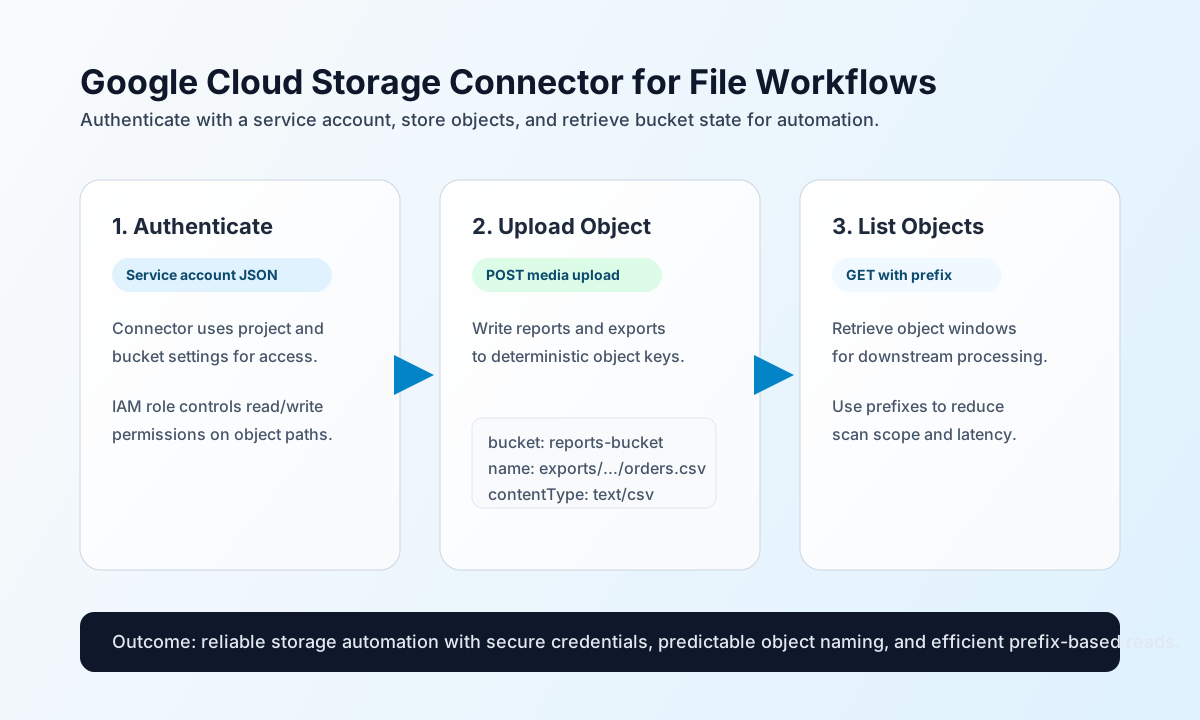
Configure bucket access
Configure the connector with your project and bucket context so workflow runs can access Cloud Storage without embedding credentials in each step. This keeps secret handling centralized and helps enforce consistent bucket targeting.
Required integration settings are project_id, bucket_name, and credentials_json (service account JSON). Optional timeout_seconds can be increased for larger object operations (default 30). The test operation validates all three required settings; other operations rely on bucket_name and credentials_json at runtime like the legacy PHP connector.
For most workflows, grant the service account roles/storage.objectAdmin at bucket scope or a least-privilege equivalent.
Upload objects with upload
Use upload when workflows need to persist generated files such as exports, logs, or transformed payload snapshots. Keep object names deterministic to simplify retries and downstream readers. object_name and content use PHP empty() semantics ("" and "0" are rejected).
const baseUrl = "https://api.example.com/api/v1";
const tenantId = "<TENANT_ID>";
const apiKey = "<API_KEY>";

async function uploadCsv(integrationId: string) {
  const response = await fetch(`${baseUrl}/integrations/${encodeURIComponent(integrationId)}/execute`, {
    method: "POST",
    headers: {
      "X-API-Key": apiKey,
      "X-Tenant-ID": tenantId,
      "Content-Type": "application/json",
    },
    body: JSON.stringify({
      operation: "upload",
      object_name: "exports/2026-05-08/orders.csv",
      content: "order_id,status\n<ENTITY_ID>,packed\n",
      content_type: "text/csv"
    }),
  });
  if (!response.ok) throw new Error(`Request failed: ${response.status}`);
  return response.json();
}
curl -X POST "https://api.example.com/api/v1/integrations/<ENTITY_ID>/execute" \
-H "X-API-Key: <API_KEY>" \
-H "X-Tenant-ID: <TENANT_ID>" \
-H "Content-Type: application/json" \
-d '{
"operation": "upload",
"object_name": "exports/2026-05-08/orders.csv",
"content": "order_id,status\n<ENTITY_ID>,packed\n",
"content_type": "text/csv"
}'
{
  "success": true,
  "data": {
    "object_count": 1,
    "object_name": "exports/2026-05-08/orders.csv",
    "response": {
      "name": "exports/2026-05-08/orders.csv",
      "bucket": "reports-bucket",
      "contentType": "text/csv"
    }
  }
}
Retrieve and list objects with download and list
Use download when a workflow needs object content for parsing or enrichment, and use list for prefix-driven discovery before batch processing. Prefix scoping is the simplest way to keep object scans fast in larger buckets.
const baseUrl = "https://api.example.com/api/v1";
const tenantId = "<TENANT_ID>";
const apiKey = "<API_KEY>";

async function listDailyExports(integrationId: string) {
  const response = await fetch(`${baseUrl}/integrations/${encodeURIComponent(integrationId)}/execute`, {
    method: "POST",
    headers: {
      "X-API-Key": apiKey,
      "X-Tenant-ID": tenantId,
      "Content-Type": "application/json",
    },
    body: JSON.stringify({
      operation: "list",
      prefix: "exports/2026-05-08/"
    }),
  });
  if (!response.ok) throw new Error(`Request failed: ${response.status}`);
  return response.json();
}
curl -X POST "https://api.example.com/api/v1/integrations/<ENTITY_ID>/execute" \
-H "X-API-Key: <API_KEY>" \
-H "X-Tenant-ID: <TENANT_ID>" \
-H "Content-Type: application/json" \
-d '{
"operation": "list",
"prefix": "exports/2026-05-08/"
}'
{
  "success": true,
  "data": {
    "object_count": 1,
    "objects": [
      {
        "name": "exports/2026-05-08/orders.csv",
        "size": "28"
      }
    ]
  }
}
download returns raw object bytes in data.content:
{
  "success": true,
  "data": {
    "object_count": 1,
    "content": "order_id,status\n<ENTITY_ID>,packed\n"
  }
}
Delete objects with delete
Use delete to remove a single object by object_name:
{
  "operation": "delete",
  "object_name": "tmp/obsolete.bin"
}
{
  "success": true,
  "data": {
    "object_count": 1
  }
}
Signed URLs (signed_url)
The signed_url operation is registered for compatibility with the legacy connector but is not implemented in either runtime. Both return a validation error indicating that signed URL generation requires the Google Cloud Storage client library.
Test connection with test
test validates project_id, bucket_name, and credentials_json, obtains a service-account access token, and probes GET /storage/v1/b/{bucket_name}:
{
  "success": true,
  "data": {
    "message": "GCS connection test successful",
    "details": {
      "project_id": "my-gcp-project",
      "bucket_name": "reports-bucket"
    }
  }
}
When required settings are missing, test returns Configuration validation failed (same as legacy testConnection).
Reliability guidance
Most failures come from missing bucket permissions, incorrect object names, or large object transfer limitations. If a call fails, validate service account scope first, then confirm object path correctness, and finally adjust timeout values for larger operations.
For high-volume pipelines, keep object naming conventions consistent and process by prefix windows to reduce expensive broad scans. If you need very large uploads, use resumable upload workflows outside this connector’s simple media path.