Google Cloud Pub/Sub Connector Guide
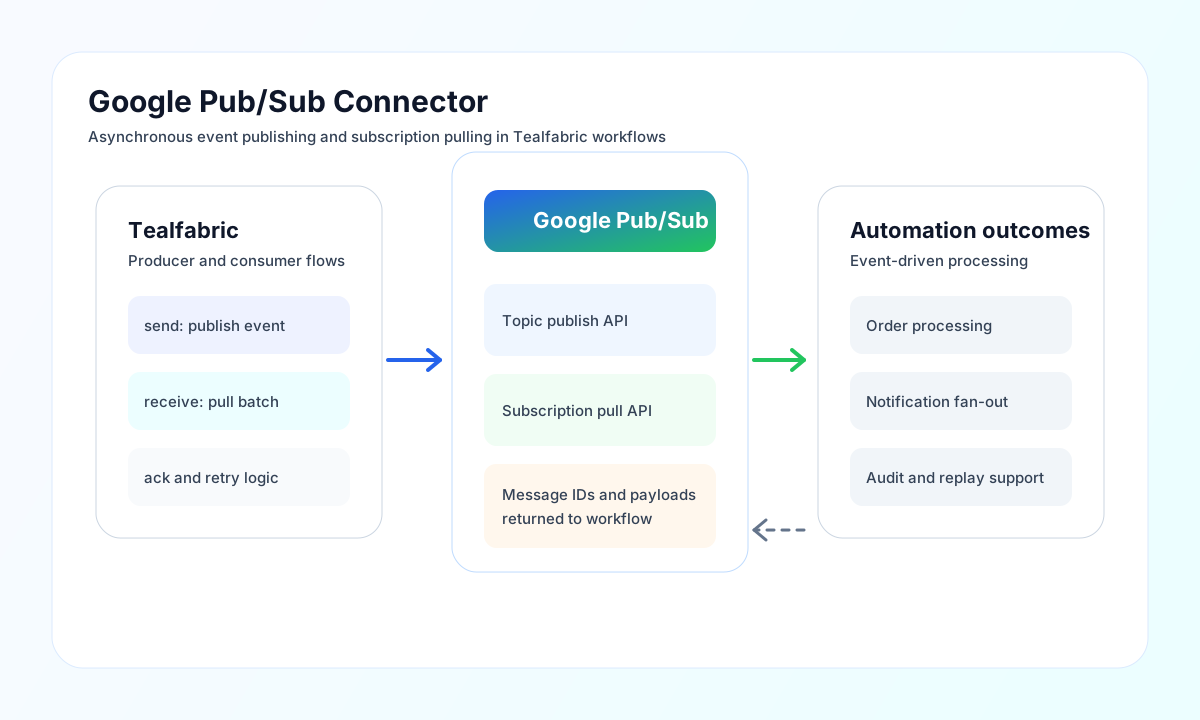
The Google Pub/Sub connector lets Tealfabric workflows publish events to topics and pull messages from subscriptions. It is useful for event-driven processing, asynchronous integration, and decoupled pipeline orchestration.
Document information
| Field | Value |
|---|---|
| Canonical URL | /docs/04_connecting-systems/connectors/g/google-pubsub |
| Version (published date) | 2026-05-08 |
| Tags | connectors, reference, google-pubsub |
| Connector ID | google-pubsub-1.0.0 |
Configure OAuth and topic context
Set client_id, client_secret, and redirect_uri from your Google Cloud OAuth client configuration. Configure queue_name with your topic ID and set project_id so publish and pull requests resolve to the correct project path.
If your setup requires long-running token reuse, add refresh_token and keep the scope aligned to Pub/Sub access. Run test after configuration to confirm authentication and API reachability before sending production events.
Publish events with send
Use send to publish JSON payloads to your configured topic. Keep event schemas stable and include metadata attributes for routing and downstream filtering. Provide the payload in message (or alias data). The connector base64-encodes the body for the Pub/Sub REST API.
const baseUrl = "https://api.example.com/api/v1";
const tenantId = "<TENANT_ID>";
const apiKey = "<API_KEY>";

async function publishOrderEvent(integrationId: string) {
  const response = await fetch(`${baseUrl}/integrations/${encodeURIComponent(integrationId)}/execute`, {
    method: "POST",
    headers: {
      "X-API-Key": apiKey,
      "X-Tenant-ID": tenantId,
      "Content-Type": "application/json",
    },
    body: JSON.stringify({
      operation: "send",
      message: {
        orderId: "ORD-5001",
        status: "paid",
        occurredAt: "2026-05-08T19:19:00Z"
      },
      attributes: {
        source: "erp",
        domain: "orders"
      }
    }),
  });
  if (!response.ok) throw new Error(`Request failed: ${response.status}`);
  return response.json();
}
curl -X POST "https://api.example.com/api/v1/integrations/<ENTITY_ID>/execute" \
-H "X-API-Key: <API_KEY>" \
-H "X-Tenant-ID: <TENANT_ID>" \
-H "Content-Type: application/json" \
-d '{
"operation": "send",
"message": {
"orderId": "ORD-5001",
"status": "paid",
"occurredAt": "2026-05-08T19:19:00Z"
},
"attributes": {
"source": "erp",
"domain": "orders"
}
}'
{
  "success": true,
  "data": {
    "message_count": 1,
    "message_ids": ["1234567890123456"]
  }
}
Pull messages with receive
Use receive to pull messages from a subscription. Set subscription when it differs from the default {queue_name}-sub. Control batch size with max_messages (alias limit, default 10).
{
  "operation": "receive",
  "subscription": "orders-topic-sub",
  "max_messages": 10
}
{
  "success": true,
  "data": {
    "message_count": 1,
    "data": [
      {
        "ackId": "projects/my-project/subscriptions/orders-topic-sub:2",
        "data": { "orderId": "ORD-5001", "status": "paid" },
        "attributes": { "source": "erp" }
      }
    ],
    "total_size": 1
  }
}
Combined publish and pull with sync
Use sync when a workflow needs both outbound publish and inbound pull in one call. Omit outbound or inbound when only one direction is needed. Nested results.outbound and results.inbound use legacy-shaped fields (message_count, message_ids, data, and so on) rather than another data envelope.
{
  "operation": "sync",
  "outbound": {
    "message": { "event": "order-paid", "orderId": "ORD-5001" }
  },
  "inbound": {
    "subscription": "orders-topic-sub",
    "max_messages": 5
  }
}
Batch publish with batch
Use batch to publish multiple messages in one :publish request. Provide messages (alias items).
{
  "operation": "batch",
  "messages": [
    { "event": "created", "id": "A-1" },
    { "event": "created", "id": "A-2" }
  ]
}
Validate configuration with test
The test operation validates required OAuth app settings (client_id, client_secret, redirect_uri, queue_name) and probes GET projects/{project_id}/topics. Other operations require a valid access_token but do not re-validate the full OAuth app configuration up front.
Reliability and delivery guidance
Common production failures include missing project_id, insufficient Pub/Sub IAM permissions, invalid subscription names, and token expiration. Validate project and credential settings first, then confirm topic and subscription mapping.
For resilient event handling, make consumers idempotent, monitor ack behavior, and apply retry-with-backoff for transient API failures. This keeps asynchronous workflows stable at higher message volume.