Google Meet Connector Guide
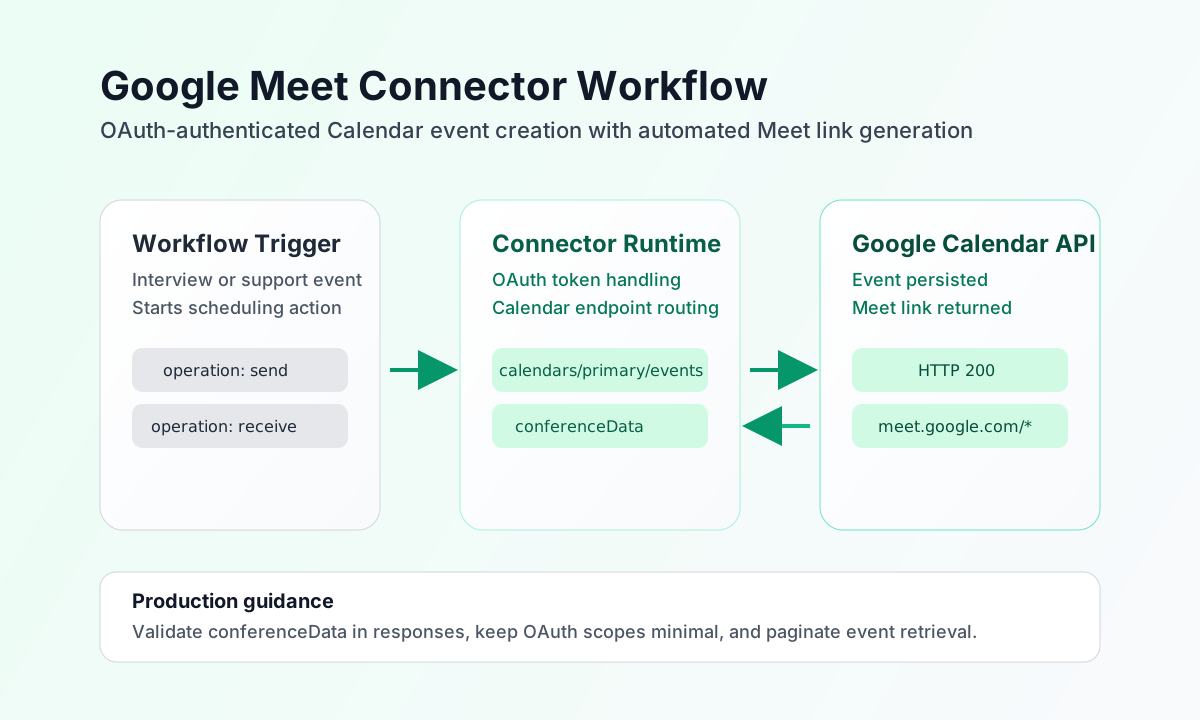
The Google Meet connector helps Tealfabric workflows create and manage meetings by using Google Calendar events with Meet conference data. It is useful for automating interview scheduling, customer calls, and internal collaboration workflows where a valid Meet join URL is required.
Document information
| Field | Value |
|---|---|
| Canonical URL | /docs/04_connecting-systems/connectors/g/google-meet |
| Version (published date) | 2026-05-08 |
| Tags | connectors, reference, google-meet |
| Connector ID | google-meet-1.0.0 |
Configure Google Calendar OAuth access
Set client_id, client_secret, and redirect_uri from your Google Cloud OAuth application and ensure the Calendar API is enabled in the same project. If you provide access_token and refresh_token, the connector can reuse and refresh credentials for unattended workflows.
Set scope to include Calendar permissions required for event creation, such as https://www.googleapis.com/auth/calendar. Run test after configuration to verify OAuth app fields (client_id, client_secret, redirect_uri) and Calendar API access. Non-test operations require a valid access_token but do not re-validate OAuth app credentials on every call.
Create Meet-enabled events with send
Use send to create Google Calendar events with conferenceData so Google Meet links are generated automatically. Keep event timestamps explicit and include a timezone to avoid scheduling drift across regions.
const baseUrl = "https://api.example.com/api/v1";
const tenantId = "<TENANT_ID>";
const apiKey = "<API_KEY>";

async function createProjectReviewMeeting(integrationId: string) {
  const response = await fetch(`${baseUrl}/integrations/${encodeURIComponent(integrationId)}/execute`, {
    method: "POST",
    headers: {
      "X-API-Key": apiKey,
      "X-Tenant-ID": tenantId,
      "Content-Type": "application/json",
    },
    body: JSON.stringify({
      operation: "send",
      endpoint: "calendars/primary/events",
      method: "POST",
      data: {
        summary: "Project review sync",
        description: "Weekly stakeholder review with engineering and product.",
        start: {
          dateTime: "2026-05-12T15:00:00",
          timeZone: "America/New_York"
        },
        end: {
          dateTime: "2026-05-12T15:45:00",
          timeZone: "America/New_York"
        },
        conferenceData: {
          createRequest: {
            requestId: "meet-<ENTITY_ID>"
          }
        }
      }
    }),
  });
  if (!response.ok) throw new Error(`Request failed: ${response.status}`);
  return response.json();
}
curl -X POST "https://api.example.com/api/v1/integrations/<ENTITY_ID>/execute" \
-H "X-API-Key: <API_KEY>" \
-H "X-Tenant-ID: <TENANT_ID>" \
-H "Content-Type: application/json" \
-d '{
"operation": "send",
"endpoint": "calendars/primary/events",
"method": "POST",
"data": {
"summary": "Project review sync",
"description": "Weekly stakeholder review with engineering and product.",
"start": {
"dateTime": "2026-05-12T15:00:00",
"timeZone": "America/New_York"
},
"end": {
"dateTime": "2026-05-12T15:45:00",
"timeZone": "America/New_York"
},
"conferenceData": {
"createRequest": {
"requestId": "meet-<ENTITY_ID>"
}
}
}
}'
{
  "success": true,
  "data": {
    "message_count": 1,
    "data": {
      "id": "<ENTITY_ID>",
      "hangoutLink": "https://meet.google.com/abc-defg-hij",
      "status": "confirmed"
    },
    "response": {
      "id": "<ENTITY_ID>",
      "hangoutLink": "https://meet.google.com/abc-defg-hij",
      "status": "confirmed"
    }
  }
}
List scheduled Meet events with receive
Use receive to retrieve upcoming meetings for reminders, attendance prep, or orchestration logic. Add date windows and ordering parameters so workflows pull only relevant events.
const baseUrl = "https://api.example.com/api/v1";
const tenantId = "<TENANT_ID>";
const apiKey = "<API_KEY>";

async function listUpcomingMeetEvents(integrationId: string) {
  const response = await fetch(`${baseUrl}/integrations/${encodeURIComponent(integrationId)}/execute`, {
    method: "POST",
    headers: {
      "X-API-Key": apiKey,
      "X-Tenant-ID": tenantId,
      "Content-Type": "application/json",
    },
    body: JSON.stringify({
      operation: "receive",
      endpoint: "calendars/primary/events",
      query: {
        timeMin: "2026-05-10T00:00:00Z",
        singleEvents: "true",
        orderBy: "startTime",
        maxResults: 20
      }
    }),
  });
  if (!response.ok) throw new Error(`Request failed: ${response.status}`);
  return response.json();
}
curl -X POST "https://api.example.com/api/v1/integrations/<ENTITY_ID>/execute" \
-H "X-API-Key: <API_KEY>" \
-H "X-Tenant-ID: <TENANT_ID>" \
-H "Content-Type: application/json" \
-d '{
"operation": "receive",
"endpoint": "calendars/primary/events",
"query": {
"timeMin": "2026-05-10T00:00:00Z",
"singleEvents": "true",
"orderBy": "startTime",
"maxResults": 20
}
}'
{
  "success": true,
  "data": {
    "message_count": 1,
    "data": [
      {
        "id": "<ENTITY_ID>",
        "summary": "Project review sync",
        "hangoutLink": "https://meet.google.com/abc-defg-hij"
      }
    ],
    "total_size": 1
  }
}
Operate safely in production
Meeting automation can fail when domain policies restrict Meet creation or when OAuth scopes are insufficient. Validate conferenceData in responses and monitor for missing hangoutLink values before proceeding with downstream notifications.
API throttling can occur when listing large event windows frequently. Use bounded timeMin ranges, pagination, and retry with backoff to keep workflow performance stable and predictable.
Related resources
For event schema and conference settings, see the Google Calendar API reference and Google Meet integration guidance.